Android VPNSecure your phone everywhere
Encrypt Wi-Fi and mobile data with one tap. KloxVPN for Android includes kill switch, split tunneling, and four protocols—on Google Play and official APK.
Also: iOS, Android TV, TV box APK

Five devices
First purchase
Google Play verified
WireGuard default
Inside the Android app
Connect, split tunnel per app, and pick servers—built for phones and tablets
One tap to connect
Large connect button shows your session timer, masked IP, download and upload speed, and latency while the tunnel is active.
- Green shield when connected—tap to disconnect
- Live download, upload, and latency stats
Connected
What is VPN for Android?
A VPN for Android encrypts traffic from your phone or tablet before it leaves the device. Whether you are on 5G, LTE, or café Wi-Fi, KloxVPN wraps data in a tunnel to our servers so outsiders see encrypted packets—not which apps you use or sites you open.
The KloxVPN Android VPN app is on Google Play (Android 6.0+). It supports WireGuard, OpenVPN, OpenConnect, and Shadowsocks, plus kill switch and split tunneling for real-world mobile use.
Need browser-only on desktop? See Chrome VPN extension. For the big screen, use Android TV VPNor Android box APK.
Android VPN app features
Mobile-first security—not a desktop app shrunk onto a phone
Four protocols
WireGuard, OpenVPN, OpenConnect, and Shadowsocks—switch when the network is rude.
Kill switch
Blocks traffic if the tunnel drops so your real IP never leaks on public Wi-Fi.
Split tunneling
Route only the apps you want through VPN. Keep banking local if needed.
60+ countries
US, UK, UAE, Singapore, Germany, and more for travel and streaming.
No-logs policy
We do not track, store, or sell your mobile browsing activity.
Android app vs Chrome extension
Full-device VPN on mobile—not just one browser
| Feature | Android app | Chrome extension |
|---|---|---|
| Coverage | All apps & system traffic | Chrome tabs only |
| Install | Google Play or APK | Chrome Web Store |
| Protocols | WireGuard, OpenVPN, OpenConnect, Shadowsocks | Browser proxy tunnel |
| Kill switch | Built in | Browser disconnect only |
| Best for | Full phone protection | Quick browser sessions on PC |
Why you need a VPN on Android
Your phone is your wallet, inbox, and entertainment hub
Public Wi-Fi safety
Cafés, airports, and hotels expose logins. Encrypt before you open banking or email.
Travel & roaming
Mask your home IP abroad and reduce ISP throttling on streaming apps.
Mobile payments
Extra layer when shopping or paying on cellular—not a substitute for HTTPS, but valuable on bad networks.
Carrier visibility
Your mobile ISP sees less about which services you use when traffic is encrypted.
Android VPN use cases
Where the mobile app matters most
Daily commute
Auto-connect on untrusted Wi-Fi at stations and coffee shops.
Streaming on phone
Regional apps and travel catalogs—where platform terms allow.
Remote work phone
Encrypt client mail and SaaS on Android when off corporate VPN.
Tablet & foldable
Same app on Galaxy Tab, Pixel Tablet, and large-screen Android devices.
How to install KloxVPN on Android
Google Play or official APK—in under five minutes
Get KloxVPN
Subscribe, then open Google Play on your phone or use our APK.
Install & sign in
Search Klox, install, log in with your subscription email.
Pick protocol & server
WireGuard first. Choose a nearby country for speed.
Connect
One tap. Enable kill switch and split tunnel if you need them.
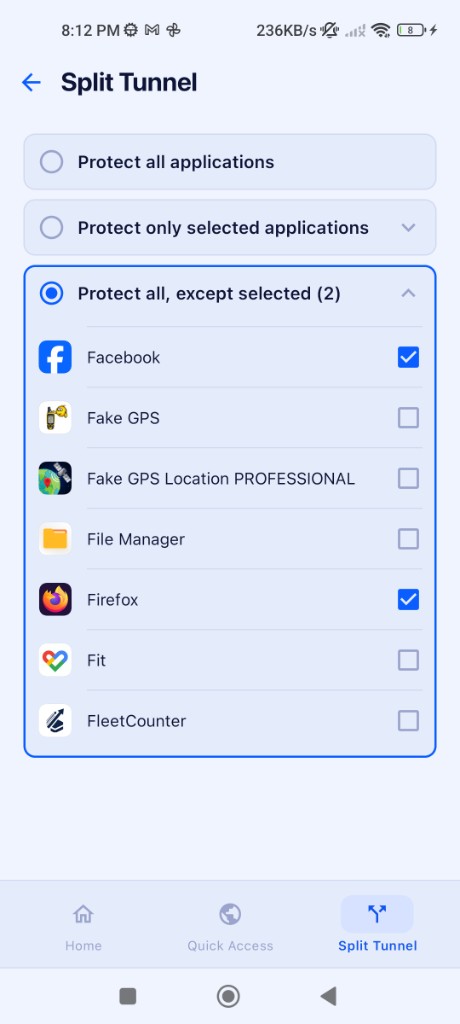
Split tunneling on Android
Route only the apps you need through the VPN. Exclude Facebook and Firefox from the tunnel while everything else stays protected—or flip the mode to protect selected apps only.
Pair with auto-connect on untrusted Wi-Fi in app settings so the tunnel turns on before background apps sync on café or hotel networks.
VPN server locations for Android
Switch country from the app
| Location | Best for |
|---|---|
| United States | Streaming, browsing, low latency |
| United Kingdom | BBC iPlayer, UK apps |
| United Arab Emirates | Regional privacy, Middle East exit |
| Singapore | Asia-Pacific, gaming latency |
| Germany | EU privacy, streaming |
| Japan | Asia content, travel |
Browse countries in the app—search, filter, and pick your server.

Verify with our VPN tools.
Android VPN FAQ
Google Play, protocols, and mobile privacy
Protect your Android today
Yearly from $2.83/mo · 7-day money-back guarantee
Five devices · Four protocols · Google Play + APK
iOS VPN · Windows · Mac · All downloads