Chrome VPN ExtensionVPN for Google Chrome
Install the KloxVPN Chrome extension for one-click browser VPN. Encrypt Chrome traffic, hide your IP, and pick from 60+ countries—without opening a desktop app.
Also on Edge, Firefox (desktop app), full download
What is a Chrome VPN extension?
A Chrome VPN extension is a lightweight add-on for Google Chrome that routes your browser traffic through an encrypted VPN tunnel. Unlike a full VPN app that covers every program on your PC, a browser VPN focuses on Chrome tabs—perfect when you want fast protection on public Wi-Fi or a quick region switch without installing software.
KloxVPN Secure Proxy is listed on the Chrome Web Store. After you add it to Chrome, the icon sits in your toolbar. Sign in with your subscription, choose a country, and tap connect. Sites you visit in Chrome see the VPN server's IP address instead of yours. Your ISP still sees that you use a VPN, but not which websites you open inside the encrypted session.
Need Slack, Outlook, games, or Firefox covered too? Install the Windows, Mac, or Linux app for system-wide VPN with WireGuard, OpenVPN, OpenConnect, and Shadowsocks. The Chrome extension and desktop apps share one account and the same five-device limit.
Chrome extension VPN features
Everything you need for secure browsing in Google Chrome
One-Click Chrome VPN
Connect from the toolbar. No separate app window. Ideal for quick public Wi-Fi sessions.
Encrypted Browser Traffic
Chrome requests travel through KloxVPN servers with strong encryption on the tunnel.
60+ Countries
Switch VPN server location in one tap. United States, UK, Germany, Japan, and more.
No-Logs Policy
We do not monitor or store your Chrome browsing history or connection logs.
Lightweight Extension
Runs inside Chrome with low overhead. Faster setup than a full VPN install.
Inside the KloxVPN Chrome extension UI
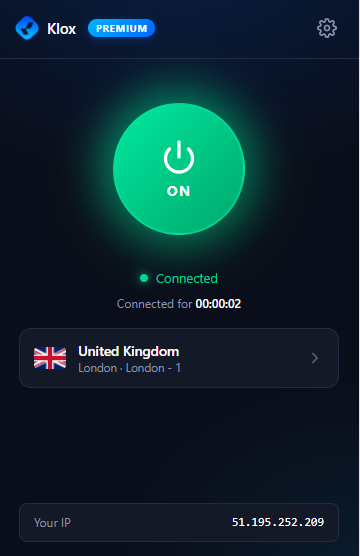
The popup is built for speed: one power button, clear connection status, server list with flags, and a live IP readout so you know Chrome is on the tunnel.
- Power toggle
Large ON button shows live connection state and session timer.
- Server picker
Flag, country name, and city—tap to browse 60+ locations.
- Your IP
Live display of your masked IP so you can confirm the tunnel.
- Premium badge
Active subscription unlocks every server in the network.
Chrome extension vs desktop VPN
Pick browser-only or full-device protection—same KloxVPN account
| Feature | Chrome extension | Desktop / mobile app |
|---|---|---|
| Protects | Google Chrome tabs only | All apps and browsers |
| Install | Chrome Web Store, no admin | Installer (.exe, .dmg, etc.) |
| Protocols | Managed secure proxy tunnel | WireGuard, OpenVPN, OpenConnect, Shadowsocks |
| Kill switch | Browser disconnect on off | System-wide kill switch |
| Best for | Quick browser sessions | Gaming, mail, full privacy |
Verify your tunnel with our VPN tools — IP check and leak tests.
Why use a VPN extension for Chrome?
Fast browser VPN when you need encryption without a full install
Public Wi-Fi in Chrome
Café, hotel, and airport networks expose HTTP and DNS. Encrypt before you sign in to Gmail or banking.
Change Virtual Location
Appear in another country for sites that gate content by region—where your use complies with their terms.
Hide Your IP in Chrome
Websites and many trackers see the VPN server IP instead of your home or office address.
No Admin Install
Browser-only protection when you cannot install a system VPN on a shared or locked-down PC.
Common Chrome VPN use cases
Where a Google Chrome VPN extension helps most
Travel & hotels
Connect before opening booking sites or airline portals on guest Wi-Fi.
Remote work in browser
Extra layer for SaaS dashboards and webmail when you are off the corporate VPN.
Streaming in Chrome
Some users pick US or UK servers for regional players—subject to each platform’s rules.
School & library PCs
When policy allows extensions, protect your session without a system install.
How to install the Chrome VPN extension
Three steps from Chrome Web Store to connected
Open Chrome Web Store
Search “KloxVPN” or use our official listing. Click Add to Chrome.
Sign in
Click the toolbar icon. Log in with your KloxVPN subscription email and password.
Connect
Choose a server country, tap the power button, and browse with an encrypted Chrome connection.
VPN server locations for Chrome
Switch country from the extension popup
| Location | Best for |
|---|---|
| United States | Streaming, browsing, low latency |
| United Kingdom | BBC iPlayer, UK sites |
| Germany | EU privacy, streaming |
| Netherlands | EU exits, privacy-focused use |
| Japan | Asia streaming, regional content |
| Australia | Regional libraries, APAC speed |
Incognito mode & permissions
Enable Allow in incognito under Chrome → Extensions → KloxVPN → Details so private windows use the same VPN tunnel. The extension needs permission to read and change data on sites you visit—that is how a browser proxy routes traffic. We do not sell your data; see privacy policy.
Work-managed Chrome may block Web Store installs. Use the desktop VPN if your IT policy allows it.
Chrome VPN extension FAQ
Google Chrome VPN questions answered
Get the Chrome VPN extension
7-day money-back guarantee on your first purchase.