Mac VPNSecure your MacBook
Encrypt Wi-Fi and Ethernet with one click. KloxVPN for macOS includes kill switch, split tunneling, four protocols, and 60+ countries—from the menu bar.

Five devices
First purchase
Intel & Apple Silicon
WireGuard default
Inside the Mac app
Same desktop UI as Windows—native .dmg for macOS 11 and later
Live session stats
When connected, view download and upload speed, data in/out, and session timer—with a green ring around Disconnect.
- Real-time speed and data counters
- Masked IP while tunnel is active
Connected
What is VPN for Mac?
A VPN for Mac encrypts traffic from your MacBook or desktop Macbefore it reaches the internet. On hotel Wi-Fi, coworking networks, or your home ISP connection, KloxVPN wraps data in a tunnel to our servers so observers see encrypted packets—not which apps or sites you use.
The macOS app uses Apple’s Network Extension framework with WireGuard, OpenVPN, OpenConnect, and Shadowsocks, plus split tunneling and a kill switch. Install the .dmg on Intel or Apple Silicon, then control everything from the menu bar.
Running a newer macOS? See macOS Sequoia VPN notes. Compare with Windows VPN or read Mac app privacy.
Mac VPN app features
Native macOS security—not a manual profile workaround
Four protocols
WireGuard, OpenVPN, OpenConnect, and Shadowsocks—pick what works on your network.
Kill switch
Fail-closed protection if the tunnel drops on public or hotel Wi-Fi.
Split tunneling
Send only chosen apps through the VPN; keep local tools on direct route.
Menu bar app
Quick connect from the menu bar, auto-start, and fast server switching.
No-logs policy
We do not track, store, or sell your Mac browsing or app usage.
Mac vs Windows VPN
Same Klox account—pick the installer for your OS
| Feature | macOS | Windows |
|---|---|---|
| Installer | .dmg direct download | .exe (x64 or ARM) |
| Apple Silicon | Native M-series support | ARM .exe for Snapdragon PCs |
| Protocols | WireGuard, OpenVPN, OpenConnect, Shadowsocks | Same four protocols |
| Split tunneling | Per-app routing | Per-app routing |
| Best for | MacBook, menu bar workflow | PC gaming, office desktops |
Why you need a VPN on Mac
Your MacBook carries work and personal data on every network
Public Wi-Fi safety
Coworking spaces, hotels, and campus networks expose logins. Encrypt before Mail or banking.
Streaming & geo content
Pick a server region for libraries that geo-check your IP—where platform terms allow.
ISP throttling
Encrypted traffic is harder for providers to shape or throttle by service type.
Remote work MacBook
Extra layer when your laptop leaves the office network or corporate VPN.
Mac VPN use cases
Where the macOS app matters most
MacBook daily driver
Always-on encryption for the laptop that handles email, SaaS, and personal accounts.
Creative & dev workflows
Split tunnel local dev servers while the browser and cloud tools use the VPN.
Travel & coworking
Protect client work on airport and hotel Wi-Fi without trusting the local network.
Apple Silicon Macs
Native .dmg for M-series chips—same four protocols as Intel Macs.
How to install KloxVPN on Mac
Download, install, connect in under five minutes
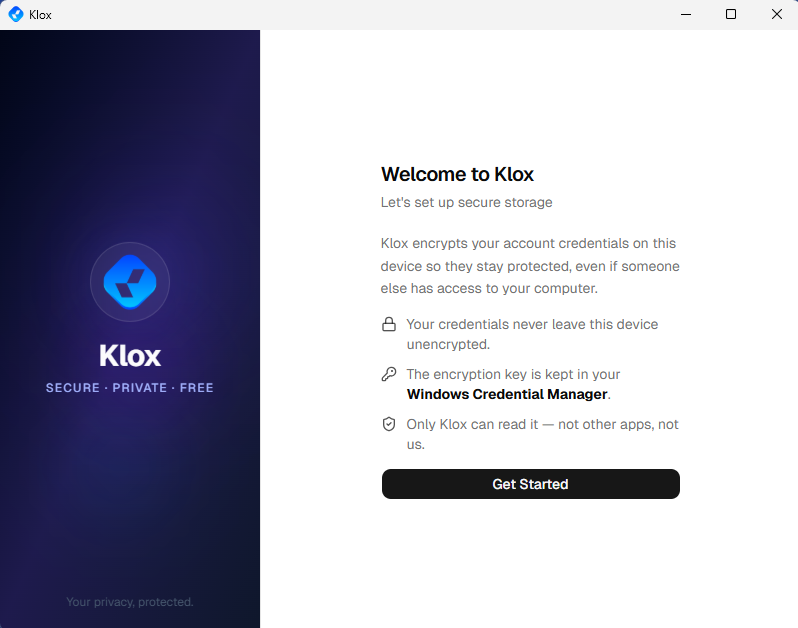
Install, then Get Started
Open the .dmg, drag KloxVPN to Applications, complete the welcome flow, sign in, and connect from the same desktop dashboard as on Windows.
Get the Mac installerGet KloxVPN
Subscribe, then open the macOS section on our download page.
Download .dmg
Save the installer. Open the disk image when download completes.
Install to Applications
Drag KloxVPN to Applications. Allow the network extension when macOS prompts.
Connect
Sign in, pick protocol and server, connect from the menu bar or main window.
Intel & Apple Silicon Macs
One .dmg works on Intel Macs and Apple Silicon (M1, M2, M3, and newer). No separate installer—macOS picks the right binary automatically. Same four protocols and five-device subscription. Download from the macOS download section.
VPN server locations for Mac
Switch country from the macOS app
| Location | Best for |
|---|---|
| United States | Streaming, browsing |
| United Kingdom | BBC iPlayer, UK apps |
| Japan | Asia streaming |
| Australia | Regional content |
| Canada | Privacy, streaming |
| Germany | EU privacy, streaming |
Browse countries in the app—search, filter, and pick your exit region.
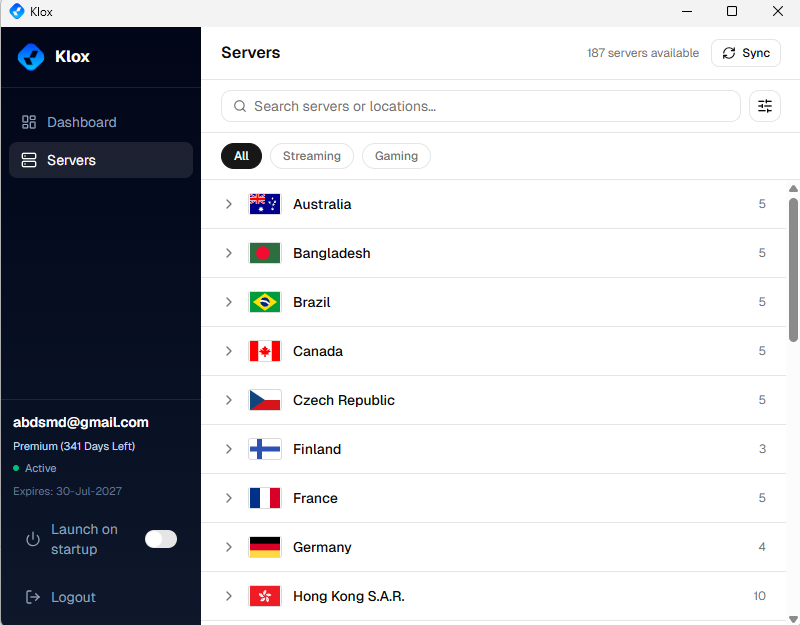
Verify with our VPN tools.
Mac VPN FAQ
macOS install, Apple Silicon, and compatibility
Secure your Mac
Yearly from $2.83/mo · 7-day money-back guarantee
Five devices · Four protocols · Intel & Apple Silicon