Linux VPNNative desktop app
Official .deb and .rpm packages for Debian, Ubuntu, and Fedora. Four protocols, 60+ countries—built for desktops, laptops, and ARM boards.
Also: Router VPN, Windows

Five devices
First purchase
x64 & ARM
WireGuard default
Inside the Linux app
Same desktop UI as Windows—native .deb and .rpm for your distro
Live session stats
When connected, view download and upload speed, data in/out, and session timer—with a green ring around Disconnect.
- Real-time speed and data counters
- Masked IP while tunnel is active
Connected
What is VPN for Linux?
A VPN for Linux encrypts traffic from your workstation, laptop, or server before it leaves the machine. KloxVPN wraps packets in a tunnel to our servers so ISPs, datacenter operators, and local networks cannot see which services you reach.
Install the native .deb or .rpm app with WireGuard, OpenVPN, OpenConnect, and Shadowsocks. Sign in, pick a country, and connect—the same desktop experience as on Windows and Mac.
Desktop users: see Linux desktop VPN notes. ARM boards: Linux ARM guide. Whole-network coverage: Router VPN.
Linux VPN features
Native packages for everyday desktop use
Four protocols
WireGuard, OpenVPN, OpenConnect, and Shadowsocks in the native app.
.deb & .rpm
Official packages for Debian, Ubuntu, Fedora, and RHEL-family distros.
Desktop app
Graphical connect flow—install a package, sign in, and protect your system.
Kernel WireGuard
WireGuard runs in the kernel—low overhead on servers and laptops.
No-logs policy
We do not track, store, or sell your Linux traffic or DNS queries.
Linux vs Windows VPN
Same subscription—different installers and workflows
| Feature | Linux | Windows |
|---|---|---|
| Install | .deb / .rpm (x64 & ARM) | .exe (x64 & ARM) |
| Protocols | WireGuard, OpenVPN, OpenConnect, Shadowsocks | Same four protocols |
| App experience | Native desktop app | Native desktop app |
| Best for | Ubuntu, Fedora, ARM boards | Office PCs, gaming |
| WireGuard | In-kernel, app-managed | App-managed tunnel |
Why you need a VPN on Linux
Servers and dev machines deserve the same encryption as phones
Server & workstation
Encrypt traffic on VPS, homelab, and dev machines—not just browsers.
Untrusted networks
Coworking Wi-Fi and shared lab networks should not see your SSH and SaaS logins.
Geo & routing
Pick exit countries for testing, streaming, or region-locked tooling.
ISP privacy
Encrypted traffic limits what residential or datacenter ISPs can observe.
Linux VPN use cases
Where the Linux stack fits
Developer laptop
Daily driver on Ubuntu or Fedora with GUI connect and optional split workflows.
Headless server
Use portal config files for always-on protection on a VPS when the GUI app is not an option.
Homelab & Pi
ARM .deb on Raspberry Pi class hardware—same subscription device slot.
Dual-boot desktop
Native Linux app alongside Windows—each OS install counts as a device when connected.
How to install KloxVPN on Linux
Download, install, connect
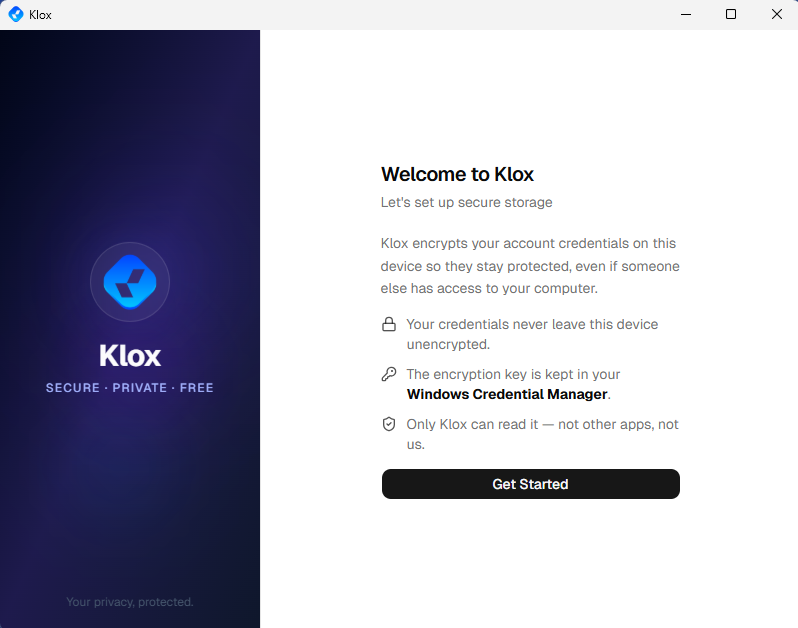
Install, then Get Started
Install the .deb or .rpm, complete the welcome flow, sign in, and connect from the same desktop dashboard as on Windows.
Get Linux packagesGet KloxVPN
Subscribe, then open the Linux section on our download page.
Install package
Pick x64 or ARM .deb (Debian/Ubuntu) or .rpm (Fedora/RHEL).
Sign in
Launch the app, log in with your subscription email.
Connect
Choose protocol and server country, then connect from the app.
x64 & ARM packages
Four builds on the download page: x64 .deb, x64 .rpm, ARM .deb, ARM .rpm. Match architecture to your CPU—amd64 for most PCs, ARM for Pi-class boards and ARM laptops. Same four protocols and five-device limit as other platforms.
VPN server locations for Linux
Same 60+ countries in app and portal
| Location | Best for |
|---|---|
| United States | Streaming, browsing |
| Netherlands | EU privacy, low latency |
| Germany | Streaming, privacy |
| Singapore | Asia, competitive latency |
| United Kingdom | BBC iPlayer, UK apps |
| Canada | North American content |
Browse countries in the app—search, filter, and pick your exit region.
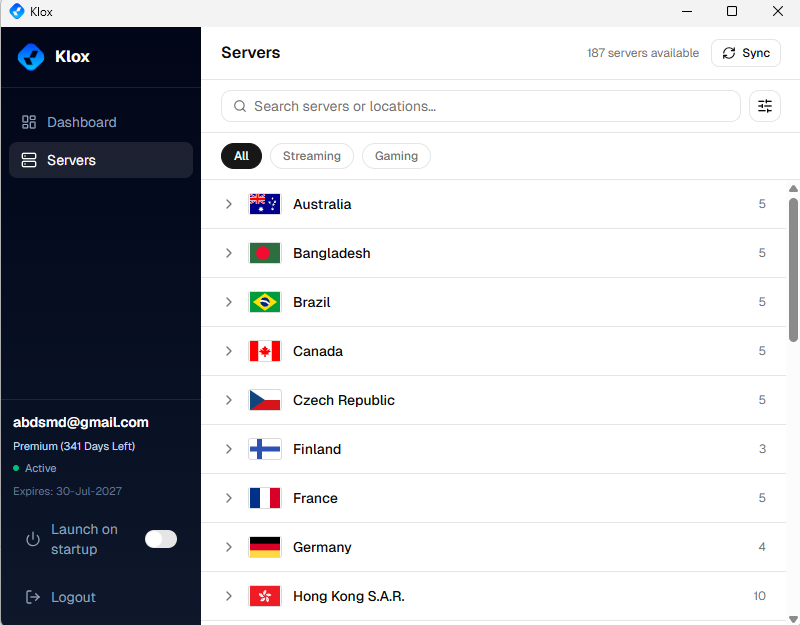
Verify with our VPN tools.
Linux VPN FAQ
Packages, distros, and ARM
Secure your Linux machine
Yearly from $2.83/mo · 7-day money-back guarantee
Five devices · Four protocols · .deb & .rpm