
A phone hotspot is a tiny router you pocket. It is not a Klox product. It is not a travel-router SKU. It is the phone's radio, sharing a path with a laptop that joined your SSID. A consumer VPN on the phone encrypts the phone. It does not automatically wrap the laptop. If you care about the laptop hop, install the app on the laptop. That is a second seat.
This is not VPN on Mobile Data vs WiFi. That piece is which radio the phone itself uses. This is not Linux esim_travel: Not a VPN Setting. An eSIM is a plan. This is not Router VPN vs Per-Device Apps. A home router that holds one seat and covers a house is a different box. This is not VPN Phone Battery: The Radio, Not the Logo. Battery shows up here because tethering already taxes the radio. I will not rewrite that essay.
A VPN still wraps the path from a device to a server you picked. Wikipedia's VPN page is the noun. RFC 8446 is TLS 1.3 on the website. It is not a tunnel. HTTPS already encrypted the page on most sites you actually use. The remainder is the hop. The cafe AP, or the carrier, can still see an IP you hop to if that device has no VPN. It can often see a server name if SNI is in the clear. Encrypted Client Hello exists in the industry and is uneven. Do not pretend the lock hid the graph. Do not pretend the phone hid the laptop.
KloxVPN is WireGuard, OpenVPN, OpenConnect, and Shadowsocks, five devices, yearly from $2.83 a month, 7-day money-back on first purchase. Phone tunneled plus laptop tunneled is two seats. Phone tunneled plus laptop clear on the hotspot is one seat and a laptop the cafe can still map. Pricing is the live number. Download is the apps. Smart Connect, if the app shows the row, means connect on untrusted Wi-Fi. The hotspot SSID you created is yours. Mark it however the app lets you. I will not invent a Klox VPN-hotspot SKU. I will not invent a toggle that says 'share this tunnel with tethering clients.' If your build does not show that row, it does not exist. Cookies on this site live at /cookie.
I have a bias. Tunnel the phone if the phone is doing work you care about. Tunnel the laptop if the laptop is doing work you care about. Do not assume one Connect button covered both. Count battery. Count seats. Skip the hotspot when cellular on the laptop, or hotel Wi-Fi after the portal, is the calmer path.
Related reading: What is a VPN? and Android VPN setup. iOS VPN setup.
Looking for a reliable VPN?
KloxVPN — from $2.83/month. Apps for every device.
Hotspot is not a router product
A home router with a VPN client is one seat covering a LAN you wired on purpose. A phone hotspot is NAT and a radio you turned on because the cafe was rude or the hotel hour died. Those are different machines. Klox does not sell a hotspot mode. We sell apps. The phone app tunnels the phone. The laptop app tunnels the laptop. A travel router is a third object you may not own.
Vendor blogs will walk you through sharing a Windows VPN adapter as a hotspot, or claim Android will push the tunnel into tethering. Some OEM stacks do something that looks like that on a good day. iOS often does not. Consumer apps usually do not promise it. I will not document a Klox ritual that depends on an OEM accident. If you need the laptop inside a tunnel, put Klox on the laptop. Test with an IP check on the laptop, not a feeling on the phone.
The hotspot SSID is still a network the laptop joined. If that laptop has no VPN, its interesting hop is whatever the phone used as backhaul: carrier, or the cafe AP the phone joined, or the hotel after the phone finished a portal. The phone's own tunnel, if up, is the phone's hop. The laptop's packets are a different conversation unless the phone is actually routing them into that tunnel. Assume it is not. Prove it if you think it is. Do not write a support ticket that says 'I turned on hotspot so the laptop is protected.' That sentence is how this article exists.
Farms and vendor KB articles will rank tethering plus VPN until the affiliate cookie expires. Nord's Windows share guide is a specimen of the other kind of page: a vendor telling you how to share their adapter. We are not that vendor. We are not that SKU.

- 1Download the app from klox.app/download — not a random APK site.
- 2Sign in with the account you paid for.
- 3Press WireGuard. Wait for the connected state.
- 4If it fails, try OpenVPN. Still failing: note the network (hotel, campus, home) before you write support.
First successful connect
| Setup | Phone hop | Laptop hop | Klox seats if both apps connect |
|---|---|---|---|
| Phone VPN on, laptop on hotspot, no laptop app | VPN server | Usually carrier or cafe via phone NAT, not the phone tunnel | 1 |
| Phone VPN on, laptop Klox on | VPN server | VPN server (laptop's own tunnel) | 2 |
| Phone VPN off, laptop Klox on hotspot | Carrier or cafe, clear | VPN server | 1 |
| Both off, laptop on hotspot | Clear | Clear, via phone NAT | 0 |
| Home router holding Klox, house behind it | N/A here | N/A here | 1 for the router, different article |
The hotspot is a radio you share. The laptop still needs its own tunnel.
— KloxVPN consumer notes
Cloudflare Learning: What is a VPN?
Wikipedia: Virtual private network
NordVPN: share a wireless VPN connection on Windows (competitor specimen)
Do not invent a share-the-tunnel toggle
If the Klox app does not show a hotspot or tethering-share row, there is no row. Screenshots from another vendor are not our settings. I will not write a fake checklist so this article matches Nord's Windows adapter share.
Prove the laptop hop on the laptop
Open an IP check in the laptop browser. Compare it to the phone. If they match a VPN exit, you got lucky or you installed the laptop app. If the laptop shows the carrier or the cafe, the phone tunnel did not eat that hop. Believe the laptop.
Who is tunneled
Start with nouns. The phone has a radio. The hotspot is a second interface the phone offers. The laptop is a client of that interface. A VPN process on the phone captures the phone's own sockets, or the phone's default route, depending on the OS and the app. Tethered clients are often routed around that process. That is why 'VPN is on' on the status bar is not a statement about the laptop.
If only the phone is doing mail and the laptop is a dumb editor that never leaves disk, tunnel the phone. The laptop hop does not exist. If the laptop is the work machine and the phone is a modem, tunnel the laptop. The phone can stay a modem. That is one seat. If both are browsing, banking, or syncing, tunnel both. That is two seats. I would rather you spend two seats than tell yourself a story about NAT as a security product.
Split tunneling on the phone, if your build even shows it, is about apps on the phone. It is not a policy for the laptop. Kill switch on the phone fail-closes the phone. It may also brick the hotspot when the tunnel dies, because the phone just lost a path. It does not fail-close the laptop's own sockets unless the laptop has its own switch. Per device. Always per device.
HTTPS still locked the page on both gadgets. RFC 8446 did not move. The cafe still sees the phone's next hop if the phone has no tunnel. The cafe still sees the laptop's next hop if the laptop has no tunnel and the phone is not stuffing that traffic into a VPN. Two maps. Two decisions.
Phone as modem, laptop as the job
Common travel kit. Phone hotspot on. Phone VPN off, or on only for the phone's own chat. Laptop Klox on. One seat if the phone stays clear. Two if you also tunneled the phone. Count what is actually connected, not what is in the bag.
Phone as the job, laptop as a screen
If the laptop is only mirroring or editing local files, skip the laptop app. The hotspot is still a radio tax. The seat is the phone. Do not connect Klox on the laptop 'for completeness.' Completeness is how you hit five.
Two seats, not a free LAN
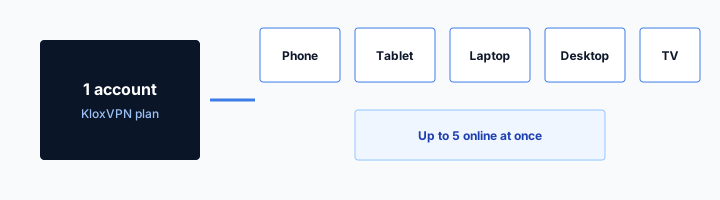
Klox is five simultaneous connections. Phone plus laptop, both tunneled, is two. A tablet on the same hotspot with its own app is three. The home tablet on auto-connect is still a seat if it is holding a session. Ghost phones count. A router at home holding a tunnel counts as one seat and then covers a house, which is the other article.
The hotspot does not collapse two gadgets into one seat. That is the router story. This is not a router. If a farm said tethering is a loophole around a device cap, they were describing a different product or a hope. Our cap is sessions. Two apps connected is two sessions.
I travel with phone plus laptop. If both need a hop I chose, I spend two. If the phone is only a modem, I spend one on the laptop. I disconnect the couch tablet before I leave the house. Sleep is not disconnect. A laptop lid can keep a peer. Remove retired devices in the portal. Do not assume the hotspot is why you hit the cap. The cap is often furniture.
You can install in more places than five. Only five can be connected at once. Teach yourself the error. It is not 'the VPN is down.' It is 'we overbooked the car.' The family seating chart is the household version. Here the chart is travel kit versus the hotspot fantasy that one phone covers a desk.
Do not leave the home tablet holding a seat
Auto-connect on a tablet at home is how you discover the cap in a cafe while tethering. Disconnect it before you leave, or take it off untrusted-only so home Wi-Fi does not keep a tunnel you forgot.
Hotspot clients are not automatically seats
A laptop on the hotspot with no Klox app is zero extra seats. It is also zero extra tunnel. A laptop with the app connected is one extra seat. Pick the sentence you actually want. Do not mash them.
Battery is already paying for the radio
Tethering heats the phone. The radio stays up. The laptop pulls. A VPN on the phone adds CPU and another radio conversation to a server. Stack them and the battery becomes the product. The longer battery essay is next door. Here the hotspot-specific sentence is: do not run phone VPN plus hotspot plus a kill-switch reconnect storm and then act shocked at 18 percent.
WireGuard is the default I want on the phone when the path is normal. It is lighter than OpenVPN. If the backhaul is a cafe that hates UDP, the phone may need OpenVPN to get its own tunnel. The laptop, on the hotspot, often has a calmer path to the same VPN server because it is not fighting the cafe portal itself. Sometimes the opposite is true. Test. Do not protocol-hop as a personality. One change, test a site, stop.
Plug the phone in if the desk has a charger. That is not a feature. That is physics. A power bank is a travel object. I will not invent a low-power hotspot mode in Klox. We do not ship one. If the phone dies, the laptop dies with it. That is the hotspot bargain. Cellular on the laptop, if it has a SIM, or hotel Wi-Fi after the portal, can be kinder to the phone you still need as a phone.
Smart Connect, if the row exists, can start a tunnel the moment the phone joins a cafe SSID you then share. That is fine for the phone. It is still not a laptop tunnel. It can also race a captive portal on the cafe side. Pause, finish the garden, restore. The hotspot cannot exist until the phone has a route. Fail-closed on the phone during a cafe splash is how you get no hotspot and no page.
WireGuard on the phone unless the backhaul is rude
Normal carrier path: WireGuard. Cafe AP that drops UDP: OpenVPN on the phone if the phone itself is tunneled. The laptop's protocol is the laptop's decision. They do not have to match.
Heat is a signal, not a badge
If the phone is too hot to hold, stop the hotspot or plug in. A tunnel will not cool silicon. I would rather you use hotel Wi-Fi after the room number than cook a battery for a principle.
Captive portal on the far Wi-Fi
Sometimes the phone is not on cellular. Sometimes the phone joined cafe or hotel Wi-Fi, then offered a hotspot to the laptop. The far network still wants a splash. Room number. I agree. Voucher. The phone has to finish that garden before it has a route to share. A VPN on the phone that starts the instant the radio associates can steal the hop the portal wanted. Then you have no internet, no splash, and no hotspot.
If Smart Connect or a kill switch already fired on the phone, disconnect. Pause the switch if traffic is still blocked. Complete the page on the phone. Confirm a boring site loads on the phone. Then turn the hotspot on. Then decide which gadgets get a tunnel. The laptop cannot complete a hotel room-number page that the phone never finished. The laptop is downstream of a brick.
If the laptop is on the hotspot and you then start Klox on the laptop, that is a normal connect. The laptop already has a route through the phone. It does not need the cafe splash. It may still need you to pause a laptop kill switch if you started the laptop app too early, before the phone had a route. Sequence: phone garden, phone route, hotspot, laptop join, laptop tunnel if you want one.
I will not claim zero exposure while the phone completes a cafe splash. That minute is the cost of the garden. It is the same cost as the cafe habit and the hotel habit. The hotspot does not erase it. It moves it onto the phone.
Phone finishes the garden, not the laptop
The captive page is on the phone's browser or the OS captive sheet. Do not sit on the laptop hitting refresh. The laptop is waiting on NAT that does not exist yet.
Then hotspot, then the laptop app
Order is the product. Reverse it and you debug ghosts. Phone VPN, if you want it, comes after the garden and can wait until after the laptop is working. Two Connect buttons. Two times.
Cellular versus cafe AP as backhaul
The clean hotspot is cellular. The phone's carrier path, maybe an eSIM, shared to the laptop. No cafe LAN. No hotel hour. The carrier still sees the phone's hop if the phone has no VPN. The laptop's hop is still the laptop's problem. You skipped a shop AP. You did not skip the need to decide who is tunneled.
The dirty hotspot is a phone on cafe or hotel Wi-Fi, sharing that path. You did this because the laptop hated the portal, or the hotel sold a one-device hour, or the cafe AP would not give the laptop a DHCP lease. Ugly. Valid. The far AP still sees the phone. If the phone is tunneled, the far AP sees a VPN endpoint. If the laptop is not tunneled, the far AP may still see laptop destinations if the phone is not stuffing them into the tunnel, which you should assume it is not. The laptop may also leak to the phone's NAT in the clear toward the same AP. Test on the laptop.
I prefer cellular backhaul when the bill allows it. I prefer hotel Wi-Fi on the laptop after the room number when the desk has a charger and a real route. I use phone-on-cafe plus hotspot when the laptop cannot finish the splash and I still need to send a file. That is a workaround, not a product. The eSIM essay is the plan. The cafe habit is the shop. The hotel habit is the voucher. This page is the extra hop you added because two radios were worse than one.
Do not buy a second carrier plan because a farm said hotspot plus VPN is a travel superpower. Yearly from $2.83 a month is the tunnel. The plan is the plan. Two bills. Two nouns.
Cellular backhaul is the calmer story
No splash on the far side. Battery still hurts. Seats still count. Carrier still sees the phone if the phone is clear. Laptop still needs its own app if you care about the laptop.
Cafe backhaul is a workaround
Phone does the garden. Laptop rides NAT. You accepted a shop AP in the path. Tunnel what you care about. Do not call it a router. Do not call it a Klox feature.
What leaks if only one device tunnels
If only the phone is tunneled, the phone's DNS and destinations go to the VPN, on a healthy session. The laptop's DNS and destinations go wherever the phone's NAT sends clear client traffic. Often the carrier resolver or the cafe resolver. Often SNI in the clear to the laptop's sites. That is the map you did not hide. HTTPS still locked the laptop's pages. The remainder is the hop. You hid the phone. You did not hide the laptop.
If only the laptop is tunneled, the laptop's map moves to a VPN server. The phone's map stays with the carrier or the cafe. The phone's hotspot control traffic is still the phone. Mail on the phone still fetches on the phone's hop. People forget the phone is a computer. They treat it as a modem with no sockets. Then the work chat on the phone posts from a cafe IP while the laptop looks clean. Two stories. You wrote both.
If neither is tunneled, you have a pocket router in the clear. Fine for a throwaway search. Not what I want for a bank password on the laptop. A VPN does not fix phishing. It does stop you from donating DNS and SNI to a LAN you do not run, or to a carrier graph you did not need to enlarge, while you type into the real bank. That is enough reason for me on the machine that types.
Klox routes DNS through the tunnel on the device that is connected. Features also lists IPv6 leak protection and WebRTC leak blocking. Those matter after that device is connected. They do not jump the hotspot and bless the other gadget. Leak-test the device you care about. Do not leak-test the phone and declare the desk safe.
SNI and the IP hop still exist
Encrypted Client Hello is uneven. The IP hop remains even when the name is hidden. A tunnel on the correct device moves both of those to 'talk to the VPN.' A tunnel on the wrong device moves the wrong map.
WebRTC is per browser, per device
The laptop browser can still embarrass the laptop to a page you opened. The phone app cannot police that. Connect Klox on the laptop, then optionally leak-test, then work. Do not ask the hotspot to be a browser extension.
When to skip the hotspot
Skip the hotspot if the laptop can join a real network and finish a portal. Hotel room number, then laptop tunnel, is often calmer than cooking the phone. Skip the hotspot if you only needed the phone. Read mail there. Leave the laptop shut. Skip the hotspot if the battery is already sad and you have no charger. A dead phone is a worse travel day than a clear laptop on a network you understood.
Skip a laptop tunnel if the laptop session is throwaway and you know it: one search for opening hours, a PDF you would show a stranger. I still connect for mail and work on the laptop. I do not connect to argue about the physics of a skip. Skip is not a personality. Skip is a packet you named.
Skip a phone tunnel if the phone is only a modem and you do not care what the carrier sees from the phone's own apps. Then be honest: the phone's apps are still talking. Close them or tunnel them. Background sync does not wait for you to feel like a modem.
If you bought Klox only to tether for a week, the consumer window is seven days on first purchase. Live page: /refund. Renewals are not that window. I would rather you keep the year if cafes and hotels will repeat. Yearly from $2.83 a month is not a power bank. If you will not, refund inside the clock. Do not invent SOC 2. Do not invent a city count. Do not invent a dedicated-IP consumer SKU. Do not invent a hotspot SKU. Download the apps. Count two seats. Then decide.
Skip is not 'NAT will save me'
NAT is not a tunnel. A skip you chose is fine. A skip you invented because the phone icon was green is how this article started. Look at the laptop IP. Then skip or connect.
Seven days if tethering was the whole product
First purchase only. Not a coupon for every trip. If the apps will not handshake on the laptop over your hotspot, try OpenVPN on the laptop. If they still will not, that is what the window is for. Document both devices in the ticket. Do not write 'hotspot mode is broken' about a mode we do not ship.
Key Takeaways
A phone hotspot is a radio you share, not a Klox SKU and not a home router. A consumer VPN on the phone does not automatically tunnel the laptop. If you care about the laptop hop, install the app on the laptop. That is a second seat of five. HTTPS already locked the page. The remainder is the hop, per device.
Cellular backhaul is calmer than cafe backhaul. Cafe backhaul still needs a garden on the phone first. Battery is already paying for tethering. WireGuard first. OpenVPN when the path is rude. Smart Connect, if the row exists, is untrusted Wi-Fi on that device, not a share-the-tunnel switch. Yearly from $2.83 a month. Seven days on first purchase. Cookies: /cookie.
If you wanted mobile data versus Wi-Fi, eSIM, router math, or battery, those URLs are next door. If you wanted a tunnel on the desk you actually type on, download the apps and stop asking the phone icon to speak for the laptop.
Related Resources
Tunnel the device that is doing the work
KloxVPN is WireGuard, OpenVPN, OpenConnect, and Shadowsocks, five devices, yearly from $2.83 a month, 7-day first-purchase money-back. We do not ship a hotspot SKU. Phone plus laptop is two seats if both connect. Download the apps and check the laptop IP.
Download KloxVPNFrequently Asked Questions
KloxVPN Team
Experts in VPN infrastructure, network security, and online privacy. The KloxVPN team has been building and operating VPN services since 2019, providing consumer and white-label VPN solutions to thousands of users worldwide.