A second travel phone is a second gadget. If Klox is connected on the spare and still connected on the phone you left at home, that is two seats. People treat the spare as a costume. Same account, same year, 'not really a device.' The portal disagrees. Connect is the counter. Install is not.
This is not the Linux esim_travel: Not a VPN Setting. That article is the radio plan: QR code, visited operator, path versus wrap. You can put an eSIM in one phone. This article is the extra handset. This is not the Family VPN on Five Devices. That page is who in the house gets a slot. You are one traveler with two phones. This is not the VPN Travel Checklist: Before You Go. That list is install and test before you leave. This page assumes the apps already work. This is not White-Label VPN and Remote Logout. That essay is branded portal copy. You still need the consumer version: kick the stolen spare, change the password, do not expect a wipe.
A VPN wraps a path. Wikipedia's VPN page is the noun. RFC 8446 is TLS 1.3 on websites. HTTPS already locked a lot of page bodies. The leftover on hotel Wi-Fi is who sees the hop. The leftover on two handsets is who holds a seat.
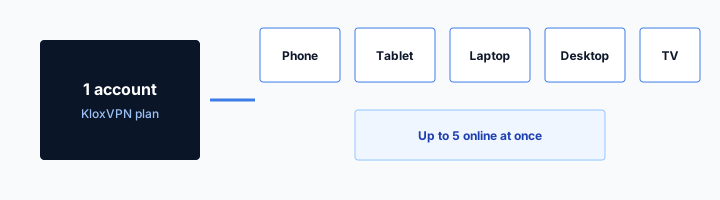
KloxVPN is WireGuard, OpenVPN, OpenConnect, and Shadowsocks, five devices, yearly from $2.83 a month, 7-day money-back on first purchase. No kids SKU. Phone plus spare is two if both tunnels are up. The couch tablet can make it three. Pricing is the live number. Download is the apps. Cookies: /cookie.
I have a bias. Disconnect the home phone before you board, or live with two seats. Do not leave auto-connect holding a peer on the nightstand. If the spare is stolen, kick the seat. Do not write a novel about Find My in a VPN ticket.
Related reading: What is a VPN? and WireGuard vs OpenVPN.
Looking for a reliable VPN?
KloxVPN — from $2.83/month. Apps for every device.
A spare is a seat
A travel phone is a physical device that can run a tunnel. Cheap Android. Old iPhone you kept. A work-personal split you bought so the daily driver stays home. The reason you bought it does not change the counter. If the Klox app is connected, it is a seat.
People say 'I only use one at a time.' Then they leave the daily driver on Smart Connect, or they forget Always-on, and both handshakes stay up. The spare joins hotel Wi-Fi. The home phone sits on the nightstand still tunneled on home Wi-Fi. Two. If a tablet at home is also holding a session, three. Five is the cap. You can install in more places. Only five can be connected at once.
I will not sell you a travel-phone add-on. There is no spare-handset SKU. There is no kids SKU either. Five simultaneous connections is the product. Yearly from $2.83 a month. Mix phones however you want. Remove a row in the portal when you retire a gadget. Do not hoard ghosts named iPhone and iPhone (2).
Farms will rank 'best VPN for travel phones' until the affiliate cookie expires. They will talk city counts and streaming. They will not tell you the home phone is still connected. That sentence is this article.
WireGuard first on the spare when the path is normal. OpenVPN when the hotel AP hates UDP. DNS through the tunnel, IPv6 leak protection, and WebRTC leak blocking still describe a live session on that handset. They do not describe the handset you left on the dresser.
- 1Skim the seating / order diagram.
- 2Do the numbered steps once on your real network.
- 3Use the FAQ if a sentence was too long.
- 4Follow one related article — not ten tabs.
How to read this page
| Kit | Home phone tunnel | Spare tunnel | Seats |
|---|---|---|---|
| Spare only, home phone disconnected | Off | On | 1 |
| Both phones connected | On | On | 2 |
| Both phones plus couch tablet auto-connect | On | On | 3 |
| Spare on hotel Wi-Fi, home phone on cellular tunnel | On | On | 2 |
| eSIM in one phone, one tunnel | Off or same phone | Same handset | 1 |
A second travel phone is a second seat if both tunnels are up. The eSIM bought a path. It did not buy a free slot.
— KloxVPN consumer notes
Cloudflare Learning: What is a VPN?
Wikipedia: Virtual private network
SafetyDetectives: best VPNs for travel (competitor specimen)
Install is free, connect is not
You can put the app on the spare weeks before the trip. That does not spend a seat. The handshake does. Open the portal the morning you leave and look. Do not trust memory.
What this post is not
Not an eSIM activation guide. Not who in the house gets the TV slot. Not a packing checklist. Not operator copy for a logout button. Extra handset. Extra seat. That is the cut.
The home phone is still connected
This is the actual failure. You packed the spare. You tested Klox on it at home. You left the daily driver on the charger, Always-on still on, or Smart Connect still marking home Wi-Fi as a reason to stay up. You land. You connect the spare. You hit an error, or you do not notice and you are already at two, and the tablet makes three when it wakes.
Disconnect the home phone before you leave the house. Open the app. Tap disconnect. If Always-on will just bring it back, turn that off for the trip or the home phone will rejoin. If Smart Connect only fires on untrusted Wi-Fi, home Wi-Fi may already be trusted and the tunnel may stay down. Confirm on the glass. I will not invent your OEM's labels.
Sleep is not disconnect. A phone on a charger can keep a peer. A laptop lid can keep a peer. The spare in airplane mode until the hotel is fine. The home phone 'not in your pocket' is not fine if the session is live.
If someone at home still needs a tunnel on that daily driver, that is a real second seat. Pay it honestly. Five exists for that. Do not pretend the spare is a clone that shares a slot. Clones are a story. Sessions are rows.
I travel with a spare when I do not want my daily number on hotel Wi-Fi, or when the daily driver is a work profile brick I will not put on a shop AP. I still count two if I left the daily driver tunneled. I count one if I killed that session. The difference is a tap at the door, not a vibe.
From the spare, open the portal in a browser before you board if you can. Look at connected rows. If the home phone is still there, you failed the tap. Do it again. Cellular on the daily driver in your pocket at the gate still counts if Klox is up. Off means the app says disconnected and the portal agrees. One of those lying is how people land at two and blame the hotel.
Always-on will undo the tap
If you disconnect and the OS brings the service back, you did not disconnect. Turn Always-on down on the phone that stays home, or the spare will meet a live peer you thought you killed.
Trusted home SSID is a setting, not a feeling
Smart Connect, if the row exists, is untrusted Wi-Fi. Home marked trusted may stay quiet. Home marked untrusted will hold a seat. Read the row. Do not assume 'I am not there' equals off.
eSIM is the SIM, not the extra handset
An eSIM is a downloaded radio plan. Local data. Roaming data. A QR. An operator. It lives in a phone. It is not a second phone. One handset with a travel eSIM and one Klox tunnel is one seat. Two handsets with two tunnels are two seats even if neither has an eSIM.
The Linux esim_travel: Not a VPN Setting already split path versus wrap. Path: the operator that routes you. Wrap: the VPN if you connect. This page will not rewrite activation, SMS-on-the-home-SIM, or banks that hate a new IP. Go there for those. Come back here when you bought a second slab of glass.
You can put the eSIM in the spare and leave the daily driver on the home SIM for codes. That is a good kit. It is still one or two seats depending on how many tunnels are up, not depending on how many profiles the spare stores. Two eSIMs in one phone is still one phone. One eSIM in each of two phones is two phones.
Farms mash 'travel eSIM VPN' into one SKU. We do not sell eSIMs. If a landing page implied we did, it was confused. Buy the plan from an eSIM vendor. Buy the tunnel from us, or do not. Two checkouts. Two nouns.
If the spare has only Wi-Fi and no eSIM, it is still a seat when it is tunneled on hotel Wi-Fi. The missing SIM does not make it a toy. If the spare has only cellular and never joins Wi-Fi, it is still a seat when Klox is up on that radio. The path changed. The counter did not.
Do not buy a second eSIM 'so the VPN has a slot.' The eSIM does not mint a seat. Do not skip the VPN 'because the spare has local data.' Local data is still an operator hop. The eSIM article already argued that. Here I only need you to stop using the SIM as an excuse to miscount handsets.

One phone, one eSIM, one tunnel
That is one seat. The eSIM article owns the rest: airport Wi-Fi versus cellular, test at home, keep the home SIM for SMS if the bank still texts.
Two phones, zero eSIMs, two tunnels
Still two seats. Wi-Fi-only spare plus daily driver on LTE. The SIM count is a distraction. The handshake count is the product.
Hotel Wi-Fi on the spare
The spare joins a property SSID. Room number, last name, paid hour. Get a real route. Complete the splash in the clear. Then connect Klox. WireGuard first. OpenVPN if the AP is rude. That habit is not unique to a second phone. The spare does not get a magic portal.
Fail-closed on a spare you barely know is how you brick the login page and decide the cheap phone is broken. Pause the kill switch, or Always-on Block connections, until the garden is done. Then restore if you still want the lock. Screenshot those toggles at home. You will not find them at 23:00 in a lobby you do not run.
HTTPS already locked the page body on the sites you actually use. The hotel still sees destination IPs and often SNI unless the hop is a VPN. The spare's tunnel hides that map from the property LAN. It does not make the AP honest. It does not fix a fake SSID. Ask the desk the network name.
If the daily driver is in the bag, off, disconnected, you have one seat on the spare. If you also open the laptop, that is two. If you also left the home phone tunneled, that is two before the laptop. Count before you sit on the bed, not after the sixth handshake fails.
I will not rewrite the hotel habit essay. Splash, paid hour versus folio, bolted TV is not a device. Here the only extra sentence is: the spare is easy to forget in the counter because it feels temporary. Temporary still handshakes.
A paid hour that dies while you still have the room will look like the VPN ate the internet if fail-closed is on. The hour died. Lift the switch, buy the hour or use cellular, then tunnel again. The spare does not remember last year's voucher. You will do the garden every stay unless the property cookie stuck. Our /cookie page is klox.app, not the hotel vendor.
Splash first on a phone you barely use
New handset, unfamiliar settings, tired. That is when auto-connect races the portal. Disconnect, finish the page, connect. Do not factory-reset the spare in the lobby.
The laptop is still a seat
Spare plus laptop is the usual travel pair. Two of five. The home phone should already be off the list. If it is not, you are at three before breakfast.
If the spare is stolen
Bag, taxi, nightstand. The spare is gone. You still have a laptop or the daily driver. You want that gadget off the VPN. Kick the seat in the account portal. Change the password. That is the consumer job.
Logout is not a wipe. Find My, Google Find Hub, a work MDM: those are disk and lock products. Klox is a tunnel product. Disconnecting the row stops a new handshake for that peer. It does not erase photos. It does not lock the screen. It does not revoke the password manager on disk. If the app stored the password, a reset matters more than a polite disconnect. Reset first if you can. Then kick every row you do not recognize.
The White-Label VPN and Remote Logout is how a branded portal should talk about this: no erase-device lie, say the delay, stolen-phone macro. You are not that operator. You are the subscriber. Use the device list you actually have. If a row will not die, change the password and write in. Do not invent an instant global kill I did not ship.
Also do the phone-vendor lost-mode. That is the wipe path, if you set it up before the trip. A VPN subscription is not travel insurance and not a tracker. Seven-day money-back will not refund a stolen handset. See /refund for the consumer window on first purchase. That window is for the apps, not for a taxi.
I would rather you rename the spare to Travel Pixel in the portal before you fly than hunt Android (3) from a hotel business center. Labels are not logout. They make logout aim.
If you cannot reach the portal because the spare was the only logged-in browser, use the daily driver or the laptop. That is why the kit is two gadgets you still hold, not one precious brick. If you have no second screen, reset the password from a password-reset mail on a machine you can borrow, then kick rows. Ugly. Better than a live tunnel in a thief's pocket.
Kick, then reset
Disconnect the stolen row. Change the account password. If the spare had the password saved, disconnect alone is a pause. The reset is the part the thief feels.
Not Find My
Do not file a Klox ticket that says wipe my phone. We cannot. Use Apple or Google lost-mode. Use work MDM if the spare was managed. Use the portal for the tunnel only.
Five is still five
Spare, daily driver, laptop, tablet, partner's phone: that is a household chart, and that chart already has a URL. This page is narrower. One traveler. Two handsets. Maybe a laptop. Stay inside five by killing what is not in the bag.
The couch tablet is the usual thief. Auto-connect, sleep, still a peer. Disconnect it before you travel, or take it off untrusted-only so home Wi-Fi does not keep a tunnel you forgot. A router at home holding a tunnel is one seat and then covers a house. Different article. If that router is up, the spare may be the seat that fails at the hotel.
Remove retired phones in the portal. The last spare you used in March can still sit in a list. A list is not always a live session. A live session is. Look at connected, not at installed.
I will not tell you to share the password with a friend so they 'hold the spare.' That is how you get a stranger's traffic on your account. I will not tell you a second account is required for a second phone. It is not, if you can count to two and leave three slots for later.
If you hit the cap every trip, you are not a spare-phone person. You are a furniture person. Fix the furniture. The cheap Android in your pocket is not the bug.
Partner's phone in the same bag is a third seat if it is tunneled. That is still not a family chart. That is one trip, three gadgets. The family URL is who keeps a slot in January. This URL is who is connected on Tuesday in a hotel. Same five. Different question.
Disconnect the couch tablet
Do it the night before. Confirm the portal dropped the row. If it comes back by morning, Always-on or auto-connect is still on. Turn those down on the tablet that stays home.
No second account for a second slab
Five is enough for a spare plus a laptop plus slack. A second checkout is how people lose which password opened which app. One account. Honest seats.
What a second phone cannot do
It cannot hide that you are in that hotel. Cameras, folio, the AP vendor: not VPN problems. It cannot make a fake SSID honest. It cannot unlock a catalog I did not promise. Cafe plus spare plus a farm cookie is not a Netflix product.
It cannot replace unique passwords. The spare is often the sloppy phone: reused PIN, no lock, old OS. A tunnel on that pile is a nicer hop for the same account takeover. Update it at home. Lock it. Do not treat cheap as disposable security.
It cannot be a kids product. We do not sell a kids SKU. If the spare is a teenager's phone you brought 'just in case,' you are in the family chart and the kids-device essay, not in a travel-phone loophole. Same five seats. Same Connect button.
It cannot carry the home phone's number unless you set that up with the carrier. VPN does not forward SMS. The eSIM article already said keep the home SIM for codes if the bank still texts. The spare will not catch those texts because you installed Klox.
It cannot survive a theft with a status-bar glyph. The glyph dies when the battery dies. The seat lives until you kick it. That is why the portal exists.
Cheap is not a threat model
A $80 Android still holds mail tokens if you signed in. Tunnel it like you mean it, or do not put mail on it. I put mail on the daily driver and keep the spare thin.
No streaming fairy tale
A second phone plus a second country in a server list is not a rights locker. If a farm said otherwise, they were selling a cookie. Klox is a tunnel. Use it as that.
The kit, not a family chart
The kit is what leaves the house. Spare phone. Maybe a laptop. Daily driver off or in the bag disconnected. Tablet at home disconnected. Router question answered before you fly, not in the lobby.
Install Klox on the spare at home. Sign in. Grant the VPN dialog. Test WireGuard on home Wi-Fi. Test OpenVPN once so you know the spare tire exists. Test a hotel-like guest SSID if you have one, including the splash sequence. The VPN Travel Checklist: Before You Go is the longer pre-trip list. This is the spare-specific add: kill the home phone session, rename the spare in the portal, know how you will kick it if a taxi eats it.
If you only needed the spare for one week of hotels, the consumer window is seven days on first purchase. Live page: /refund. Renewals are not that window. I would rather you keep the year if you travel again. Yearly from $2.83 a month is not a minibar. If you will not, use the window instead of a chargeback.
See pricing for the live number. Download the apps onto the spare before you need a boarding-pass QR over cafe DNS. Practice the disconnect on the daily driver once so the airport is not the first rehearsal.
I pack a spare when the daily driver is the wrong chassis: work profile, bad radio, or a number I do not want on property Wi-Fi. I pack one seat's worth of honesty with it. Two tunnels, two seats. That is the whole plot.
Rename before you fly
Travel Pixel, Spare Android. Ugly. Clear. Android (2) is how you kick the laptop by mistake from a hotel and then you have two problems.
Seven days if the spare was the whole product
First purchase only. If you already used the window, you already used it. The spare is not a new coupon. Keep the year if hotels are a habit. Refund if they were a one-off.
Key Takeaways
A spare travel phone is a second seat if both tunnels are up. Disconnect the daily driver. Disconnect the couch tablet. eSIM is the SIM. The family chart is household math. Hotel splash first, then WireGuard. If the spare is stolen, kick the row and change the password. That is not a wipe.
Five devices. Yearly from $2.83 a month. Seven-day first-purchase money-back. No kids SKU. No city count. No streaming fairy tale. Cookies for this site: /cookie.
If you wanted the radio plan, the eSIM article is next door. If you wanted who gets the TV slot, that is the family chart. If you wanted a packing list, that is the checklist. If you wanted operator logout copy, that is the white-label essay. If you wanted a tunnel you will actually count, see pricing, put the app on the spare at home, and kill the nightstand session before you lock the door.
Related Resources
Two phones, two seats, one price
KloxVPN is WireGuard, OpenVPN, OpenConnect, and Shadowsocks, five devices, yearly from $2.83 a month, 7-day first-purchase money-back. A spare is a seat if the tunnel is up. Count before you board.
See KloxVPN pricingFrequently Asked Questions
KloxVPN Team
Experts in VPN infrastructure, network security, and online privacy. The KloxVPN team has been building and operating VPN services since 2019, providing consumer and white-label VPN solutions to thousands of users worldwide.