
Public WiFi has become infrastructure — available in cafes, airports, hotels, hospitals, libraries, and shopping centers worldwide. For many people, connecting to any available WiFi is automatic behavior. The security implications of this habit rarely get the attention they deserve.
Public WiFi networks are fundamentally different from your home network. Your home router is under your control, with a private password and known connected devices. A public hotspot may have hundreds of simultaneous users, minimal security controls, and no restriction on what tools those users run. This creates a real and documented attack surface for several categories of threat. The attacks described below are not theoretical — they use widely available tools and require no advanced expertise. Understanding them is the first step to defending against them.
Research from security firms and academic studies consistently shows that public WiFi is a high-risk environment. Unencrypted HTTP traffic, weak or shared WPA2 passwords, and the absence of client isolation on many networks create opportunities for attackers. The solution is not to avoid public WiFi entirely — that is impractical for travelers and remote workers — but to ensure that your traffic is encrypted before it reaches the network. A VPN is the most effective defense because it encrypts everything at the device level, regardless of the network's security posture.
Related reading: VPN for Content Creators: Protect Your IP and Uploads and Blsfill: Not a Mitigation Toggle. Blsi: Not a Mitigation Toggle and Blsic: Not a Mitigation Toggle. What is a VPN? and Download KloxVPN.
Looking for a reliable VPN?
KloxVPN — from $2.83/month. Apps for every device.
Threat 1: Packet Sniffing
On many public WiFi networks — particularly those without proper client isolation — it is technically possible for one device on the network to capture the raw data packets transmitted by other devices. This technique is called packet sniffing.

- 1Join the SSID. Do not start the VPN yet.
- 2Open a browser and finish the captive portal.
- 3Open Klox. Connect WireGuard.
- 4If the handshake dies, switch to OpenVPN. Then work.
Do this in order
How it works
Tools like Wireshark can place a network interface into "promiscuous mode," capturing all packets on the network segment rather than just those addressed to the capturing device. On networks without client isolation (where all users are on the same broadcast domain), this captures traffic from all connected users. No special access is required — anyone on the network can run these tools. Tutorials and guides are freely available online. The barrier to executing this attack is low; the impact on victims is high.
What attackers can see
On unencrypted (HTTP) traffic, attackers can read everything: form submissions, login credentials, email content, and session tokens. On HTTPS traffic, the content is encrypted at the TLS layer, but DNS queries (the lookups that resolve domain names) may still be visible, revealing which sites you visit.
Mitigation
A VPN encrypts all traffic — including DNS queries — before it leaves your device. Even if an attacker captures your packets, the VPN encryption renders them unreadable. The captured data shows only encrypted gibberish.
Threat 2: Evil Twin Attacks
An evil twin attack involves an attacker creating a rogue WiFi access point that impersonates a legitimate network. When users connect, all their traffic passes through the attacker's controlled device.
| Fact | KloxVPN | Not on this page |
|---|---|---|
| Protocols | WireGuard, OpenVPN, OpenConnect, and Shadowsocks | A third invented protocol |
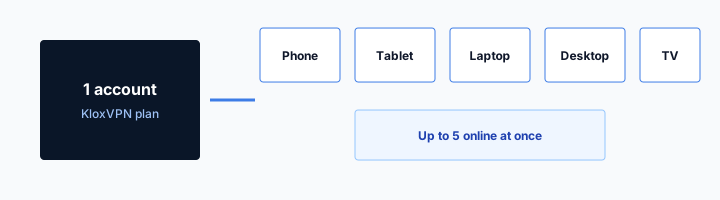
| Devices | Five simultaneous | Unlimited seats |
| Yearly | From $2.83/month | A fake city count |
| Refund | 7-day, first purchase | An On Demand toggle |
How attackers set it up
Using a laptop with a WiFi adapter and software like hostapd, an attacker creates an access point with the same SSID as the legitimate network ("Airport WiFi" or "Starbucks Guest"). In many cases, the fake network has a stronger signal and better bandwidth because the attacker is sitting nearby. Devices with auto-connect enabled may connect automatically.
What the attacker can do
With all traffic flowing through their device, attackers can perform SSL stripping (downgrading HTTPS connections to HTTP), inject content into web pages, capture credentials, and redirect users to phishing pages that mimic legitimate services.
Mitigation
Even on an evil twin network, a VPN encrypts all your traffic before it leaves your device. The attacker controlling the fake access point sees only encrypted VPN traffic — not your actual data. This is one of the few scenarios where VPN provides protection even when you have already connected to a malicious network.
Threat 3: Man-in-the-Middle (MitM) Attacks
Man-in-the-middle attacks occur when an attacker secretly relays and potentially modifies communication between two parties who believe they are communicating directly. On public WiFi, this is facilitated by techniques like ARP spoofing.
public wifi security risks stays on the box. The hop wrap stays in the app.
— KloxVPN operator notes
ARP Spoofing
ARP (Address Resolution Protocol) is used by devices to find each other on a local network. An attacker using ARP spoofing sends fake ARP responses that map the attacker's MAC address to the IP addresses of the victim's device and the default gateway. This routes all traffic from the victim through the attacker's device.
What can be captured
Once in a MitM position, an attacker can capture all traffic, attempt SSL certificate substitution, inject code into web pages, and modify downloaded files. Modern browsers and certificate pinning in apps mitigate some of these attacks, but not all.
Mitigation
VPN traffic is encrypted end-to-end between your device and the VPN server. An attacker who intercepts your traffic via ARP spoofing captures only the encrypted VPN tunnel — they cannot decrypt it or modify its contents without the private key held by the VPN server.
Best Practices for Public WiFi Security
Understanding the threats leads to clear protective practices. These habits, applied consistently, eliminate the vast majority of public WiFi risk.
Use a VPN on every public connection
The single most impactful practice. Enable VPN before connecting to any public network. Use auto-connect on untrusted networks to automate this. The protection it provides against all three threat types above is comprehensive and does not require technical knowledge to use. Configure your VPN app to auto-connect when joining new networks; add only your home and trusted work networks to the exception list. This ensures you are never unprotected on public WiFi by accident.
Verify networks before connecting
Confirm the official network name with venue staff or signage before connecting. Avoid connecting to any open network with a generic name. If multiple networks with similar names exist, ask which is official.
Keep software and OS updated
Security patches fix known vulnerabilities that attackers exploit. Keeping your device OS and apps current closes the most common attack vectors. Enable automatic updates on mobile devices.
Threat 4: Unencrypted Hotspot Networks
Many public networks use no encryption at all — or use weak encryption that has been compromised.
Open Networks and Captive Portals
Airport and hotel WiFi often use open networks with a captive portal for login. Until you complete the portal, your traffic may be unencrypted. Even after login, some networks use only HTTP for the portal itself, exposing session cookies. A VPN encrypts traffic regardless of the network's encryption status.
WEP and Legacy Encryption
Some older hotspots still use WEP or WPA encryption, both of which are easily cracked. An attacker can recover the key in minutes and use it to decrypt all traffic on the network. Your VPN protects you because even if the WiFi encryption is broken, your traffic is encrypted inside the VPN tunnel.
Shared Passwords
Networks with a single shared password — like "Starbucks123" — give every user the same key. Anyone who has the password can decrypt other users' traffic if the network uses WPA2-Personal. VPN adds a second layer: your traffic is encrypted to the VPN server before it reaches the WiFi layer.
Threat 5: Rogue DNS and Malicious Redirects
Attackers can hijack DNS resolution on public networks to redirect you to malicious sites.
DNS Hijacking on Public WiFi
The network you connect to may use DNS servers controlled by the venue — or by an attacker who has compromised the network. Malicious DNS can return fake IP addresses for banking sites, redirecting you to phishing pages that steal credentials. A VPN with its own DNS ensures your queries go to the VPN provider's servers, not the network's.
Captive Portal Phishing
Some attacks use fake captive portals that mimic legitimate login pages. You enter your email or credentials, which attackers capture. A VPN does not prevent you from connecting to a fake portal — but it does protect your traffic once you are past it. Always verify the portal URL and use a VPN when possible.
Verifying Your VPN Protection on Public WiFi
Before relying on VPN for public WiFi, confirm it is working correctly.
Pre-Connection Checklist
Enable your VPN before joining the network. If your app supports auto-connect on untrusted networks, enable it. Verify the VPN is connected by checking the app status or visiting a site like whatismyip.com. The displayed IP should be the VPN server's, not your real location.
DNS Leak Test
Run a DNS leak test at ipleak.net or dnsleaktest.com while connected. Results should show your VPN provider's DNS servers. If your ISP's DNS appears, you have a leak — fix it before using public WiFi for sensitive activities.
Kill Switch Verification
The kill switch blocks traffic if the VPN drops. Disconnect the VPN briefly to test: your device should lose internet access until the VPN reconnects. This prevents accidental exposure when the connection is unstable.
Industry and Regulatory Context
Understanding why public WiFi remains risky despite years of awareness helps contextualize the threat.
Why Venues Do Not Fix This
Most public WiFi operators prioritize convenience over security. Implementing client isolation, WPA3, or per-user encryption adds cost and complexity. Users expect free WiFi to "just work." The result: many networks remain vulnerable by design. Your VPN is the layer you control.
Legal and Liability
Venues typically disclaim liability for data loss on their WiFi. Terms of service often state that users connect at their own risk. This makes user-side protection not just technically necessary but legally prudent. Document that you used a VPN if a breach occurs — it demonstrates reasonable care.
Future-Proofing
WPA3 and improved WiFi security will roll out over time. Even with better encryption, a VPN provides defense in depth: it protects against compromised networks, rogue access points, and ISP logging. The habit of "VPN first" will remain valuable regardless of WiFi improvements.
Public WiFi by Venue Type: Risk Levels
Not all public WiFi is equally risky. Understanding venue-specific threats helps prioritize protection.
Airports and Transit Hubs
High risk. Dense user concentration, international travelers with valuable data, and often weak or open networks. Attackers target airports specifically. Always use VPN. Avoid sensitive transactions; if necessary, use VPN and verify the site's certificate.
Hotels
High risk. Guest networks are shared across many rooms. Some hotels use per-room VLANs, but many do not. VPN is essential. Be wary of captive portals that request excessive information — verify they are legitimate before entering credentials.
Cafes and Restaurants
Medium to high risk. Typically open or weakly secured networks. Patrons may sit for hours, giving attackers time. VPN protects you. Avoid accessing banking or sensitive accounts; if you must, ensure VPN is connected first.
Libraries and Universities
Variable risk. University networks may have better isolation; public library WiFi often does not. Assume medium risk. VPN is recommended. Some university networks block VPN — use OpenVPN TCP or Shadowsocks if WireGuard fails.
What to Do If You Suspect Compromise
If you used public WiFi without a VPN and suspect your data was captured, take immediate steps.
Change Passwords
Change passwords for any accounts you accessed on the compromised network. Start with email, then banking, then other sensitive services. Use a different network (mobile data with VPN, or home) when changing passwords.
Enable 2FA
If you have not already, enable two-factor authentication on critical accounts. This limits damage from stolen passwords. Use authenticator apps rather than SMS when possible.
Monitor for Unusual Activity
Check account activity logs, bank statements, and credit reports. Look for unfamiliar logins or transactions. Many services notify you of new device logins — review these alerts.
Children and Public WiFi
If children use devices on public WiFi, their traffic needs the same protection.
Family VPN Setup
A single VPN subscription typically covers 5-10 devices. Install the VPN app on each family member's phone and tablet. Enable auto-connect on untrusted networks so protection is automatic. Children may not remember to connect manually — automation is essential.
School and Library WiFi
School networks may block VPN. If your child cannot connect, they may need to use the network without VPN for school work. Educate them to avoid logging into personal accounts (social media, email) on school WiFi. Use VPN on their device when they are on home or public networks.
Corporate and Enterprise Public WiFi
Business travelers often connect to guest WiFi at client sites or conferences.
Guest WiFi at Client Sites
When visiting a client or partner, you may connect to their guest network. Assume it is as risky as any public WiFi. Use your VPN always. Do not access sensitive company data or credentials on guest networks without VPN. Some organizations require VPN for remote access — use both: your corporate VPN for work systems, and consider a personal VPN for general browsing if policy allows.
Conference and Event WiFi
Conferences attract high-value targets. Attackers set up evil twin networks with names like "Conference WiFi" or "Event Guest." Verify the official network with event staff. Use VPN before connecting. If you present or demo, avoid using conference WiFi for sensitive operations — use mobile hotspot with VPN instead.
Building the VPN Habit
Protection only works when you use it. Make VPN on public WiFi automatic.
Auto-Connect Configuration
Configure your VPN app to auto-connect when joining untrusted networks. Add only your home and known-safe work networks to the trusted list. Every other network — cafes, airports, hotels, friends' houses — triggers automatic VPN connection. This eliminates the risk of forgetting.
Visual Reminders
Many VPN apps show a persistent indicator (key icon, status bar) when connected. Use it as a reminder: if you do not see it on public WiFi, connect manually before doing anything else. Some users add a "VPN check" to their pre-travel checklist.
Teaching Others
Family members and colleagues may not understand public WiFi risks. Share this guide. Help them install and configure a VPN. The more people who use VPN on public networks, the smaller the pool of vulnerable targets. Start with those who travel frequently or work from cafes.
How a tunnel applies to Public WiFi Security Risks: What You Need to Know
Smart Connect is untrusted Wi-Fi. It is not On Demand. It is not a Public WiFi Security Risks: What You Need to Know toggle. Guest VLANs can isolate you and still see destinations until the tunnel is up. Isolation is not a wrap. I will not claim SOC 2 or a server map here. I will claim WireGuard, OpenVPN, OpenConnect, and Shadowsocks and the portal-then-Connect order. If UDP dies on Public WiFi Security Risks: What You Need to Know APs, one protocol swap. Then stop tinkering.
Leak tests belong after Connect, not while the Public WiFi Security Risks: What You Need to Know sign-in page is still painting. If someone asks for a Public WiFi Security Risks: What You Need to Know mode, send this slug. Same apps. same four protocols. See Cloudflare's VPN explainer if you need the noun. The SSID can say Public WiFi Security Risks: What You Need to Know or Coffee. The noun does not change. No Public WiFi Security Risks: What You Need to Know mode. Same apps. Same five devices. Same yearly $2.83/mo on yearly.
This slug is a habit page for Public WiFi Security Risks: What You Need to Know networks, not a new SKU. Device limit stays five devices. Yearly stays $2.83/mo on yearly. TLS on klox.app is the website. The hop wrap is the app. Mixing those two explanations on Public WiFi Security Risks: What You Need to Know Wi-Fi confuses tickets. A QR by the kettle is still a captive garden. Finish it. Then Connect. Then test leaks if you care. Portal first. Handshake second. Leak test third. That is the whole checklist.
The hop wrap here
I will not invent a dashboard row named Public WiFi Security Risks: What You Need to Know. Consumer facts stay boring: five devices, WireGuard, OpenVPN, OpenConnect, and Shadowsocks, 7-day money-back on first purchase. Do not paste sysctls because a Public WiFi Security Risks: What You Need to Know AP was rude. Consumer move is protocol swap. Lab move is a different desk. Klox is five devices, yearly from $2.83/mo on yearly, 7-day money-back on first purchase. There is no Public WiFi Security Risks: What You Need to Know SKU and no city count on this page. Apps at /download. Plans at /pricing. Garden in the browser. Tunnel in the app.
This page exists because people search "Public WiFi Security Risks: What You Need to Know VPN" when they mean "I am on a network I do not run." Fair. Here is the habit. I will not publish a server map here. I will publish WireGuard, OpenVPN, OpenConnect, and Shadowsocks, five devices, $2.83/mo on yearly, and the portal order. Cookies: /cookie. That is this website. It is not the tunnel and not the portal. Land, sign in, wrap. Repeat it until it is boring. Boring is the goal.
I treat Public WiFi Security Risks: What You Need to Know Wi-Fi like any hotel or cafe: land, sign in, then wrap. Skip a step and the garden loops or destinations stay visible. Smart Connect belongs on untrusted Wi-Fi. It is not a per-SSID profile named Public WiFi Security Risks: What You Need to Know. Keep the ritual small. Join Public WiFi Security Risks: What You Need to Know Wi-Fi. Finish the page. Connect. Work. That is the complete consumer flow. Treat Public WiFi Security Risks: What You Need to Know like a hotel SSID even when the branding looks official.
Related product pages
If you came here looking for a Public WiFi Security Risks: What You Need to Know mode in Settings: there is not one. Same apps. Same WireGuard, OpenVPN, OpenConnect, and Shadowsocks. Hotel, airport, campus, Public WiFi Security Risks: What You Need to Know: same NAT story. You are a guest. Guests get wrapped after sign-in. HTTPS on the website is not a hop wrap. RFC 8446 is TLS. Different job from Connect on Public WiFi Security Risks: What You Need to Know Wi-Fi. Send this slug when someone asks for a special Public WiFi Security Risks: What You Need to Know profile. There is not one.
Public WiFi Security Risks: What You Need to Know is a convenient name for a shared hop. It is not a VPN profile and not a city. A minute of waiting after join is normal while DHCP and the garden load. Do not mash Connect ten times. Staff SSIDs still dump you through NAT. "Staff" is a word. Public WiFi Security Risks: What You Need to Know is a word. Neither word is a private backbone. The SSID label does not change the physics. Wrap after sign-in.
Shared Public WiFi Security Risks: What You Need to Know Wi-Fi is not your network even when the SSID looks friendly. Assume NAT. Assume a garden. Then wrap. Phone hotspot versus Public WiFi Security Risks: What You Need to Know AP is the same ritual with a different radio. Untrusted, then wrap. WireGuard is fast when UDP lives. OpenVPN is the spare tire when a filter eats handshake packets. One swap. Then stop. You are done when Connect is up and the portal is in the past. Not when you renamed a sysctl.
Key Takeaways
Public WiFi security risks are real and well-documented. Packet sniffing, evil twin attacks, and man-in-the-middle techniques are all practically executable with consumer-grade equipment and freely available software. The good news is that defending against all of them is straightforward: a VPN active from the moment you connect encrypts everything and eliminates the effectiveness of these attacks.
The key habit: VPN on before you open any application on public WiFi. Everything else is secondary. Run the verification checks above periodically to confirm your VPN is configured correctly. With encryption active from the moment you connect, you can use public WiFi without the risks that make it dangerous by default.
Unencrypted networks, rogue DNS, and evil twin networks all share one weakness: they cannot decrypt VPN traffic. Your data is encrypted before it reaches the network. Whether you are at an airport, hotel, or coffee shop, the same defense applies. Enable auto-connect, verify with the checklist above, and use public WiFi with confidence. Share this knowledge with family and colleagues — the more people who use VPN on public networks, the harder it becomes for attackers to find vulnerable targets. The cost of a VPN subscription is negligible compared to the cost of identity theft, credential compromise, or data breach. A VPN is the single most cost-effective security investment for anyone who travels or works remotely.
Related Resources
Stay Protected on Every Public Network
KloxVPN encrypts your connection on any public network. One tap protection for all your devices.
VPN for Public WiFiFrequently Asked Questions
KloxVPN Team
Experts in VPN infrastructure, network security, and online privacy. The KloxVPN team has been building and operating VPN services since 2019, providing consumer and white-label VPN solutions to thousands of users worldwide.