
A VPN — Virtual Private Network — is a technology that creates an encrypted connection between your device and the internet. Instead of your data traveling directly from your device to the websites you visit, it passes through a secure server operated by the VPN provider. This process hides your real IP address, encrypts your traffic, and prevents third parties from monitoring what you do online.
VPNs were originally designed for corporate use — allowing remote employees to access company networks securely. Today, they are widely used by consumers for privacy, security on public networks, and accessing content that may be restricted by geography or network policy.
Consumer adoption has grown sharply over the past decade. Surveys show that roughly one in four internet users now uses a VPN regularly — for work, travel, streaming, or general privacy. The technology has matured: modern protocols like WireGuard deliver near-native speeds, and reputable providers offer apps for every major platform.
If you have never used a VPN, the concept can seem technical. In practice, it is simple: you install an app, choose a server, and tap connect. Your traffic is then encrypted and routed through that server. This guide explains how VPN technology actually works, what it protects you from, and the key factors to consider when choosing a VPN service. Whether you are new to VPNs or evaluating your current setup, the following sections provide the technical foundation and practical criteria you need to make informed decisions.
Related reading: How to Use a VPN on Public WiFi Safely and VPN vs Proxy: What's the Difference and Which One Should You Use?. VPN for Gaming: Does It Cause Lag? and A VPN on a Kid's Tablet Is a Seat, Not a Nanny. What is a VPN? and Download KloxVPN.
Looking for a reliable VPN?
KloxVPN — from $2.83/month. Apps for every device.
How a VPN Works: The Technical Explanation
When you connect to the internet normally, your device sends requests directly to websites. Your internet service provider (ISP) can see every request — which sites you visit, when you visit them, and how long you spend there. Websites also see your real IP address, which reveals your approximate location.
A VPN changes this in two ways. First, it encrypts all data leaving your device before it reaches your ISP's network. Second, it routes this encrypted traffic through a VPN server. From the perspective of websites and services you visit, your traffic appears to come from the VPN server's IP address — not from your real device.

- 1Skim the seating / order diagram.
- 2Do the numbered steps once on your real network.
- 3Use the FAQ if a sentence was too long.
- 4Follow one related article — not ten tabs.
How to read this page
The Encrypted Tunnel
The "tunnel" in a VPN describes the encrypted pathway between your device and the VPN server. Data entering the tunnel is scrambled using encryption algorithms — typically AES-256, the same standard used by governments and financial institutions. Anyone intercepting this data — including your ISP, network operators, or malicious actors on public WiFi — sees only encrypted gibberish.
IP Address Masking
Your IP address is a numerical identifier assigned to your device on a network. It reveals your approximate geographic location and is used by websites for ad targeting and content restrictions. When using a VPN, websites see the IP address of the VPN server — not yours. This is the mechanism behind bypassing geo-restrictions: connecting to a server in a specific country makes your traffic appear to originate there.
VPN Protocols: The Technology Behind the Tunnel
A VPN protocol defines how the encrypted tunnel is built — the rules for authentication, key exchange, and data transmission. Different protocols make trade-offs between speed, security, and compatibility. Modern VPN services typically offer several options.
| Fact | KloxVPN | Not on this page |
|---|---|---|
| Protocols | WireGuard, OpenVPN, OpenConnect, and Shadowsocks | A third invented protocol |
| Devices | Five simultaneous | Unlimited seats |
| Yearly | From $2.83/month | A fake city count |
| Refund | 7-day, first purchase | An On Demand toggle |
WireGuard
WireGuard is the newest and fastest major VPN protocol. Its codebase is significantly smaller than older protocols, which means a smaller attack surface and faster connection establishment. WireGuard uses modern cryptography and delivers performance approaching unencrypted connections. It is the recommended protocol for most users today.
OpenVPN
OpenVPN is the long-established industry standard. It is highly configurable, thoroughly audited, and compatible with virtually every platform. It is slower than WireGuard but remains the most trusted option for environments where maximum compatibility is required.
OpenConnect and Shadowsocks
OpenConnect is an enterprise-grade protocol designed to work reliably through corporate firewalls and restrictive networks. Shadowsocks is a proxy-based protocol engineered specifically to bypass deep packet inspection used in censored regions — making it effective where standard VPN protocols are blocked.
What a VPN Protects You From
Understanding VPN limitations is as important as understanding its benefits. A VPN provides strong protection against specific threats while offering no defense against others.
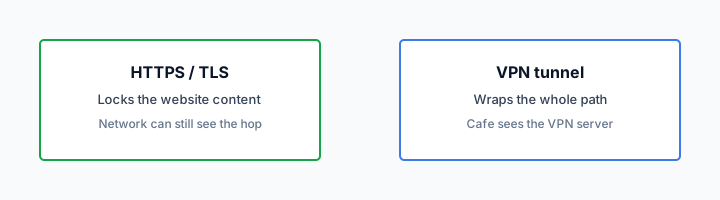
HTTPS can hide a page body and still leave a destination visible. That is not a VPN.
— KloxVPN operator notes
What a VPN does protect
A VPN effectively prevents your ISP from logging your browsing activity. It encrypts your traffic on public networks, making it unreadable to other users on the same network. It hides your real IP address from websites, preventing location-based tracking and geo-restrictions. It can prevent your ISP from throttling specific types of traffic — streaming, gaming, or torrenting — since they cannot identify what the encrypted traffic contains.
What a VPN does not protect
A VPN does not protect you from malware or phishing attacks — for that, you need security software. It does not prevent websites from tracking you using cookies or browser fingerprinting. It does not anonymize your traffic completely — the VPN provider can see your activity unless they maintain a strict no-logs policy. Understanding these limitations helps you use VPN effectively as one layer of a broader privacy strategy.
Key Factors When Choosing a VPN Service
Not all VPN services are equal. The technical characteristics and policies of a VPN provider directly affect the protection it delivers. Four factors stand out above the rest.
No-Logs Policy
The most important policy is whether the VPN keeps logs of your activity. A genuine no-logs VPN retains no record of what you did while connected. If the provider stores connection logs, timestamps, or browsed URLs, a data request or breach could expose your activity. Look for services with clearly defined, audited no-logs policies.
Protocol Support
Services offering WireGuard, OpenVPN, and Shadowsocks cover the full range of use cases: speed, compatibility, and censorship bypass. Avoid services that only offer proprietary protocols with no independent audits.
Server Network
A larger server network means more location options and less congestion per server. More importantly, servers distributed across multiple geographic regions give you flexibility — you can connect to whichever country gives the best performance for your purpose.
Kill Switch
A kill switch blocks all internet traffic if the VPN connection drops unexpectedly. Without it, your real IP and unencrypted data are briefly exposed when reconnecting. This feature is non-negotiable for anyone serious about privacy.
Common VPN Use Cases and When to Connect
Understanding when a VPN provides the most value helps you develop consistent usage habits. Different scenarios call for different levels of protection.
Public WiFi and Travel
Public WiFi at airports, hotels, cafes, and libraries is the highest-risk environment. Networks are shared, often unencrypted at the local level, and attackers use packet sniffing and evil twin attacks to capture credentials. Always connect your VPN before joining any public network. Many VPN apps offer auto-connect on untrusted networks — enable this so protection is automatic.
Home and Office Browsing
Even on your home network, your ISP can log every domain you visit. In many countries, ISPs sell anonymized browsing data to advertisers. A VPN prevents this by encrypting traffic before it reaches your ISP. For users who value privacy from their ISP or want to prevent throttling of streaming and gaming traffic, keeping the VPN on at home is a reasonable default.
Streaming and Geo-Restricted Content
Streaming services license content by region. A VPN with servers in the target country can make your traffic appear to originate there, potentially unlocking region-locked catalogs. Note that many streaming providers actively block VPN IP ranges — reliability varies by provider and server.
Torrenting and P2P
P2P file sharing exposes your IP address to every peer in the swarm. Copyright holders and monitoring organizations track these connections. A VPN hides your real IP from the swarm and encrypts your torrent traffic from your ISP. Use a VPN with a clear no-logs policy and P2P-friendly servers when torrenting.
VPN Performance: Speed, Latency, and Overhead
VPN encryption adds computational overhead and routing distance. Understanding these factors helps you optimize performance and set realistic expectations.
Encryption Overhead
Modern protocols like WireGuard use efficient cryptography that adds minimal CPU load. On most devices, the encryption overhead is under 5% of throughput. Older protocols like OpenVPN can add 10-20% overhead, especially on mobile devices with limited CPU.
Server Distance and Latency
Latency increases with physical distance. A server 50 miles away may add 5-10ms. A server on another continent can add 100-200ms. For browsing and streaming, this is usually acceptable. For gaming, video calls, or real-time applications, choose the closest server with good bandwidth.
Bandwidth and Congestion
VPN servers share bandwidth among connected users. During peak hours, congested servers can slow down. Quality providers monitor load and add capacity. If you experience slow speeds, try a different server in the same region or a different protocol.
Setting Up Your First VPN: What to Expect
Getting started with a VPN is straightforward. Most providers offer native apps for Windows, macOS, iOS, Android, and Linux. The typical flow: download the app, sign in with your account, select a server, and connect. The entire process takes under five minutes for most users. No technical configuration is required — the apps handle protocol selection and encryption automatically. You simply choose a location and tap connect. That is all it takes.
After installation, you will see a list of server locations. Choose a server in your country for minimal latency, or a server in another region if you need to access geo-restricted content. Many apps include a "fastest server" or "best location" option that automatically selects the lowest-latency connection.
First-Time Connection Checklist
Before your first use, verify a few settings. Enable the kill switch in the app preferences — this prevents traffic leaks if the VPN connection drops. Enable auto-connect on untrusted networks if you frequently use public WiFi. Check that your IP address is correct by visiting a site like whatismyip.com before and after connecting; the displayed IP should change to the VPN server's address. Run a DNS leak test to confirm your DNS queries are routed through the VPN rather than your ISP. Most VPN apps include a built-in leak test; you can also use third-party tools like dnsleaktest.com.
Multi-Device Coverage
Most VPN subscriptions allow multiple simultaneous connections — typically five to ten devices. A single subscription can cover your laptop, phone, tablet, and smart TV. Install the VPN on each device you use regularly; for devices that cannot run VPN apps (such as routers or smart TVs), you can configure the VPN on your router to protect all traffic.
Troubleshooting Common Connection Issues
If the VPN fails to connect, try switching protocols — WireGuard first, then OpenVPN. Some networks block VPN traffic; Shadowsocks or OpenConnect may work where standard protocols fail. Restart the app and your device if connections drop repeatedly. Check your firewall settings; some corporate or school networks block VPN ports entirely. If you see "connection timeout" errors, the network may be blocking VPN. Try a different server or protocol before concluding the VPN is broken.
VPN Myths vs Reality
Misconceptions about VPNs persist. Understanding what is true and what is not helps you set realistic expectations and avoid overspending or underusing the tool.
Myth: VPNs Make You Completely Anonymous
Reality: A VPN hides your IP address and encrypts your traffic. It does not anonymize you entirely. Websites can still track you via cookies, browser fingerprinting, and account logins. The VPN provider can see your traffic unless they maintain a no-logs policy. For true anonymity, you would need Tor or similar tools — and even those have limitations.
Myth: Free VPNs Are Just as Good
Reality: Free VPNs must monetize somehow. Many sell user data, inject ads, or limit bandwidth. Their privacy policies often allow logging or sharing data with third parties. For serious privacy, paid VPNs with audited no-logs policies are the only reliable option.
Myth: VPNs Are Only for Tech-Savvy Users
Reality: Modern VPN apps are designed for simplicity. One-tap connect, automatic server selection, and built-in kill switches mean anyone can use a VPN effectively. If you can install an app and tap a button, you can use a VPN.
VPN vs Other Privacy Tools: When to Use What
A VPN is not the only privacy tool available. Understanding how it fits alongside other options helps you build a layered defense. Each tool addresses different threats and use cases; combining them appropriately gives you stronger protection than relying on any single solution.
VPN vs Tor
Tor routes your traffic through multiple volunteer-run relays, providing stronger anonymity than a VPN. No single relay sees both your identity and your destination. But Tor is significantly slower — often 50-80% throughput loss — and less reliable for streaming, gaming, or video calls. Many sites block Tor exit nodes. Use Tor when anonymity is paramount and speed is secondary; use a VPN for everyday privacy, streaming, and general browsing.
VPN vs DNS-over-HTTPS (DoH)
DoH encrypts DNS queries so your ISP cannot see which domains you resolve. It is lightweight and built into modern browsers. But DoH does not encrypt your full traffic or hide your IP address — it only protects DNS lookups. A VPN encrypts all traffic and masks your IP. Use both: DoH for DNS privacy when VPN is off; VPN for full protection when you need it. Many VPNs route DNS through their own servers, which provides similar protection.
VPN vs Browser Extensions
Browser-based VPN extensions only protect traffic from that browser. Apps running outside the browser — email clients, games, cloud sync, background updates — send traffic directly to the internet without VPN protection. System-wide VPN apps protect every application. For comprehensive protection, use a full VPN app rather than a browser extension. Extensions can be useful for quick, browser-only privacy on shared computers where you cannot install software.
How a tunnel applies to What Is a VPN and How Does It Work?
Someone else owns the AP on What Is a VPN and How Does It Work? networks. Guest SSIDs still NAT you. That is the whole physics lesson. Open a browser first. If the garden needs a click, give it the click. Then open Klox. That order fixes most What Is a VPN and How Does It Work? loops. Do not run leak tests during sign-in. The portal has to see you. That is the point of the garden. Treat What Is a VPN and How Does It Work? like a hotel SSID even when the branding looks official.
I will not invent a dashboard row named What Is a VPN and How Does It Work?. Consumer facts stay boring: five devices, WireGuard, OpenVPN, OpenConnect, and Shadowsocks, 7-day money-back on first purchase. Inner DNS through the tunnel is the setting you wanted. The LAN seeing a blob to a node is success. If you need a plan, /pricing. If you need the binary, /download. If you need the garden to open, use a browser first. What Is a VPN and How Does It Work? Wi-Fi is shared. Finish the portal. Then WireGuard, OpenVPN, OpenConnect, and Shadowsocks.
Smart Connect is untrusted Wi-Fi. It is not On Demand. It is not a What Is a VPN and How Does It Work? toggle. If someone asks for a What Is a VPN and How Does It Work? mode, send this slug. Same apps. same four protocols. Keep the ritual small. Join What Is a VPN and How Does It Work? Wi-Fi. Finish the page. Connect. Work. That is the complete consumer flow. You are done when Connect is up and the portal is in the past. Not when you renamed a sysctl.
What success looks like
Join. Portal. Connect. That order is the What Is a VPN and How Does It Work? ritual. Everything else is optional tinkering. When UDP dies, one OpenVPN attempt is the spare tire. A third client is how you create two default routes. If WireGuard hangs for a minute on What Is a VPN and How Does It Work? Wi-Fi, wait out the portal, confirm you have a WAN, then try OpenVPN once. Land, sign in, wrap. Repeat it until it is boring. Boring is the goal.
What Is a VPN and How Does It Work? Wi-Fi is still a LAN you do not run. {place} is a location, not a protocol. Smart Connect belongs on untrusted Wi-Fi. It is not a per-SSID profile named What Is a VPN and How Does It Work?. WireGuard is fast when UDP lives. OpenVPN is the spare tire when a filter eats handshake packets. One swap. Then stop. The SSID label does not change the physics. Wrap after sign-in.
Captive pages see the first request. Fire the tunnel too early and the sign-in never opens. Never fire it and the LAN keeps reading destinations. Do not invent a city because the SSID mentioned a brand. Connect to a node. That is enough. HTTPS on the website is not a hop wrap. RFC 8446 is TLS. Different job from Connect on What Is a VPN and How Does It Work? Wi-Fi. No What Is a VPN and How Does It Work? mode. Same apps. Same five devices. Same yearly $2.83/mo on yearly.
What not to invent
If the page loops, you probably raced the tunnel. Drop it. Finish the garden. Connect again. That is the What Is a VPN and How Does It Work? recovery. TLS on klox.app is the website. The hop wrap is the app. Mixing those two explanations on What Is a VPN and How Does It Work? Wi-Fi confuses tickets. White-label branded clients live at /white-label. This page is the traveler habit on What Is a VPN and How Does It Work? Wi-Fi, not a partner packaging ticket. Send this slug when someone asks for a special What Is a VPN and How Does It Work? profile. There is not one.
Airport, hotel, campus, What Is a VPN and How Does It Work?: the label changes. The hop does not. Untrusted LAN, then wrap. Do not paste sysctls because a What Is a VPN and How Does It Work? AP was rude. Consumer move is protocol swap. Lab move is a different desk. Klox is five devices, yearly from $2.83/mo on yearly, 7-day money-back on first purchase. There is no What Is a VPN and How Does It Work? SKU and no city count on this page. Apps at /download. Plans at /pricing. Garden in the browser. Tunnel in the app.
Shared What Is a VPN and How Does It Work? Wi-Fi is not your network even when the SSID looks friendly. Assume NAT. Assume a garden. Then wrap. Leak sites during the garden will look broken. They are supposed to see you. Test after Connect. I will not claim SOC 2 or a server map here. I will claim WireGuard, OpenVPN, OpenConnect, and Shadowsocks and the portal-then-Connect order. Portal first. Handshake second. Leak test third. That is the whole checklist.
Key Takeaways
A VPN is one of the most practical privacy tools available. It encrypts your traffic on public networks, hides your IP address from websites and advertisers, and prevents your ISP from monitoring your activity. The right VPN combines a strict no-logs policy, modern protocols like WireGuard, and a reliable server network.
Using a VPN should be straightforward — a single tap to connect, working silently in the background across all your devices. If your current setup does not meet that standard, the guide above gives you the framework to evaluate your options.
Prioritize a no-logs policy and modern protocols first. Server count and location matter for flexibility. The kill switch is essential for leak prevention. With those fundamentals in place, you have a VPN that delivers real privacy protection rather than a false sense of security.
Remember that a VPN is one layer of a broader privacy strategy. Combine it with strong passwords, two-factor authentication, and mindful sharing of personal data. No single tool solves every privacy concern — but a well-chosen VPN addresses a significant portion of the risks you face online every day.
Start with the basics: install a reputable VPN, enable the kill switch, and connect before browsing on any untrusted network. As you become comfortable, explore protocol options, server locations, and advanced features like split tunneling. The goal is consistent protection without friction — a VPN that works in the background so you can focus on what you do online, not on securing it.
Related Resources
Try KloxVPN — Secure, Fast, Simple
KloxVPN supports WireGuard, OpenVPN, OpenConnect, and Shadowsocks. No-logs policy. Apps for every device.
View Pricing PlansFrequently Asked Questions
KloxVPN Team
Experts in VPN infrastructure, network security, and online privacy. The KloxVPN team has been building and operating VPN services since 2019, providing consumer and white-label VPN solutions to thousands of users worldwide.