You factory reset a phone or laptop you own. Slow. Glitchy. You wanted a clean disk. Apple or Google already did the wipe. The VPN app is gone with everything else. The account is not gone. The old device slot may still sit until you remove it in the live app. Ranked listicles will mash that into selling day, new-phone day, and a restore-purchases cape. This page is narrower. Same human. Same glass. Empty OS. Stores. Install. Seat.
This is not Selling a Phone: Disconnect the VPN Before You Wipe. That URL is outbound: disconnect, then hand the glass to a buyer or a trade-in sleeve. You are keeping this device. This is not VPN on a New Phone: Restore Day, Permission Sheet, Old Seat. That plot is a new IMEI, a restore, an Allow sheet the backup skipped, an old handset that may still be peered. Here the IMEI did not change. You erased the one you still hold. This is not White-Label VPN and Remote Logout. That essay is branded portal copy for a stolen phone: kick the seat, do not promise a wipe. You are a consumer with glass you still have. This is not A Second Travel Phone Is a Second VPN Seat. A spare you packed on purpose is a different plot. Here the plot is a wipe you ran on purpose.
HTTPS already encrypts the page on most of the sites you actually use. The lock in the browser is real. A VPN still wraps the path from this device to a server you picked, once the app is back and the tunnel is up. Wikipedia's VPN page is the noun. RFC 8446 is TLS 1.3 on the website. It is not a factory reset. It is not Activation Lock. Encrypted Client Hello will not sign you into the App Store. Do not pretend the padlock reinstalled Klox.
KloxVPN is WireGuard, OpenVPN, OpenConnect, and Shadowsocks, five devices, yearly from $2.83 a month, 7-day money-back on first purchase. The wiped phone is still one seat while a leftover peer sits, and it becomes a seat again when you connect after reinstall. Download is the apps. iPhone: the real listing is Klox on the App Store. Android: Play, or sideload the APK from Download. The Chrome extension is browser-only: KloxVPN Secure Proxy. It is not a phone install. Restore purchases is a store row if IAP existed. That is a White-Label VPN and Restore Purchases. I will mention it. I will not clone it. There is not a factory-reset SKU. The seven-day window is first purchase, not a wipe coupon. Pricing is the live number. Cookies on this site live at /cookie. I will not invent a city count as a reason the wipe is special. I will not invent a portal URL. I will not invent SOC 2.
I have a bias. This checklist is for a device you own. Sign into the stores you actually used. Install from /download or the real listings. Approve the sheet again. Remove the old slot in the live app if it still sits. Do not wipe a phone you do not own. Do not treat erase as a logout. Count the household on the Family VPN on Five Devices if a tablet is also holding a session.
Related reading: How to Set Up a VPN on Android: Step-by-Step Guide and What is a VPN?. Android VPN setup and iOS VPN setup.
Looking for a reliable VPN?
KloxVPN — from $2.83/month. Apps for every device.
A factory reset of your device is not selling day and not a new IMEI
Selling day is outbound. The glass leaves. Disconnect first, then Apple or Google wipe, then a buyer. The selling article already owns that sleeve. A factory reset you ran because the phone felt sick is inbound to the same hardware. You still hold it. You still owe the stores a login. You still owe the VPN a fresh Allow tap. Mixing those in one sentence is how farms sell best VPN after factory reset until the affiliate cookie expires.
New-phone day is a different IMEI. Restore from iCloud or Google. The old handset may still be peered in a drawer. This wipe did not mint a new radio. The old slot and the new install are the same physical device wearing a new OS. The account may still show a row named iPhone or Pixel until you remove it in the live app. Prefer looking. Do not assume erase logged the VPN out.
I will not walk packet sniffing. The public Wi-Fi how-to already did. I will not pack your chargers. The travel checklist exists for install-before-you-fly. Here the glass is already in your hand, empty. The stores are the next job. The seat is the job after that.
Klox is a consumer tunnel to an exit you picked. It is not Apple's Erase All Content. It is not Google's factory reset. Apple's what to do before you sell, give away, or trade in and Google's factory reset help are the vendor wipe novels. I will stay at overview height. I will not paste a 40-tap path that rots when iOS moves a menu. Farms skip that sentence because the keyword is privacy. Privacy after a wipe you meant is a store login plus a seat, not a screenshot of Fastest server.

- 1Download the app from klox.app/download — not a random APK site.
- 2Sign in with the account you paid for.
- 3Press WireGuard. Wait for the connected state.
- 4If it fails, try OpenVPN. Still failing: note the network (hotel, campus, home) before you write support.
First successful connect
| Situation | What you think happened | What actually happened | This page? |
|---|---|---|---|
| Selling a phone you own | Trade-in logged the VPN out | Peer can sit until disconnect or timeout | Selling-phone article |
| New phone, new IMEI | Backup granted VPN | App returned; sheet did not | New-phone setup article |
| Stolen phone, operator copy | Portal erase | Kick seat, no wipe | White-label remote logout |
| Spare packed on purpose | Second travel phone | Second seat if both tunneled | Travel-phone article |
| You wiped YOUR device | Erase logged Klox out and reinstalled it | OS gone; account and slot may remain; app is gone | Yes |
| Phone you do not own | A blog ranked privacy | Stop | No. Do not wipe it. |
| Store IAP after reinstall | Restore Purchases is this checklist | Receipt check is a different essay | Mention, do not clone |
You wiped your own glass. Sign into the stores. Install again. Remove the old slot in the live app. Do not wipe a phone you do not own.
— KloxVPN consumer notes
Cloudflare Learning: What is a VPN?
Wikipedia: Virtual private network
Apple: what to do before you sell, give away, or trade in your iPhone
Same glass, empty OS
Selling is outbound. New phone is a new radio. This URL is a wipe you ran on hardware you kept. Do not paste one checklist into all three days.
Erase is not a Klox logout button
The OS died. The account may still show a device row until the handshake dies or you remove it in the live app. Prefer looking. A reset is not a VPN feature.
Sign into the stores you actually used, then install Klox again from the real listings
A factory reset returns you to first-run glass. Mail is gone. Authenticator apps are gone unless you moved them first. The App Store and Play are gone until you sign into Apple ID or Google. That login is the store's, not ours. Do it on a network you already trust: home, cellular in the kitchen. Do not make a cafe splash your first rehearsal of a clean OS plus a VPN sheet.
iPhone: open the App Store. Sign in. Install Klox. That numeric id is the listing. Do not grab a clone with a similar icon from a search ad. Android: Play if that is how you installed before, or sideload the APK from download if that is how you installed before. Match the channel you already paid on. A second account is how you lose the year you already bought and then hit a seat error on the old login you forgot.
The How to Set Up a VPN on Android: Step-by-Step Guide article owns first-run taps on Play or APK. The iPhone how-to owns App Store taps. This page will not reprint those lists so three URLs compete. After install: sign into Klox with the same email. Tap Connect. When the OS shows the VPN configuration sheet, approve it. Restore did not exist here. Wipe deleted the profile. The sheet is yours again. That tap is the whole miss people skip because the icon came back from a backup they thought they had. You wiped. There is no backup of Allow.
The Chrome extension is not a phone. If you wiped a laptop and you only needed that Chrome, the store tile is KloxVPN Secure Proxy. Browser-only traffic. Slack and the mail app stay in the clear. The honesty essay is next door if that is the leftover you can name. For a phone, install the app. Do not treat the extension as a wipe recovery SKU.
Match the store you already paid
Apple ID, Google Play, or site login plus APK from /download. Do not open a second Klox account because the phone felt new. Two accounts is how a year vanishes.
The Allow sheet is back because you erased it
Wipe deleted the VPN profile. Open Klox. Sign in. Tap Connect. Approve the OS sheet. First handshake on a network you already trust. Then travel.
The old device slot can sit until you remove it in the live app
Timeout is the boring failure. You wiped. You did not disconnect first. The account still shows iPhone or Pixel for a while. You reinstall, you connect, and you are at five, or you think you were robbed of a slot. You were not robbed. You left a corpse. Remove it in the live app. I will not invent a web portal URL for that tap. Confirm the glass you already signed into. If the row is gone on its own, good. If it sits, disconnect that device from a logged-in client. A label is not a logout. Kick is a logout of that seat. It is still not a disk wipe. The disk is already gone if the reset worked.
I will not print a minutes-and-seconds figure for when a dead peer drops. Networks fail closed, fail open, retry. Prefer in-app disconnect before a wipe you plan, so you are not guessing. If you already wiped, open Klox on this phone after reinstall, or on another device that still has the app, and remove the leftover row. Change the password if you are not sure who held the glass during the wipe window. Password reset is not this article's novel. It is the obvious next move when a device sat unlocked in a shop.
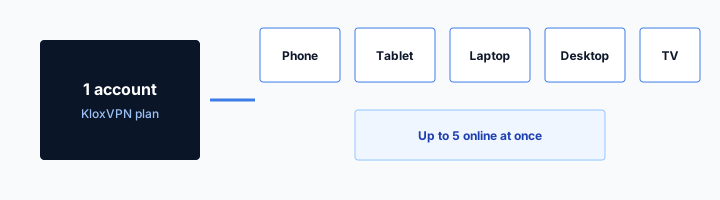
Family math lives in the five-device article. I will not rebuild the household spreadsheet. Phone you wiped plus tablet is the common kit for this URL. After a clean remove, you are back to the ones that are actually tunneled. Ghost sessions are how people think a factory reset uses extra licenses. There are no extra licenses. There are leftover peers.
Yearly from $2.83 a month does not buy a sixth seat while a wiped phone retries a name the server still holds. Seven-day first purchase if you only bought to try a tunnel and you are inside the clock. Refunds: /refund. Store purchases follow the store. A wipe is not a refund reason by itself. A wipe is not a first-purchase coupon.
Look in the live app, not at an invented URL
Device list lives in the client you already use. Remove the leftover row there. I will not mint a portal path. A screenshot from a farm is not our admin.
Disconnect before the next wipe you plan
Next time: open Klox, disconnect, then vendor erase. The slot should free because you stopped the handshake. Guessing after the fact is how corpses sit.
Restore purchases is a different essay; this page will not clone it
After reinstall, the app may show Subscribe even though you paid. If you billed through Apple or Google, the store has a Restore Purchases control. That tap asks the store for a receipt. It is not a factory-reset feature. It is not a sixth seat. It is not money back. The White-Label VPN and Restore Purchases essay owns when the button must exist, what it must not promise, and what happens to seats after the store answers. I will point. I will not rewrite the receipt novel so two URLs compete.
If you billed on the site, Apple has nothing to restore. Sign into the same email. Do not tap Restore and then open a support ticket because the App Store shrugged. The shrug was honest. If you billed Play and you sideloaded an APK from a random site, you left the receipt behind. Come back through Play or through the APK on /download that matches how you actually paid. I will not invent IAP product IDs. I will not invent a gift SKU that mints a year because you wiped.
Support tickets after a wipe often mash three jobs: the OS sheet, the leftover seat, the receipt. Split them. Sheet is Allow. Seat is the live app. Receipt is Restore or web login. Doing all three in one rage-tap is how people create a second account and then own none of the year.
Nord's setup farm is a specimen of first-run copy. It is not a wipe checklist. It is not permission to skip the store you already used. Treat it as a ranking, not a grant.
IAP restore is a receipt check
Store billed: Restore Purchases, then the other essay. Site billed: same email, no Apple receipt. A wipe does not mint a subscription.
Do not open a second account because the glass felt new
Clean OS is not a new customer. Same login. Same year. Same five seats. A second account is how the old slot and the new login both disappoint you.
iPhone erase and Android reset are Apple and Google checklists, not a Klox feature
You already wiped, or you are about to. On iPhone, Apple's flow is the source of truth. On Android, Google's flow is the source of truth. Carrier overlays add extra screens. Samsung adds extra screens. I will not pretend one paragraph replaces those vendors. Apple's page on giving away or resetting a device and Google's factory reset answer are the links. Read them. Follow them. I will stay at overview height.
Where Klox sits in that order, if you have not wiped yet: disconnect in the app, then their erase. If you already wiped, you skipped disconnect. Come back to the live app after reinstall and remove the leftover. Do not interleave Connect with Erase All Content as a personality. One product at a time.
I will not write a SIM-eject novel. I will not write an eSIM travel essay. That URL already exists. Photos, password managers, authenticator apps: those are not Klox. Move them before you wipe, on a phone you own, using the tools you already pay for. A VPN does not back up Photos. A VPN does not export 2FA. If you needed that reminder, you needed it before the reset, not in a ranked VPN list.
Find My and Factory Reset Protection are account features. A tunnel does not release them. A tunnel does not set them. If you wiped a phone you own and you are still locked in setup, that is Apple or Google doing their job with the Apple ID or Google account you left on the device. Complete their flow. Our Connect button will not help. Our disconnect will not help either.
Vendor wipe first, or you already did it
If the disk is already empty, skip to stores and install. If it is not, disconnect Klox, then follow Apple or Google. Do not use Connect as a ritual in the middle of erase.
A tunnel does not export 2FA or Photos
Move authenticators and backups before you wipe a phone you own. Klox wraps a hop. It is not iCloud. It is not Google Backup. It is not a password manager.
Do not wipe a phone you do not own, and do not treat this page as a stranger's checklist
This checklist is for a device in your hand that is yours to erase. Work phone. Partner's phone. A handset you found on a bus. A phone you are holding because a relationship ended badly. Stop. I will not coach a factory reset on glass that is not yours. I will not coach removing someone else's Apple ID. I will not coach bypassing Factory Reset Protection. I will not coach a VPN as a cloak for that. If you found a phone, use the vendor lost-and-found path, or hand it to the desk, or leave it. If it is employer property, IT owns the wipe. If it is not yours, it is not yours.
Stolen-phone VPN work, when it is your phone that left, is kick the seat and change the password. Find My if it is still yours. That is not a wipe of a device you cannot hold. The operator essay exists so brands do not write erase on a portal button. You should not write erase in your head either when the glass belongs to someone else. I will not invent a portal URL that pretends to wipe a stranger's disk.
I am not a lawyer. This is not legal advice. It is a product boundary. Klox is a tunnel you paid for on seats you are allowed to run. It is not a toolkit for taking over a handset. Cafe Wi-Fi still wants a hop on phones you actually use. That hop is not a reason to factory reset a stranger's Pixel.
If you are helping a parent reset their own phone, they should be present and signed into their accounts. You are not their attacker. You are reading Apple's page together. That is the allowed version of help.
Found, work, or someone else's
Not this checklist. Found: vendor or desk. Work: IT. Someone else's: stop. Do not install Klox on it as a workaround. Do not erase it because a blog ranked privacy.
Your stolen phone is kick plus Find My
You do not have the glass. You cannot factory reset it from a VPN. Remove the seat in the live app on another device. Change the password. Use Apple or Google's lock. Do not expect a disk wipe from Klox.
Five seats after a wipe: the glass is new, the account is not
After a clean reinstall, this phone is one seat when the tunnel is up. If the old slot still sits, that is two names for one radio until you remove the corpse. A tablet at home is another seat if it is tunneled. Five is the cap. You can install in more places. Only five can be connected at once.
A travel spare you kept is still the second-travel-phone article. Do not call a wipe a spare. Do not call a spare a wipe. Nouns matter when the account only counts handshakes. A laptop you also wiped is another install and another sheet. Count before you tap Connect on all of them at once.
Klox ships WireGuard, OpenVPN, OpenConnect, and Shadowsocks. WireGuard first on the phone you just rebuilt. OpenVPN when a cafe AP is rude. DNS through the tunnel still matters on a live session. None of that is a wipe-day feature. Wipe day is stores, install, sheet, then count.
If you bought Klox only because a farm said you needed a VPN to factory reset a phone, you did not. You needed a vendor reset and, if you use Klox, a reinstall. Seven-day first purchase if you are inside the clock and the product was not what you wanted. Live page: /refund. Renewals are not that window. Yearly from $2.83 a month if you will keep using the tunnel on the glass you rebuilt. No city count. No wipe SKU. No tvOS app hiding in this paragraph.
One radio should not hold two slots
Old row plus new handshake is a leftover, not extra hardware. Remove the old name in the live app. Then this phone is one seat.
The Android how-to owns first-run taps
Play or APK, Allow, connect: that URL. This URL is the wipe plot around those taps. Do not merge the comments. Do not skip Allow because you had it last month.
Practice Connect on a network you already trust before you take the clean OS to a cafe
First handshake should happen on home Wi-Fi or cellular in the kitchen. Confirm WireGuard comes up. Open a boring site. Then pack. A hotel splash plus a first-ever Allow sheet on a wiped phone is how people decide the reset hated VPNs. The product did not hate them. The garden raced the tunnel.
Smart Connect, if the app shows the row, means connect on untrusted Wi-Fi. A cafe SSID is untrusted. A house SSID you run can be marked however the app lets you. I will not invent a toggle named On Demand. If the row is missing, you have a Connect button. Use the button after the splash, same as any other day. Wipe day does not mint a special auto-connect.
Do not skip because the app felt slow once. Switch protocol. WireGuard first. OpenVPN when UDP is rude. If both fail on a network you trust, wait. A cafe is not the spare tire for a rude first handshake. A rude first handshake is a reason to stay in the kitchen until a boring site loads through the hop.
Cookies on klox.app remain at /cookie. A factory reset is not a cookie. A leftover seat is not a cookie. Do not file a cookie ticket because a wiped phone still showed a peer. That peer is this article. Nord's setup ranking is not your wipe. Download the apps. Count the seats. Leave glass you do not own alone.
Kitchen first, cafe second
Confirm a boring site through the hop at home. Then travel. A splash plus a fresh Allow sheet is a bad first rehearsal.
Seven days is not a reset coupon
First purchase, seven days, /refund. Not a factory-reset gift. If you already had a year, a wipe does not restart that clock. Store purchases follow the store.
Key Takeaways
A factory reset of a device you own is stores, install, Allow, then the live app for any leftover slot. Prefer disconnect before a wipe you plan. Apple and Google own the erase. Klox does not. Restore Purchases is a receipt check next door. Do not clone it here.
This is not selling day, not a new IMEI, not operator remote logout, not a travel spare. Do not wipe a phone you do not own. Do not treat erase as a logout. Phone you rebuilt plus tablet is still the household math. Five means five.
Yearly from $2.83 a month on the seats that remain. Seven-day first purchase if you are inside the clock. No city count. No portal URL. Cookie policy at /cookie. If you wanted outbound day, that article is next door. If you wanted a hop on the glass you just rebuilt, download the apps, approve the sheet, and remove the corpse if it still sits.
Related Resources
Reinstall Klox on the glass you still own
KloxVPN is WireGuard, OpenVPN, OpenConnect, and Shadowsocks, five devices, yearly from $2.83 a month, 7-day first-purchase money-back. After a wipe you ran, install from /download or the real store listings. Remove leftover slots in the live app.
Download KloxVPNFrequently Asked Questions
KloxVPN Team
Experts in VPN infrastructure, network security, and online privacy. The KloxVPN team has been building and operating VPN services since 2019, providing consumer and white-label VPN solutions to thousands of users worldwide.