
Most VPNs use shared IPs: hundreds or thousands of users share the same exit IP address. When you connect to a VPN server, your traffic leaves through an IP that many others use simultaneously. That design improves anonymity — your traffic is mixed with others, making it harder to tie activity to you specifically.
Dedicated IP is different. You get your own IP address that no one else uses. Your traffic always exits from that IP. Dedicated IP is useful when you need a fixed IP for whitelisting (e.g., work systems that allow only certain IPs), when services block shared VPN IPs, or when you want consistent access to banking or other IP-sensitive services. The trade-off: dedicated IP is less anonymous. Your activity is tied to a single IP that only you use.
For most users, shared IP is the right choice. Privacy is the main reason to use a VPN, and shared IP maximizes it. Dedicated IP is a niche product for specific use cases. This guide explains the difference, when to use each, and the privacy implications of both.
Cost is a factor. Shared IP is included in standard VPN plans. Dedicated IP typically costs extra — often $5–15 per month on top of the base subscription. The added cost reflects the provider's expense: they must allocate an IP exclusively to you instead of sharing it across thousands of users. For users who do not need dedicated IP, the extra cost is unnecessary.
Switching between shared and dedicated is possible with some providers. You might use shared for general browsing and dedicated only when accessing a work system that requires whitelisting. That requires changing settings or server selection each time — not seamless, but workable for occasional dedicated-IP needs.
Related reading: What Is a VPN and How Does It Work? and No-Logs VPN: What It Really Means. White-Label VPN and Dedicated Ip Sla and When to Use a VPN Daily: Habits That Help. What is a VPN? and Download KloxVPN.
Looking for a reliable VPN?
KloxVPN — from $2.83/month. Apps for every device.
How Shared IP Works
With shared IP, many users share the same VPN server exit IP. Your traffic mixes with theirs.
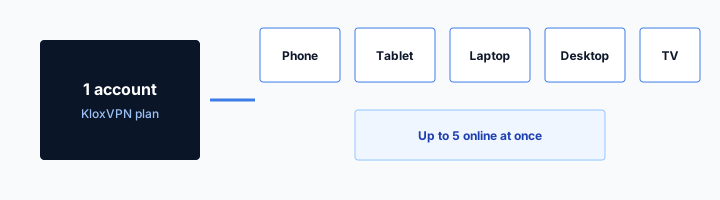
- 1Skim the seating / order diagram.
- 2Do the numbered steps once on your real network.
- 3Use the FAQ if a sentence was too long.
- 4Follow one related article — not ten tabs.
How to read this page
Anonymity Through Mixing
When thousands of users share one IP, no single user's activity can be easily isolated. A website or service sees traffic from that IP but cannot tell which user did what. Your traffic is indistinguishable from others.
Server Capacity
VPN servers handle many simultaneous connections. Each connection uses the same exit IP. The server routes traffic to the correct destination based on the encrypted tunnel, not the source.
Default for Most VPNs
Shared IP is the standard model. It is cheaper to operate (fewer IPs needed) and better for privacy. Most VPNs use it by default.
How Dedicated IP Works
With dedicated IP, you get an IP address that only you use. Your traffic always exits from that IP.
| Fact | KloxVPN | Not on this page |
|---|---|---|
| Protocols | WireGuard, OpenVPN, OpenConnect, and Shadowsocks | A third invented protocol |
| Devices | Five simultaneous | Unlimited seats |
| Yearly | From $2.83/month | A fake city count |
| Refund | 7-day, first purchase | An On Demand toggle |
Your Own IP
The VPN assigns you a dedicated IP. No other user shares it. Every time you connect, you get the same IP. It is stable and predictable.
Additional Cost
Dedicated IPs cost more — the provider must allocate an IP per user instead of sharing. Plans that include dedicated IP are typically more expensive.
Less Anonymity
Your activity is tied to a single IP that only you use. If that IP is logged or correlated, it points to you. Dedicated IP reduces the anonymity benefit of a VPN.
When to Use Shared IP
Shared IP is the right choice for most users.

HTTPS can hide a page body and still leave a destination visible. That is not a VPN.
— KloxVPN operator notes
Privacy and Anonymity
If your goal is to hide your activity from your ISP, websites, and trackers, shared IP is better. Your traffic mixes with others. No one can easily tie activity to you.
General Browsing and Streaming
For browsing, streaming, and most everyday use, shared IP works. Some streaming services block VPN IPs — that affects both shared and dedicated. For access, server location matters more than shared vs dedicated.
Cost
Shared IP is included in standard VPN plans. No extra fee. It is the default and the most cost-effective option.
When to Use Dedicated IP
Dedicated IP solves specific problems that shared IP cannot.
Work Whitelisting
Some work systems allow access only from specific IP addresses. A dedicated IP lets you add your VPN IP to the whitelist. With shared IP, your IP changes when you reconnect or switch servers — whitelisting is impractical.
Services That Block Shared VPN IPs
Some banks, streaming services, or websites block known VPN IP ranges. Shared VPN IPs are often flagged. A dedicated IP may not be in those blocklists — though some services block dedicated VPN IPs too.
Consistent Access
If you need the same IP every time — for API access, remote desktop, or other IP-sensitive applications — dedicated IP provides that.
Reduced Captchas
Shared IPs sometimes trigger more captchas because many users share them. A dedicated IP may reduce that — though it is not guaranteed.
Privacy Implications
The privacy difference is significant.
Shared IP: Stronger Anonymity
With shared IP, your traffic is mixed with others. A third party seeing traffic from that IP cannot attribute it to you without additional information. The VPN provider could, if they log — but a no-logs provider does not.
Dedicated IP: Weaker Anonymity
With dedicated IP, all traffic from that IP is yours. If the IP is ever logged or correlated (e.g., through a breach or legal request to a service you use), it points to you. Dedicated IP is a trade-off: convenience and access for reduced anonymity.
When Dedicated IP Privacy Is Acceptable
If you need dedicated IP for work whitelisting and trust your VPN provider's no-logs policy, the risk may be acceptable. Your employer sees your VPN IP; the VPN provider does not log. The main exposure is to services you connect to — they see your dedicated IP.
KloxVPN and IP Types
KloxVPN uses shared IP by default.
Shared IP Default
KloxVPN uses shared IPs on all servers. Your traffic mixes with other users. That maximizes privacy.
Dedicated IP Availability
Check the KloxVPN website for current plans. Some providers offer dedicated IP as an add-on or on higher tiers.
Shared IP and Streaming
Streaming services treat shared and dedicated VPN IPs differently.
Blocklists
Netflix, BBC iPlayer, and others maintain blocklists of known VPN IPs. Shared IPs are often on these lists because they are easier to identify. Dedicated IPs may avoid some blocks — but services are getting better at detecting them too.
Server Rotation
VPN providers rotate shared IPs when they get blocked. Dedicated IPs are static — if yours gets blocked, you need a new one. Shared IP users benefit from the provider's ongoing rotation.
Dedicated IP and Remote Work
Remote work often has IP requirements.
VPN to Corporate Network
Some employers require a corporate VPN for access. A personal VPN with dedicated IP can run alongside — but check your employer's policy. Some prohibit personal VPNs on work devices.
IP Whitelisting for Freelancers
Freelancers and contractors sometimes need to whitelist their IP for client systems. A dedicated IP makes that possible. With shared IP, your IP changes and whitelisting breaks.
Shared IP and Captcha Rates
Shared IPs can trigger more captchas. Dedicated IP may reduce them.
Why Shared IPs Trigger Captchas
Sites use captchas to block bots. Shared VPN IPs are used by many users — some may be bots or abusers. The IP gets a bad reputation. Legitimate users connecting through that IP see more captchas. Google, Cloudflare, and other providers rate IPs by behavior. A shared VPN IP with mixed traffic may score poorly.
Dedicated IP and Captcha
A dedicated IP is only yours. Your behavior determines its reputation. If you use it normally, it may accumulate a good reputation and trigger fewer captchas. Not guaranteed — new IPs start with no history. Over time, a dedicated IP used for normal browsing may see fewer captchas than a heavily shared one.
Trade-Off
Fewer captchas is a convenience, not a security feature. If captchas are annoying, dedicated IP might help. If privacy is the priority, shared IP is better — and you accept more captchas as the trade-off. For most users, occasional captchas are acceptable.
Dedicated IP and Email Sending
Some users need a stable IP for email or API access.
Email Reputation
If you send email through a service that uses your IP for reputation (e.g., self-hosted mail server, some SMTP relays), a dedicated IP can help. Shared IPs have unpredictable reputation — other users' activity affects it. A dedicated IP gives you control. Most users do not send email this way; they use Gmail, Outlook, or other providers that handle IP reputation.
API Rate Limits
Some APIs rate-limit by IP. With shared IP, you share the limit with other VPN users. A dedicated IP gives you your own limit. For developers who hit rate limits through a shared VPN, dedicated IP can help. For typical use, shared IP is fine.
SSH and Remote Access
If you SSH into servers that whitelist by IP, dedicated IP works. Add your dedicated VPN IP to the server's allowlist. With shared IP, your IP changes when you reconnect or switch servers — the allowlist breaks. Dedicated IP stays constant.
Cost Comparison: Shared vs Dedicated
Dedicated IP costs more. Is it worth it for your use case?
Typical Pricing
Shared IP is included in standard plans — no extra fee. Dedicated IP add-ons typically cost $5–15 per month. Some providers include dedicated IP on higher tiers. Compare the total cost: base plan plus dedicated IP add-on vs a plan that includes it.
Break-Even
If you need dedicated IP for work whitelisting, the cost may be justified — you cannot do your job without it. If you are considering it for fewer captchas or slightly better streaming access, the cost may not be worth it. Calculate: how much do you value the benefit? For most users, shared IP is sufficient and cheaper.
Trial Options
Some providers offer dedicated IP trials or let you add it for one month to test. Try it before committing. If whitelisting works and you need it ongoing, keep it. If you find you do not need it, cancel the add-on and return to shared.
Switching Between Shared and Dedicated
Some providers let you use both. Know how it works.
Per-Session Choice
With providers that offer both, you may select "shared" or "dedicated" when connecting. Use shared for general browsing and dedicated only when accessing whitelisted systems. The switch is manual — connect to the appropriate server or toggle the option. No automatic switching.
Configuration
Dedicated IP may require separate configuration — a different server list, a different protocol, or a dedicated-IP-specific login. Check your provider's docs. Once configured, switching is usually a matter of selecting the right server or profile.
Billing
If you add dedicated IP as an add-on, you are charged for it whether you use it or not. There is no "pay per use" for dedicated IP in most cases. If you only need it occasionally, the monthly fee may feel wasteful. Consider whether the benefit justifies the ongoing cost.
Dedicated IP and Geographic Consistency
Location matters for dedicated IP.
Choosing a Location
Dedicated IP is usually tied to a specific city or country. Choose one that matches your needs. For work whitelisting, use the location your employer expects. For banking or services that check location, use your actual country. A dedicated IP in the wrong country can trigger fraud checks or access blocks.
Travel and Dedicated IP
When you travel, your dedicated IP stays in its assigned location. You connect to it from wherever you are. Services see traffic from that IP — they do not know you are traveling. That can be useful for consistent access. It can also trigger "unusual location" flags if you normally use a different region. Some users switch to shared IP when traveling for flexibility.
Multiple Dedicated IPs
Some providers let you purchase dedicated IPs in multiple locations. Useful if you need whitelisting in different regions or consistent access from different countries. Expensive — each IP costs extra. Most users need at most one.
Dedicated IP Setup and Management
How to get and use a dedicated IP.
Activation
Dedicated IP is usually an add-on. Purchase it in the provider's dashboard or during signup. You may need to choose a location. Activation can take a few minutes to a few hours. The provider provisions an IP and assigns it to your account. You will receive confirmation when it is ready. Test the connection to verify you are using the dedicated IP — run an IP check and confirm it matches the one assigned to you.
Configuration
Once activated, you connect to the dedicated IP server instead of the shared pool. The app may have a "Dedicated IP" section or server list. Select your dedicated IP server. Your traffic will always exit from that IP. Save it as a favorite for quick access.
When to Renew
Dedicated IP is typically billed monthly with your subscription. If you cancel the add-on, you lose the IP. The provider may reassign it. If you need it again, you may get a different IP. Plan accordingly. Some providers offer annual dedicated IP at a discount. If you need it long-term, compare monthly vs annual pricing.
Shared IP and Anonymity in Practice
How shared IP improves anonymity in real-world use.
Traffic Mixing
When thousands of users share one IP, a single user's traffic is a tiny fraction of the total. A website or service sees requests from that IP but cannot easily attribute them to one person. Your traffic blends with others. The more users per IP, the stronger the anonymity.
Timing and Correlation
Even with shared IP, timing could theoretically correlate activity — if you are the only user at 3 a.m., your traffic might be identifiable. In practice, VPN servers have users around the clock. The risk is low but not zero. For maximum anonymity, use shared IP during peak hours when traffic mixing is strongest. Large VPN providers have more users per server.
No-Logs Requirement
Shared IP anonymity assumes the VPN provider does not log. If they log, they can correlate your connection to the shared IP and thus to your activity. No-logs is essential for shared IP to provide real anonymity. Always verify the provider's policy. An independent audit adds confidence. Without it, you are trusting the provider's word.
How a tunnel applies to Dedicated IP vs Shared IP VPN
You do not need a special build because the SSID says Dedicated IP vs Shared IP VPN. You need the same Klox app you would use at a cafe. Open a browser first. If the garden needs a click, give it the click. Then open Klox. That order fixes most Dedicated IP vs Shared IP VPN loops. Do not paste sysctls into the app because a Dedicated IP vs Shared IP VPN AP was rude. Protocol swap is the consumer move. Kernel knobs are a lab move. Land, sign in, wrap. Repeat it until it is boring. Boring is the goal.
I treat Dedicated IP vs Shared IP VPN Wi-Fi like any hotel or cafe: land, sign in, then wrap. Skip a step and the garden loops or destinations stay visible. I will not publish a server map here. I will publish WireGuard, OpenVPN, OpenConnect, and Shadowsocks, five devices, $2.83/mo on yearly, and the portal order. Cookies: /cookie. That is this website. It is not the tunnel and not the portal. Dedicated IP vs Shared IP VPN Wi-Fi is shared. Finish the portal. Then WireGuard, OpenVPN, OpenConnect, and Shadowsocks.
Join. Portal. Connect. That order is the Dedicated IP vs Shared IP VPN ritual. Everything else is optional tinkering. Inner DNS through the tunnel is the setting you wanted. The LAN seeing a blob to a node is success. Once Klox is up, inner DNS and inner sites go through the tunnel. The LAN still sees a blob to a node you chose. That is success, not a bug. If UDP dies on Dedicated IP vs Shared IP VPN APs, one protocol swap. Then stop tinkering.
What success looks like
Shared Dedicated IP vs Shared IP VPN Wi-Fi is not your network even when the SSID looks friendly. Assume NAT. Assume a garden. Then wrap. Leak sites during the garden will look broken. They are supposed to see you. Test after Connect. White-label branded clients live at /white-label. This page is the traveler habit on Dedicated IP vs Shared IP VPN Wi-Fi, not a partner packaging ticket. Send this slug when someone asks for a special Dedicated IP vs Shared IP VPN profile. There is not one.
I will not invent a dashboard row named Dedicated IP vs Shared IP VPN. Consumer facts stay boring: five devices, WireGuard, OpenVPN, OpenConnect, and Shadowsocks, 7-day money-back on first purchase. Confirm you have a WAN before you blame the protocol. A captive garden with no accept button is not a WireGuard bug. If WireGuard hangs for a minute on Dedicated IP vs Shared IP VPN Wi-Fi, wait out the portal, confirm you have a WAN, then try OpenVPN once. Portal first. Handshake second. Leak test third. That is the whole checklist.
Smart Connect is untrusted Wi-Fi. It is not On Demand. It is not a Dedicated IP vs Shared IP VPN toggle. Phone hotspot versus Dedicated IP vs Shared IP VPN AP is the same ritual with a different radio. Untrusted, then wrap. Five devices means five. It does not mean a Dedicated IP vs Shared IP VPN site license. Share the account inside that cap. Treat Dedicated IP vs Shared IP VPN like a hotel SSID even when the branding looks official.
Related product pages
The front desk can print a QR. The kettle can sit next to a portal. Neither object wraps a hop. Dedicated IP vs Shared IP VPN Wi-Fi still needs Connect after sign-in. If both protocols fail, check whether you ever left the garden. WAN first. Then handshake. Then leak test. A QR by the kettle is still a captive garden. Finish it. Then Connect. Then test leaks if you care. The SSID label does not change the physics. Wrap after sign-in.
If you came here looking for a Dedicated IP vs Shared IP VPN mode in Settings: there is not one. Same apps. Same WireGuard, OpenVPN, OpenConnect, and Shadowsocks. Five seats means five devices total, not five devices per Dedicated IP vs Shared IP VPN location. Share inside the cap. Klox is five devices, yearly from $2.83/mo on yearly, 7-day money-back on first purchase. There is no Dedicated IP vs Shared IP VPN SKU and no city count on this page. Apps at /download. Plans at /pricing. Garden in the browser. Tunnel in the app.
Dedicated IP vs Shared IP VPN Wi-Fi is still a LAN you do not run. {place} is a location, not a protocol. TLS on klox.app is the website. The hop wrap is the app. Mixing those two explanations on Dedicated IP vs Shared IP VPN Wi-Fi confuses tickets. Inner packets stay inner. Outer header goes to a node. Dedicated IP vs Shared IP VPN NAT still exists. You wanted that. No Dedicated IP vs Shared IP VPN mode. Same apps. Same five devices. Same yearly $2.83/mo on yearly.
Key Takeaways
For privacy, shared IP is usually better. Your traffic mixes with others; it is harder to tie activity to you. Dedicated IP gives you a fixed IP for whitelisting or access — but it reduces anonymity. Your activity is tied to an IP that only you use.
Use shared IP for general browsing, streaming, and privacy. Use dedicated IP only when you have a specific need: work whitelisting, services that block shared VPN IPs, or consistent IP access. For most users, shared IP is the right choice.
KloxVPN uses shared IP by default. Your traffic is mixed with other users. That is the privacy-first approach.
Dedicated IP can reduce captchas and help with email or API reputation — but it costs extra and weakens anonymity. Weigh the trade-off. If you need it for work whitelisting, the cost is often justified. If you are considering it for convenience, shared IP may be enough. Some providers let you switch between shared and dedicated per session; use dedicated only when necessary. Shared IP anonymity relies on traffic mixing and a no-logs provider. Choose geographic location carefully for dedicated IP. When traveling, your dedicated IP stays fixed; consider switching to shared for flexibility. Dedicated IP is useful for whitelisting; shared IP is better for privacy. Most users should choose shared IP. Dedicated IP costs extra; only pay if you need it. For whitelisting, dedicated is required. For privacy, shared is better. Compare costs before adding dedicated IP. Shared IP is included in standard plans at no extra charge. Dedicated IP is a paid add-on. Use it only when you need whitelisting.
Related Resources
Frequently Asked Questions
KloxVPN Team
Experts in VPN infrastructure, network security, and online privacy. The KloxVPN team has been building and operating VPN services since 2019, providing consumer and white-label VPN solutions to thousands of users worldwide.