
A VPN speed test is easy to run and easy to misread. You connect. You open a big-number site. You screenshot 180 Mbps. You tell Twitter the VPN is fine. Then the show buffers, the call stutters, or the cafe Wi-Fi was the whole story and the tunnel never had a chance. The screenshot was not a lie. It was a different question than the one you are living.
This is how to read that number without lying to yourself. Nearby server versus a node a continent away. Wi-Fi versus the tunnel. WireGuard versus OpenVPN on TCP. An old phone's CPU. A YouTube buffer that is not a lab. A VPN is still a hop. Wikipedia's VPN page will not clock your cafe. RFC 8446 is TLS on the website. HTTPS already wrapped the page. It did not pick your speed-test server.
This is not Why WireGuard Is Faster Than OpenVPN. That piece is why the protocol is light. This is not VPN for Gaming: Does It Cause Lag?. This is not VPN and Streaming: Stop Buffering or What a VPN Can and Cannot Do for Streaming. Games, stalls, catalogs: other URLs. Here the plot is the test itself. What you measured. What you did not.
KloxVPN is WireGuard, OpenVPN, OpenConnect, and Shadowsocks, five devices, yearly from $2.83 a month, 7-day money-back on first purchase. We do not publish Mbps guarantees. We do not publish city counts on this blog so a 'fastest VPN' farm can scrape them. Download is the apps. Pricing is the live number. The cookie page is this website. Ookla has its own cookies. Neither is a throughput SLA.
I have a bias. Test once on a path you actually use. Switch protocol once if it is rude. Stop collecting screenshots. If a ranked list sold you a number we never printed, that list was selling a cookie, not a lab.
Related reading: What is a VPN? and WireGuard vs OpenVPN.
Looking for a reliable VPN?
KloxVPN — from $2.83/month. Apps for every device.
What you actually measured
A speed test measures a path to the test's own servers, under the conditions of that minute: radio, CPU, protocol, which VPN node you picked, who else is on the AP. It does not measure 'the internet.' It does not measure Netflix. It does not measure a game tick. It measures that test. If the test picked a nearby city and your VPN node is also nearby, you measured a short fat pipe plus overhead. If the test picked a far city while your VPN node is next door, you mixed two geographies and then argued about the VPN.
Read the line that says which test server. Read which VPN city you connected to. If you cannot name both, you do not have a result. You have a vibe. Vibes are how farms write 'fastest VPN 2026' until the affiliate cookie expires. Klox will not print a guaranteed megabit figure so you can compare vibes. The honest move is: same Wi-Fi, same device, tunnel off, tunnel on, same test server if you can pin it, WireGuard first.
Throughput is not latency. A big download number can coexist with a painful ping. A call cares about delay and jitter. A file cares about fill rate. A test that only shouts Mbps is answering the file. If you came here because a meeting sounded like you were underwater, you brought the wrong screenshot. Ping and a real call are the job. I will not turn this into the gaming article. I will say: look at what the tool plotted. The hero number is the file. The call is delay.
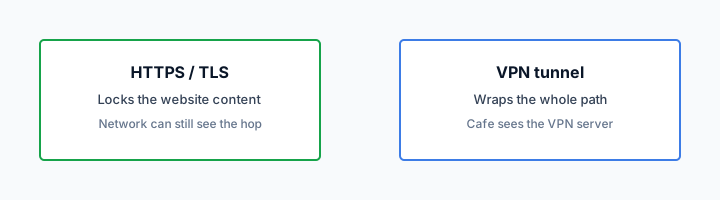
HTTPS sits on top either way. RFC 8446 does not make Ookla honest. The padlock on the test site means the cafe is not reading your results page. It does not mean the result applies to a different host. Two locks, still. This post is the stopwatch, not the padlock essay.
Five devices share an account, not a speed budget I invented. Each connected client is a seat. Two laptops hammering a test at once will fight the cafe AP long before they fight Klox. Test one machine. Leave the rest alone for two minutes. Then interpret.

- 1Skim the seating / order diagram.
- 2Do the numbered steps once on your real network.
- 3Use the FAQ if a sentence was too long.
- 4Follow one related article — not ten tabs.
How to read this page
| You did this | VPN node | Test server | What it roughly proves |
|---|---|---|---|
| Ookla, default nearby | Nearby | Nearby | Short path plus tunnel overhead on this radio |
| Ookla, default nearby | Other continent | Nearby | You mixed a long tunnel with a short test. Hard to read. |
| Same test, tunnel off then on | Same node both times if on | Pinned same | Overhead of this hop on this device |
| YouTube buffer on a show | Wherever you picked | Google, not Ookla | That show on that CDN, not the lab |
| Speedtest.net cookies | Irrelevant | Ookla's site | See their policy; ours is /cookie |
A nearby speed test is not a catalog in another country. It is a stopwatch on a lab server you probably will not watch movies on.
— KloxVPN consumer notes
Cloudflare Learning: What is a VPN?
Name both ends
VPN node and test server. If either is 'auto,' write that down too. Auto is a choice. You cannot compare two autos from different days and call it science.
Mbps is not a meeting
Fill rate versus delay. If the pain was a call, look at ping and try a real call. If the pain was a download, the big number is at least the right family of metric.
Server distance
Packets travel. A node in the same metro as you adds a hop and some encryption. A node on another continent adds that hop plus an ocean. Far nodes are how people chase catalogs and how people accidentally test 'VPN to the wrong hemisphere' when they only wanted cafe privacy. If your job is hide-the-hop from the ISP, pick nearby. Then test nearby. If your job is 'I need this exit,' accept that the stopwatch will look worse, and do not compare it to a farm screenshot of a local node.
Auto-connect that picks a 'fast' city is still a pick. Read which city landed. If it landed far, you did not measure Klox in the abstract. You measured that far hop. Switch to a nearer city once. Test again. One change. Stop.
I will not publish a city list here. The app shows what you can pick. Farms scrape lists and then grade vendors on a count we did not put in this article. Distance is physics. Count is marketing. Physics wins the stopwatch. Marketing wins the listicle.
Asymmetric links lie in both directions. Upload-heavy tests on a cable line that was never symmetric will look sad with or without a tunnel. Know your baseline off-VPN on the same AP. If baseline upload is already 8 Mbps, a VPN did not steal 200. You never had 200 on that chair.
Time of day is real on shared APs and on shared nodes. Noon cafe is not 7 a.m. cafe. A single run is a snapshot. Two runs, same setup, five minutes apart, is still a snapshot, but you will catch the waiter who restarted the router. I do not want you to live in a lab. I want you to stop treating one lucky screenshot as a personality.
Nearby for privacy hops
If you only needed the ISP not to see the inner map, nearby is the default. Testing a far node 'to see if the VPN is fast' is how you conclude the product is slow when you asked it to swim.
Far for an exit you named
If you named an exit, measure that exit. Do not compare it to a local-node screenshot from a farm. Different jobs. Different oceans.
Wi-Fi versus the tunnel
Cafe radios are rude. They roam, they rate-limit, they share 40 phones. A speed test on that radio measures the radio first. The tunnel rides on top. If off-VPN is already 12 Mbps and choppy, on-VPN cannot invent a fiber drop. People still blame the app because the app is a toggle they can hate. The AP does not have a one-star form.
Control for the radio. Same seat, same SSID, lid not half closed, nobody downloading a game on the same account's other seat if you can help it. Run off. Run on. If both are sad, move seat, use cellular, or accept the shop. If off is fine and on falls off a cliff, then you have a tunnel problem worth a protocol switch. That is the only comparison that isolates the hop.
Ethernet at home is how you see the tunnel with less radio noise. If you only ever test in a shop, you only ever measure shops. Fine if shops are the product you bought. Misleading if you then write a review about 'Klox is slow' that was actually a microwave next to the AP.
Cellular is a different radio. Testing VPN-on-cellular versus VPN-on-cafe-Wi-Fi is not a VPN comparison. It is two access networks. Keep the access network still, change one VPN variable. That is the whole scientific method you need. You do not need a lab coat. You need to stop moving two knobs.
HTTPS on the test site still does not make the radio honest. The padlock is the page. The radio is the pipe. Speedtest by Ookla is a tool you can use. It is not a court. Their farm cousins will still sell you a fastest-VPN medal. Rel-honest: the medal is a cookie.
Off, then on, same chair
If you skip the off run, you have no baseline. Every on number is then a story. Stories are how you refund the wrong product.
Do not compare two radios
Home fiber versus cafe Wi-Fi is not a protocol test. Cellular versus Wi-Fi is not a protocol test. One radio. One change.
Protocol tax
Klox ships WireGuard, OpenVPN, OpenConnect, and Shadowsocks. WireGuard is usually the lighter hop on the same path. Confirm by switching once, same node family, same radio. OpenVPN, especially on TCP, pays more: extra wrapping, sometimes extra politeness to lossy links that already hate you. That tax is why OpenVPN is the spare tire, not the daily driver I want on a normal network.
UDP gets blocked. Some APs and some office filters pick on VPN fingerprints. Then OpenVPN on TCP is how you get a route at all. You will feel it on a speed test. You should still prefer a slow route over no route if the job is 'this network must tunnel.' If the job is 'max the stopwatch,' stay on WireGuard and pick a network that allows it. Do not live on TCP because a forum said it is more reliable in the abstract. Abstract is not this AP.
I will not paste the WireGuard-why-fast essay. Handshake cost, crypto cost, userspace versus kernel: other URL. Here: one switch, one test, write down which protocol the app showed. If you cannot see the label, you cannot blame a protocol. Look at the glass.
Do not hop protocols as a personality. WireGuard until it is rude. OpenVPN when it is. Back to WireGuard on the next normal network. Collecting protocols is fidgeting. Fidgeting produces twelve screenshots and zero conclusions.
Encryption has a cost. It is usually smaller than a bad radio and smaller than a far node. If a farm promised 'zero overhead,' they promised physics a vacation. We will not. We also will not print a plus-or-minus megabit SLA. Your CPU and your path are not our lab.
WireGuard first
Same server idea, same chair, WireGuard. That is the number I want you to remember. OpenVPN is the comparison when UDP dies, not a second identity.
TCP is a spare tire
You feel it. You also get through filters that hated UDP. Use it when you need it. Do not grade WireGuard by a TCP screenshot.
Device CPU
Old phones and tired laptops encrypt every packet with a chip that also wants to decode a stream and keep a chat app alive. A speed test is a CPU test as much as a network test. If the phone is hot, charging poorly, and five years old, the tunnel will look slower than the same account on a desktop with Ethernet. That is not Klox stealing megabits. That is AES and friends on a small core.
Close the zoo. One browser tab with the test. Not a backup, not a store download, not a meeting. Then run. If you need the meeting, you are not in a lab. Skip the screenshot. You already know the call is the priority.
Battery savers throttle. Low-power modes lie. iOS and Android both have moods. If a test after lunch is half of a test at midnight, check thermal and power before you open a ticket. Desktop: check the other VPN, the other browser, the VM you forgot. Two tunnels is how you get none, and how you get a sad number.
Five seats means the Linux box at home can still be holding a session while you test a phone in a shop. That does not split a secret megabit pool I invented. It can split a household pipe if they share one. Test the device you care about. Disconnect the furniture if the furniture is saturating the same ISP line. Count seats so you do not hit a cap mid-test and call it slowness. A failed handshake is not 0 Mbps on Ookla. It is a different error.
I will not invent a supported-CPU matrix. If the app runs, it encrypts. If it crawls, try WireGuard, try a nearer node, try a device that is not gasping. Seven days on first purchase if the kit you own cannot run a tunnel you like. That window is for the apps on your glass, not for a farm's lab PC.
Hot phones lie
Cool the device. Unplug the zoo. Test again. If it is still sad and Ethernet on a PC is fine, you learned about the phone, not about a vendor SLA.
Two tunnels, sad numbers
OS VPN plus Klox, or two clients, or a VM with its own hop. Disconnect the extra. Then measure. Stacking is not a speed feature.
The site is not Ookla
The site you actually use has its own CDN, its own peeking, its own bad day. A YouTube buffer is YouTube plus your radio plus the hop. An Ookla run can look healthy while a particular host is sad. The reverse is also true: a bad test server can smear a path that still watches a show just fine. If the job is a show, watch the show for a minute. If the job is a meeting, join the meeting. The lab is optional after that.
Farms love Ookla because the number is screenshotable and the affiliate cookie is nearby. I am fine with you using speedtest.net as one instrument. I am not fine with you treating it as the product. Klox is a tunnel. The product is whether the hop you needed worked. Catalog geo is a different honest-limits article. Buffering as a stall pattern is a different article. Do not steal those plots into this stopwatch essay.
Pin a real URL you care about. Time a download from a host you actually use, off then on. That number is uglier to share and closer to life. A browser download is still not a game. It is closer than a test PoP in a city you will never visit.
HTTPS on the real site still wraps the page. The stopwatch is underneath. Do not confuse a slow TLS handshake on a dying radio with 'RFC 8446 made me slow.' TLS is cheap next to a microwave. If a site hangs on DNS, that is names, not megabits. Tunnel DNS is a Features sentence. This is still not the DNS essay. Check that you are connected before you time anything. A test in the clear while you thought you were tunneled is how you publish a fake baseline.
Cookies on the test site follow the test site. Cookies on klox.app follow /cookie. Neither cookie is throughput. Close the consent banner and run the test, or do not. Do not file the banner under VPN lag.
Watch the show if the job is the show
Thirty seconds of the actual stream beats three Ookla medals. If it plays, you are done. If it does not, then open the lab and the other articles.
Connected is a precondition
If the app still says connecting, you are timing the cafe. Look at the glass. Then time. Fake baselines waste seven days.
When slow is the network
Captive portals, hotel filters, office middleboxes, saturated APs, ISP evening congestion: the tunnel sits on whatever you already had. If off-VPN is broken, on-VPN will not negotiate with the universe. Finish the splash page. Pause a kill switch if fail-closed is fighting the garden. Then connect. Then test. Testing during a portal deadlock is how you get 0 and a one-star review.
Packet loss on Wi-Fi looks like a slow VPN because retransmits eat the stopwatch. Move. Use 5 GHz if the shop has it and your device can hear it. Use cellular. I would rather you leave the AP than spend forty minutes 'optimizing WireGuard' on a microwave oven with an SSID.
ISP congestion is a time-of-day story. Your tunnel cannot create capacity the last mile sold to everyone on the block. Baseline off-VPN at the same hour. If both are sad, call the ISP or live with the hour. If only on is sad, then protocol, node distance, CPU. In that order, one change at a time.
IPv6 leftovers and WebRTC do not usually show up as 'slow.' They show up as leaks. Do not mix leak anxiety into a speed ticket. Features lists protections. Leak tests are another post. Speed is the stopwatch. Leaks are the map. Two drawers.
If both protocols fail after a real route exists, the network may not want you. Cellular is still a valid strategy. The seven-day first-purchase window exists if this path is the whole product for you and it will not handshake. Document the SSID in a ticket if you write in. Do not invent an Mbps guarantee we refused to print.
Portal first, stopwatch second
No route, no test. Splash, boring site loads, tunnel, then Ookla. Reverse that order and you will test a brick.
Loss is not encryption tax
Retransmits on a bad radio dwarf WireGuard's overhead. Change the radio before you change vendors in your head.
A boring test ritual
Here is the ritual I actually want. Same device. Same radio. Note the hour. Tunnel off, pin a test server if the tool lets you, run once. Tunnel on, WireGuard, nearby node, same test server, run once. If on is roughly in the same world as off, you are done. If on fell over, switch OpenVPN once. If OpenVPN saved you, the AP hated UDP. Live with the tax or leave the AP. If both fell over and off was fine, write in with protocol, city you picked, and that off number. Do not paste a farm medal.
Do not ritual this every morning. Once per network class is enough: home, office, the cafe you actually use. Travel week: once on hotel Wi-Fi after the splash. Then stop. A personality built on speed tests is a farm's dream customer.
Smart Connect, if the row exists, can race a portal and look like slowness. It is not a speed feature. It is an untrusted-Wi-Fi connect feature. Turn it off for the ritual if it is fighting the garden. Restore it after. Kill switch fail-closed during a drop will look like 0. That is the switch working. Pause it to test the radio, then restore it if you still want fail-closed.
Price stays on /pricing. Apps on /download. No city count. No SLA percent. No invented megabits. Yearly from $2.83 a month. Five devices. Seven days if the first purchase was a stopwatch you hated. WireGuard first. OpenVPN when the path is rude. Read the number as a hop on this chair, not as a medal.
If you wanted why WireGuard is light, that explainer is next door. If you wanted games, stalls, catalogs, those URLs exist. This page was the stopwatch. Use it. Then close it.
One change per run
Radio or protocol or city. Not all three. If you cannot say which knob moved, you cannot read the delta. Write the knob on the screenshot if you must keep one.
Stop collecting medals
Two runs, a decision, go do the thing you bought the tunnel for. A folder of Ookla PNGs is not a threat model.
Key Takeaways
A speed test measures a lab server under this radio, this CPU, this protocol, this node. It does not measure a catalog, a match, or 'the internet.' Name both ends. Baseline off, then on. Nearby if the job is a privacy hop. Far if you named an exit. WireGuard first. OpenVPN when UDP is rude. Believe the show if the job is the show.
Klox will not print an Mbps guarantee or a city count for a farm to scrape. WireGuard, OpenVPN, OpenConnect, and Shadowsocks, five devices, yearly from $2.83 a month, seven-day first purchase. Cookies for this site: /cookie. Download the apps. Run the boring ritual once on the network you actually use. Then close the tab.
If a ranked 'fastest VPN' list already decided for you, you already know what they sold. If you wanted a hop you can read without lying, you have the ritual. Use it.
Related Resources
Measure the hop you actually use
KloxVPN is WireGuard, OpenVPN, OpenConnect, and Shadowsocks, five devices, yearly from $2.83 a month, 7-day first-purchase money-back. No Mbps SLA on this blog. Download the apps, run off then on, and keep the protocol that actually routes.
Download KloxVPNFrequently Asked Questions
KloxVPN Team
Experts in VPN infrastructure, network security, and online privacy. The KloxVPN team has been building and operating VPN services since 2019, providing consumer and white-label VPN solutions to thousands of users worldwide.