HTTPS and a VPN are two locks on two different doors. People mash them into one sentence because both use the word encrypt. That mash is how you get 'I have the padlock, so I do not need a tunnel' and the equally lazy 'I have a VPN, so HTTPS is redundant.' Both sentences are half true. Half true is how you donate a map of your next hop to a network you do not run.
HTTPS locks the conversation with the website. The body of the page, the password in the form, the JSON in the API: TLS is supposed to keep that off the wire in the clear. A VPN locks a different hop: your device to a VPN server you picked. Wikipedia's VPN page is the noun for that tunnel. RFC 8446 is TLS 1.3 on the website path. It is not a tunnel. Cloudflare also keeps a HTTPS explainer if you want the padlock in someone else's words.
This is not What a VPN Cannot Do. That piece is malware, phishing, streaming fairy tales. This is not What Is a VPN and How Does It Work?. That is the primer. This is not the VPN on Cafe Wi-Fi: A Habit, Not a Superpower. Timing a splash page is a different plot. This is not What DNS Does on a VPN (Plain English) as a full resolver essay. DNS shows up here as one leftover on the HTTPS path, then that article owns the hop.
KloxVPN is WireGuard, OpenVPN, OpenConnect, and Shadowsocks, five devices, yearly from $2.83 a month, 7-day money-back on first purchase. Features lists DNS through the tunnel, IPv6 leak protection, WebRTC leak blocking. There is no consumer custom-DNS picker in this article. There is no SOC 2 badge. Download is the apps. Pricing is the live number. The cookie page is how this website treats cookies. Neither lock is a cookie policy.
I have a bias. Keep HTTPS. Add a VPN when the local network or the ISP seeing your destination map is a problem you actually have. Do not pick one lock and call the other a scam. Do not pick both and call yourself invisible.
Related reading: What is a VPN? and VPN kill switch. DNS leak explained.
Looking for a reliable VPN?
KloxVPN — from $2.83/month. Apps for every device.
Two different locks
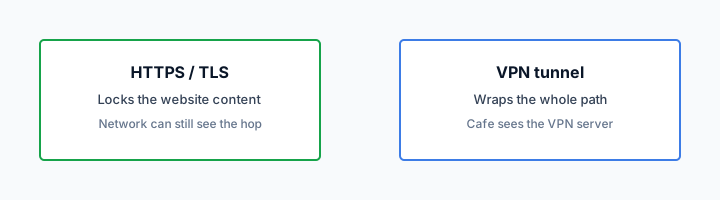
Picture two padlocks. The first sits on the conversation between your browser and mail.example. TLS, often TLS 1.3 as RFC 8446 describes it, wraps that session. A person on the cafe LAN who is only sniffing packets does not get the email body from that wrap. The second padlock sits on the path from your laptop to a VPN node. Everything that enters that tunnel, including the fact that you later spoke TLS to mail.example, is a blob to the cafe and to your ISP. They see 'talked to a VPN.' They do not see 'talked to mail.example' as the interesting hop.
Those are different jobs. HTTPS does not move your next hop. A VPN does not sign the website's certificate. Mixing the jobs is how affiliate pages rank 'HTTPS vs VPN winner' until the cookie dies. There is no winner. There are two doors. You can lock one, both, or neither. Neither is how 2012 coffee-shop HTTP felt. Both is how a careful person sits on a network they do not run.
The lock in the address bar is real. Treat it as real. The industry spent years killing plain HTTP on the public web. That work is why 'the waiter can read my bank password' is usually the wrong scare. The remaining scare is quieter: destination IP, often a server name during TLS start, DNS if names never entered a tunnel. A VPN is how you hide that quieter map from the chair next to you, and from the ISP at home if that is your actual worry.
Klox is the second lock when you connect it. It is not a new certificate for Gmail. If the site is HTTP in 2026, fix the site or leave. Do not ask a consumer VPN to invent TLS for a host that refused it.
- 1Skim the seating / order diagram.
- 2Do the numbered steps once on your real network.
- 3Use the FAQ if a sentence was too long.
- 4Follow one related article — not ten tabs.
How to read this page
| Observer | HTTPS only | VPN only (to HTTP) | Both |
|---|---|---|---|
| Cafe LAN / ISP | Sees IPs, often SNI or DNS; not the page body on TLS sites | Sees a blob to a VPN; HTTP beyond the node is still clear to the site path | Sees a blob to a VPN; page body still TLS to the site |
| The website | Sees you, your IP, the session | Sees the VPN exit IP if you reached it; HTTP contents if the site is still HTTP | Sees the VPN exit IP and a normal TLS session |
| A fake site you typed | TLS to the fake host is still TLS to a liar | Tunnel does not authenticate the liar | Same liar, nicer hop |
| Cookie on klox.app | Unrelated | Unrelated | See /cookie; neither lock is a CMP |
HTTPS already locked the page. The network still sees the next hop unless that hop is a VPN.
— KloxVPN consumer notes
Cloudflare Learning: What is a VPN?
Do not crown a winner
Farm posts love a winner because a winner has an affiliate URL. HTTPS won the public web for page bodies. VPNs won a different argument: who sees the graph of your hops. Keep both sentences. Rank neither.
What this post is not
Not a malware catalog. Not cafe splash timing. Not a DNS leak procedure. Those URLs exist. This URL is two locks until you can say which door you meant.
What HTTPS already did
Most of the sites you actually use already speak TLS. Mail web UIs. Banks. Work chat. Stores. RFC 8446 is the TLS 1.3 document a lot of that traffic grew up on. Older TLS still exists. The point for a consumer is not version trivia. The point is: the page is not a gift to the person with Wireshark at the next table.
That is a big deal and it is boring, which is why farms still write as if 2012 HTTP were the default. It is not. If your scare is 'they can read my password on the cafe LAN,' check the padlock first. If the padlock is there and the certificate is for the host you meant, the cafe is not reading that password from the TLS records. They might still see that you spoke to that host. That is a different sentence.
HTTPS also does not care whether you used a VPN. The site still terminates TLS. You still have a session cookie in the browser. You still look like a logged-in human to Gmail. The cookie policy on this site is about our website, not about Gmail's cookies. A tunnel does not delete those. TLS does not delete those. Login state is not a network-encryption problem.
Certificate warnings are still your job. Clicking through a warning because you are in a hurry is how you give a password to a box that is not the bank. A VPN will happily encrypt that mistake to a node, then onward. Encryption of a lie is still a lie. The padlock on a host you did not intend is not the padlock you wanted.
I will not turn this into a PKI course. Trust the browser's name match. Update the OS. Do not collect random root certificates because a cafe printed a 'install this to get Wi-Fi' PDF. That PDF is a different threat than 'HTTPS is fake.' HTTPS is not fake. People installing extra roots is how you make it fake for you.
The padlock is not a costume
Treat TLS as the reason page bodies are not LAN gossip. Then ask the quieter question: who still sees the hop. That quieter question is why a VPN exists next to HTTPS, not instead of it.
Warnings are still your job
A tunnel does not approve a bad certificate. If the browser yells, stop. Complete a splash page if you must, on a boring site, then come back to the bank with a lock you trust.
What the path still shows
Without a VPN, the local network and the ISP still get a map. You used their pipe. You transferred some number of bytes. You opened TCP or QUIC to some IPs. Often they get a name: SNI in the TLS ClientHello, or a DNS query that never entered another wrap. That map is not the password. People mash map and password because both sound like 'they can see me.' Split them.
The IP hop remains even when names get quieter. You can hide SNI in some setups and still leave 'this client spoke to 203.0.113.10 for twenty minutes.' An intelligence shop that already knows who lives at that IP does not need the name. A cafe owner probably does not care. Your ISP's ad-tech partner might. Your threat model is allowed to be 'I do not want my ISP building that graph.' A VPN is the consumer tool for that sentence.
With a VPN up, the interesting hop for the cafe and the ISP becomes the VPN server. They still know you used the AP. They still see volume. They see a destination you chose when you picked a node. They do not get the inner map of sites unless something leaked around the tunnel: DNS, IPv6, WebRTC. Klox documents those as tunnel DNS, IPv6 leak protection, WebRTC leak blocking. Features is the live list. This article will not invent a picker.
Volume is still metadata. A four-hour 4K stream through a VPN looks like a four-hour fat blob. A VPN hides destinations, not the fact that you were awake and hungry for bandwidth. If your threat is a person who already sits in the room, sit differently. If your threat is the LAN graph, tunnel. If your threat is the site, that is the site.
I will not invent city counts so the map sounds fancier. You pick a server in the app. Nearby is usually enough when the job is 'hide this hop from the ISP,' not 'pretend I live in a catalog.' Catalogs are a different article.

Map versus password
Password: TLS, if the site is the real site. Map: IPs, often names, DNS. A VPN moves the map. It does not type the password for you and it does not un-phish you.
Volume is still a blob
Encrypting a hop does not make you look like you were idle. Fat blobs are fat. Plan for that if your threat actually watches sizes. Most cafe threats do not.
SNI and ECH without theater
SNI is a name the client often sends while TLS is starting, so the server knows which certificate to show on a box that hosts many sites. Historically that name was in the clear. Encrypted Client Hello, ECH, is the industry's attempt to hide more of that handshake. Deployment is uneven. Browsers, CDNs, and origin configs have to agree. Do not write 'SNI is dead' in 2026 because a blog said ECH exists. Do not write 'SNI always dooms you' as if ECH never ships.
Even with ECH, the IP hop remains. Many names still share anycast IPs. Many do not. A dedicated IP for a small site is a name in all but letters. A VPN still collapses that outer hop to 'talk to the VPN' from the cafe's point of view. That is the honest remainder after you admit HTTPS exists and after you admit ECH is a work in progress.
I will not perform handshake theater. No screenshots of ClientHello fields. If you want to see SNI on your own LAN, you already know Wireshark. If you do not, you do not need to. Trust the split: page body versus hop metadata. SNI is metadata. ECH tries to shrink that metadata. A VPN moves it.
Klox does not claim to implement ECH for you. ECH is a browser-and-CDN story. The tunnel is a device-to-node story. Keep them in separate drawers. Mixing them is how you get support tickets that say 'why is SNI still a thing if I paid for a VPN.' Because SNI lives inside the inner TLS after you decrypt at the node, or on the clear path if you never tunneled. The cafe does not get the inner SNI when the tunnel is up. The VPN operator's path to the site still does TLS like everyone else.
RFC 8446 is TLS 1.3. ECH rides later work. You do not need the draft numbers to use Klox. You need to stop treating the address-bar lock as a complete privacy product.
ECH is uneven
Some clients, some CDNs, some days. Plan as if SNI might still be visible on a clear path. Plan as if a tunnel still earns its keep even when ECH works, because IPs remain.
Inner TLS still exists
The VPN node is not the website. After the tunnel, you still speak HTTPS to the site. That inner lock is still the page. The outer lock is still the hop. Two locks, still.
DNS as a leftover
HTTPS can hide page bodies and still leave names on the floor if DNS never entered the tunnel. You type a host. The stub resolver asks someone what IP that is. Off a VPN, that someone is often the ISP or the cafe router. That question is a shopping list. TLS on the later HTTP session does not retroactively encrypt the shopping list.
On a VPN, if the client is doing the job Klox documents, DNS rides the tunnel. The ISP sees a blob to the VPN, not the list. That is the leftover this section exists to name. The full resolver essay is What DNS Does on a VPN (Plain English). The leak procedure is elsewhere. Here: HTTPS did not eat DNS. People who say 'I have HTTPS so I do not need a VPN' are often forgetting the shopping list, or they decided the shopping list is fine. Say which.
DoH and DoT in the browser can encrypt DNS to a third party without a VPN. That is another hop, another company. It can help against a cafe that would have seen clear DNS. It does not hide the IP you later connect to. It can also fight a VPN's tunnel DNS if you stack them as a hobby. I would rather you let Klox own names while connected. We are not selling a custom-DNS picker in this post. If a farm tells you to type a public resolver into the adapter 'for speed,' that farm is teaching a different leftover.
IPv6 can be another leftover: a v6 path that never entered a v4-only tunnel. WebRTC can ask STUN for a public IP while the UI says connected. Features lists protections. This is still not the leak-test article. It is why 'HTTPS finished the job' is the wrong slogan even after you grant TLS on every site you love.
If you want to verify after connect, do it once, then stop collecting testers. The two-lock story does not require a lab every morning.
The shopping list is not the page
DNS names are metadata. Page bodies are content. HTTPS is content. Tunnel DNS is metadata hygiene. Different drawers, same week of your life.
Do not stack resolvers as vitamins
Browser DoH plus VPN DNS plus a random adapter IP is how you get a leak you cannot draw. One owner for names while the tunnel is up. Klox is that owner on our apps.
When you still want both
You want HTTPS always on sites that offer it, which is most of them. You want a VPN when the observer you care about sits on the path before the website: cafe LAN, hotel, airport, a shared apartment, an ISP you do not want building a hop graph. Both is the default I actually use on networks I do not run. Home Wi-Fi is a yes-or-no you already have a different article for. This article will not re-litigate home.
You still want both when the site is TLS and you are logged in. Login does not retire the map. You still want both when you are 'only reading the news.' News IPs are still IPs. Skip on purpose if the packet is boring and you know it. Skipping because HTTPS exists is the half-sentence I am arguing with.
Work laptops sometimes already have a corporate tunnel. Two consumer tunnels plus a corporate one is how you get none. If work owns the hop, this essay is background, not a second app. If work does not, and you are on cafe Wi-Fi with mail, connect Klox after you have a route. Phone plus laptop is two of five seats. Count.
You do not need both to 'be secure' as a personality. You need both when you can name the observer. If you cannot name the observer, you are collecting padlocks. Collecting padlocks is how people buy three VPNs and still click phishing. Name the chair. Then pick the lock that faces that chair.
Yearly from $2.83 a month is not a reason to skip HTTPS. It is a reason you can afford the second lock without a farm's lifetime coupon. Seven days on first purchase if the product is not the hop you wanted. Refunds live on /refund. This page will not turn into a billing sermon.
Name the observer
Cafe LAN, ISP, the website, a phishing host: four different chairs. HTTPS faces the LAN for page bodies. A VPN faces the LAN and ISP for the map. The website still sees you.
Work tunnels first
If the company already owns the hop, do not stack Klox for sport. If they do not, and you are on a network they do not run, the consumer app is allowed. One tunnel that works beats two that fight.
What neither lock is
Neither lock is antivirus. Neither is 2FA. Neither is a unique password. Neither is a backup. Neither is a cookie blocker. Our cookie page is how this website talks about cookies. Gmail's cookies are Google's. A VPN does not eat them. HTTPS does not eat them. If you wanted tracking reduced, that is browsers, permissions, and account hygiene. Do not file it under TLS.
Neither lock authenticates the coffee shop. An evil twin can still offer Wi-Fi. TLS to the real bank still works through a twin if you reach the real bank. A tunnel through a twin still works as a tunnel. The twin can still annoy you, portal you, and see that you spoke to a VPN. Encryption is not a background check on the SSID. Ask the staff the name.
Neither lock is anonymity. The website still has your account. The VPN operator still has a customer record: email, invoice, device list. No-logs, when it is honest, is about activity files, not about disappearing. I will not recap the whole cannot-do catalog. I will say: if you came here for that catalog, you opened the wrong tab. Two locks. Not a cloak.
Neither lock is a streaming product. HTTPS does not fetch a catalog from another country. A VPN might change the exit IP and still fail a streaming check. We do not promise catalogs. We do not publish city counts on this blog so a farm can scrape them. WireGuard, OpenVPN, OpenConnect, and Shadowsocks, five devices. Use that as the product.
Neither lock is SOC 2. I will not invent an audit PDF because an enterprise blog said buyers like logos. Consumer Klox is a tunnel. If you need a named audit, that is a different conversation than this English lesson.
Cookies are not TLS
Session cookies live in the browser after HTTPS did its job. A tunnel does not clear them. If you meant our site: /cookie. If you meant ads: that is not a VPN FAQ.
The shop is not a CA
The cafe does not issue Gmail's certificate. A VPN node does not either. Trust the browser's name match. Ask humans for the SSID. Those are different trust problems.
Klox as a hop, not a website
Klox is the second lock: a hop you chose. WireGuard first. OpenVPN when the network hates UDP. Five devices, so a phone and a laptop are two seats, not a family mystery. Yearly from $2.83 a month. Seven-day money-back on first purchase. DNS through the tunnel. IPv6 and WebRTC called out on Features. Download the apps from klox.app/download. Do not sideload a random APK because a listicle hosted one.
We are not the website you log into. We do not terminate Gmail's TLS. We do not see that page body when the inner HTTPS is doing its job, which is the usual case. People ask 'can the VPN read my bank.' On HTTPS sites, the inner lock still faces the bank. The VPN sees encrypted inner traffic, plus destinations at the node, plus whatever DNS the tunnel resolver handled. That is a hop operator, not a webmail host. If that still bothers you, you wanted a different threat model, maybe not a consumer VPN at all.
Smart Connect, if the app shows the row, is connect on untrusted Wi-Fi. It is not HTTPS. It does not replace the padlock. It starts the second lock. If the row is missing, you have a Connect button. Use the button. I will not invent an always-on story so this essay matches another vendor's screenshot.
If you only needed the English, stop here. If you needed a definition primer, What Is a VPN and How Does It Work? is next door. If you needed limits, What a VPN Cannot Do is the catalog I refused to paste. If you needed cafe timing, that habit post exists. If you needed the shopping list, What DNS Does on a VPN (Plain English) owns it. This page was two locks. Keep both. Crown neither.
WireGuard, then OpenVPN
Same two-lock story on both protocols. WireGuard is the default I want. OpenVPN is the spare tire when an AP is rude. Protocol hopping is not extra HTTPS.
Five seats, two locks each
Each connected device is one seat and should run its own tunnel if it is on a network you do not trust. HTTPS will be there anyway. The second lock is per device, not 'the cafe.'
Key Takeaways
HTTPS locked the page. A VPN locks the hop. RFC 8446 is not a tunnel. A tunnel is not a certificate. The cafe and the ISP can still see destinations unless that destination is a VPN you chose. DNS can remain a shopping list if names never entered the tunnel. SNI is quieter on some paths and loud on others. Encrypted Client Hello is uneven. IPs remain.
Keep the padlock. Add Klox when the observer you can name sits on the path: WireGuard, OpenVPN, OpenConnect, and Shadowsocks, five devices, yearly from $2.83 a month, seven-day first purchase. No city count. No SOC 2 sticker. No custom DNS picker in this essay. Cookies on this site live at /cookie and are not either lock.
If you wanted a winner, you wanted a farm. If you wanted two sentences you can repeat in a cafe, you have them. Download the apps. Connect on networks you do not run. Leave HTTPS on, because it was never the enemy.
Related Resources
The second lock is a hop you turn on
KloxVPN is WireGuard, OpenVPN, OpenConnect, and Shadowsocks, five devices, yearly from $2.83 a month, 7-day first-purchase money-back. HTTPS already locked the page. Download the apps if you also want the hop hidden from the network you are sitting on.
Download KloxVPNFrequently Asked Questions
KloxVPN Team
Experts in VPN infrastructure, network security, and online privacy. The KloxVPN team has been building and operating VPN services since 2019, providing consumer and white-label VPN solutions to thousands of users worldwide.