
Shadowsocks and VPN both encrypt your traffic and hide your destination from network observers. They work differently. A VPN creates a full tunnel: all traffic from your device is routed through the VPN server. Shadowsocks is a proxy: it forwards traffic for applications that are configured to use it, and it is designed specifically to evade deep packet inspection (DPI) used in censored networks.
In countries or networks where VPN traffic is blocked or throttled, Shadowsocks often works when VPN does not. Its traffic looks like ordinary HTTPS to DPI systems, making it harder to detect and block. VPN traffic, by contrast, can be identified by its characteristic patterns — even when obfuscated — and blocked by sophisticated censorship systems.
For general privacy on open networks, a VPN is usually the better choice. It protects all applications at once, requires no per-app configuration, and provides full device coverage. Shadowsocks excels in restrictive environments: corporate firewalls, school networks, and countries with aggressive internet filtering. KloxVPN offers both. Use VPN by default; switch to Shadowsocks when VPN is blocked or unreliable.
This guide explains the technical differences between Shadowsocks and VPN, when each is the right tool, how they complement each other, and how to choose based on your network and threat model.
Do not treat them as mutually exclusive. A provider that offers both — like KloxVPN — lets you adapt. Use VPN when it works; switch to Shadowsocks when it does not. The same servers, the same account, a different protocol for different conditions.
Mobile carriers in some regions block or throttle VPN. Shadowsocks, because it resembles HTTPS, often passes through. If your VPN fails on cellular, try Shadowsocks before concluding the network blocks all privacy tools.
Related reading: What Is a VPN and How Does It Work? and WireGuard VPN Explained: Why It's the Fastest Modern Protocol. VPN in Restrictive Countries: What to Know and VPN Travel Checklist: Before You Go. What is a VPN? and Download KloxVPN.
Looking for a reliable VPN?
KloxVPN — from $2.83/month. Apps for every device.
What Is Shadowsocks
Shadowsocks is a lightweight proxy protocol originally designed to bypass the Great Firewall of China. It uses a SOCKS5-style proxy with encryption. Unlike a VPN, it does not create a virtual network interface that captures all traffic. Instead, applications must be configured to send their traffic through the Shadowsocks proxy — either by using a system-wide proxy setting or by running only proxy-aware apps.
Shadowsocks traffic is designed to resemble normal HTTPS traffic. It uses common ports (often 443), and the encrypted payload does not have the distinctive signatures that VPN protocols like OpenVPN or WireGuard produce. Deep packet inspection systems that block VPN traffic often allow Shadowsocks through because they cannot reliably distinguish it from regular web traffic.
Shadowsocks was created for users in China and has evolved into a general-purpose proxy for censorship bypass. It is open source; multiple clients and server implementations exist. KloxVPN integrates Shadowsocks into the same app as VPN — no separate installation.
- 1Skim the seating / order diagram.
- 2Do the numbered steps once on your real network.
- 3Use the FAQ if a sentence was too long.
- 4Follow one related article — not ten tabs.
How to read this page
Proxy vs Tunnel
A proxy forwards requests on behalf of clients. The client connects to the proxy; the proxy connects to the destination. A VPN creates a tunnel: the operating system routes all traffic through a virtual interface, and the VPN client encapsulates it. With a VPN, every app uses the tunnel automatically. With a proxy, only apps configured to use it send traffic through it.
DPI Evasion
Shadowsocks was engineered to evade DPI. Censorship systems inspect packet contents to identify VPN, Tor, or other restricted traffic. Shadowsocks uses encryption and traffic shaping to avoid these patterns. The result is that it often works on networks where VPN is blocked.
What Is a VPN (Full Tunnel)
A VPN creates an encrypted tunnel between your device and a VPN server. All traffic from your device — every app, every browser tab, every background service — is routed through that tunnel. The VPN client integrates at the operating system level, so no per-app configuration is needed.
VPN traffic has recognizable characteristics. OpenVPN, WireGuard, and other VPN protocols use specific handshakes, packet structures, and port patterns. Sophisticated firewalls and censorship systems can detect and block VPN traffic even when it is obfuscated. In open networks, that is rarely a problem. In restrictive environments, it can be.
| Fact | KloxVPN | Not on this page |
|---|---|---|
| Protocols | WireGuard, OpenVPN, OpenConnect, and Shadowsocks | A third invented protocol |
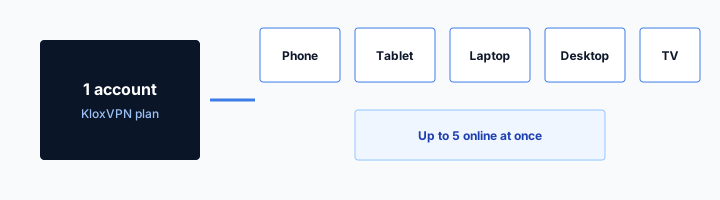
| Devices | Five simultaneous | Unlimited seats |
| Yearly | From $2.83/month | A fake city count |
| Refund | 7-day, first purchase | An On Demand toggle |
Full Device Coverage
A VPN protects every application automatically. You do not need to configure your browser, email client, or games to use it. Once connected, all traffic goes through the tunnel. That is the main advantage over proxy-based solutions.
VPN Detection
VPN traffic can be identified by DPI. Some networks block it. Obfuscation techniques exist (e.g., OpenVPN over TCP port 443, custom protocols) but are not always effective against advanced censorship. Shadowsocks was designed from the ground up to avoid these detection methods.
Shadowsocks vs VPN: Key Differences
Shadowsocks is a proxy; VPN is a full tunnel. Shadowsocks requires app or system proxy configuration; VPN works system-wide by default. Shadowsocks is optimized for DPI evasion; VPN is optimized for ease of use and full coverage. Shadowsocks often works where VPN is blocked; VPN is simpler for general use.
For privacy on an open network — home, cafe, office — VPN is usually the better choice. For bypassing censorship or restrictive firewalls, Shadowsocks may be the only option that works.
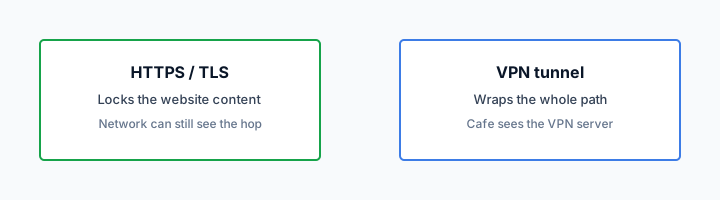
HTTPS can hide a page body and still leave a destination visible. That is not a VPN.
— KloxVPN operator notes
Coverage
VPN: all traffic, all apps, automatically. Shadowsocks: only traffic from apps configured to use the proxy. System-wide proxy settings can route most traffic through Shadowsocks, but some apps ignore system proxy. VPN has no such gap.
Bypass Capability
Shadowsocks: designed to evade DPI, often works where VPN is blocked. VPN: can be detected and blocked by sophisticated firewalls. In China, Iran, and similar environments, Shadowsocks (or similar proxy protocols) is often more reliable.
Performance
Both add overhead. Shadowsocks is lightweight; VPN protocols vary. WireGuard is very efficient. For raw throughput, the difference is often small. The main performance consideration is whether the connection works at all — in restricted networks, Shadowsocks wins by virtue of not being blocked.
When to Use Shadowsocks
Use Shadowsocks when VPN is blocked, unreliable, or throttled. That includes: networks in countries with aggressive internet filtering, corporate or school firewalls that block VPN, public WiFi that restricts VPN traffic, and any environment where you have tried VPN and it does not connect or is severely throttled.
Shadowsocks is also useful when you need lightweight, per-app control. If you want only your browser to use the proxy while other apps use the normal connection, a proxy makes that easier than VPN split tunneling in some setups.
Censorship Bypass
In China, Iran, UAE, and other countries with strict filtering, VPN traffic is often blocked. Shadowsocks and similar protocols (V2Ray, Trojan) are designed to evade these blocks. Use Shadowsocks when traveling to or living in such regions — and always check local laws before doing so.
Corporate and School Networks
Many workplaces and schools block VPN to prevent bypassing their security policies. Shadowsocks, especially when configured to use port 443 and mimic HTTPS, often works. This may violate your organization's acceptable use policy — use only where permitted.
VPN Blocked on Public WiFi
Some hotels, airports, and cafes block or throttle VPN. Shadowsocks can sometimes get through. If your VPN will not connect, try Shadowsocks as a fallback.
When to Use VPN
Use VPN by default for general privacy. It is simpler: connect once, all traffic is protected. No proxy configuration. No risk of apps bypassing the tunnel. For most users on most networks, VPN is the right choice.
VPN is also better when you want full device protection — every app, including those that do not respect system proxy settings. Background updates, push notifications, and system services all go through the VPN. With a proxy, some of that traffic may leak.
General Privacy
On home WiFi, public WiFi, or mobile data, a VPN encrypts everything and hides your IP. One tap to connect. No configuration. That is the ideal default for most users.
Full App Coverage
Some apps — games, certain streaming apps, system services — do not use the system proxy. They would bypass Shadowsocks. A VPN captures all traffic at the OS level, so nothing leaks.
Ease of Use
VPN apps are widely available and user-friendly. Shadowsocks typically requires more setup — proxy configuration, sometimes manual server entry. For non-technical users, VPN is the path of least resistance.
Security Comparison
Both Shadowsocks and VPN encrypt traffic between your device and the proxy/VPN server. The encryption prevents eavesdropping on the path. The main security difference is scope: VPN protects all traffic; Shadowsocks protects only traffic that goes through the proxy. If an app bypasses the proxy, that traffic is in the clear.
For threat models focused on network eavesdropping (e.g., public WiFi, ISP snooping), both provide protection for the traffic they handle. VPN handles more traffic by default. For threat models focused on censorship evasion, Shadowsocks may be the only option that works — and "works" is a prerequisite for "secure."
Encryption
Shadowsocks uses strong encryption (e.g., AES-256-GCM). VPN protocols like WireGuard, OpenVPN, OpenConnect, and Shadowsocks also use strong encryption. From a cryptographic standpoint, both are secure when configured correctly.
Traffic Coverage
VPN covers all traffic. Shadowsocks covers only proxy-configured traffic. The gap with Shadowsocks is the main security consideration: any app that does not use the proxy sends traffic in the clear.
Shadowsocks Configuration Options
Advanced users can tune Shadowsocks for their environment.
Encryption Methods
Shadowsocks supports multiple ciphers: AES-256-GCM, ChaCha20-Poly1305, and others. AES-256-GCM is common and secure. ChaCha20 is faster on devices without AES hardware acceleration. Your provider typically chooses; manual config allows override.
Port and Obfuscation
Port 443 is most likely to pass firewalls — it matches HTTPS. Some setups use port 53 (DNS) or 80 (HTTP). Obfuscation plugins can make traffic look like other protocols. Standard Shadowsocks on 443 works for most restrictive networks.
KloxVPN: VPN and Shadowsocks
KloxVPN offers both VPN (WireGuard, OpenVPN, OpenConnect) and Shadowsocks. Use VPN for everyday privacy. Switch to Shadowsocks when you are on a network that blocks VPN — travel, restrictive WiFi, or censorship-heavy regions.
Both use the same account and server network. You can switch between them in the app. No need to choose one exclusively. Use the right tool for the network you are on.
When VPN Fails
If your VPN will not connect or is severely throttled, try Shadowsocks. It often works where VPN does not. Configure it in the KloxVPN app or use the manual configuration for advanced setups.
Same Servers, Different Protocol
Shadowsocks and VPN use the same server infrastructure. You get the same geographic coverage, the same no-logs policy, and the same performance — just a different protocol for getting your traffic to the server.
Shadowsocks Variants and Related Protocols
Shadowsocks has evolved. Variants like ShadowsocksR and protocol families like V2Ray and Trojan offer similar DPI evasion with different implementations. Understanding the landscape helps when choosing a fallback.
ShadowsocksR and Extensions
ShadowsocksR (SSR) adds obfuscation and plugin support. Some implementations are more effective against advanced censorship. Not all VPN providers support SSR — check your provider. Standard Shadowsocks is sufficient for many restrictive networks.
V2Ray and Trojan
V2Ray and Trojan are proxy protocols designed for censorship bypass. They use different traffic-shaping techniques than Shadowsocks. Some providers offer these as additional options. If Shadowsocks is blocked, V2Ray or Trojan may work — though support varies by provider.
Protocol Rotation
In heavily censored environments, no single protocol works forever. Censors update their filters. Having access to multiple protocols — VPN, Shadowsocks, and optionally V2Ray — gives you fallback options when one is blocked.
Shadowsocks vs VPN: Performance and Reliability
In open networks, both perform similarly. In restrictive networks, Shadowsocks often wins by virtue of connecting at all.
Throughput Comparison
Shadowsocks is lightweight — minimal protocol overhead. VPN protocols vary: WireGuard is very efficient; OpenVPN adds more. For raw throughput on an open network, the difference is often 5–15%. For most users, both are fast enough. The critical factor is whether the connection works.
Connection Stability
VPN connections can be dropped by network equipment that detects and kills VPN traffic. Shadowsocks, by resembling HTTPS, is less likely to be targeted. If your VPN disconnects frequently on a restrictive network, Shadowsocks may stay connected longer.
Battery and Resource Use
Shadowsocks typically uses slightly less CPU than full-tunnel VPN because it processes only proxy traffic. For mobile devices, the difference is usually negligible. Both are efficient enough for all-day use.
Shadowsocks vs VPN: Compatibility and Platform Support
Both protocols work across major platforms, but setup complexity differs.
Desktop and Mobile Apps
VPN apps are ubiquitous — every major VPN provider offers Windows, Mac, Linux, Android, and iOS apps. Shadowsocks support is less common in consumer VPN apps. KloxVPN and a few others integrate both. If your VPN app supports Shadowsocks, switching is one tap. If not, you need a standalone Shadowsocks client and manual server config.
Router and Network-Level Setup
Router VPN is common — many routers support OpenVPN or WireGuard. Router-level Shadowsocks is rarer. OpenWrt and some custom firmware support it, but setup is more involved. For whole-network protection in restrictive environments, a Raspberry Pi or similar device running Shadowsocks as a gateway is an option.
Corporate and Managed Devices
On managed corporate devices, VPN may be required for work access. Shadowsocks is typically not installed. If you need to bypass a restrictive network on a work device, check your IT policy — using Shadowsocks may violate acceptable use. On personal devices, both are options.
Setting Up Shadowsocks
Shadowsocks setup varies by platform. Most VPN apps that support it integrate it into the same interface as VPN — select Shadowsocks, choose a server, connect. For manual setup, you need server details and a compatible client.
App-Integrated Shadowsocks
KloxVPN and similar providers offer Shadowsocks in the same app as VPN. No separate configuration. Select Shadowsocks in protocol settings, pick a server, and connect. The app handles proxy configuration for supported traffic.
Manual Configuration
For advanced users, Shadowsocks can be configured manually with server address, port, password, and encryption method. Use a standalone Shadowsocks client or a config-capable app. Manual setup allows custom servers and fine-grained control.
System Proxy vs Per-App
Shadowsocks can be set as the system proxy (all apps use it) or configured per-app. System proxy covers most traffic; some apps ignore it. VPN has no such gap — it captures traffic at the OS level.
Shadowsocks vs VPN: Summary Table
Quick reference for when to use each.
By Use Case
General privacy on open networks: VPN. Censorship bypass: Shadowsocks (or VPN if it works). Corporate/school firewall: Shadowsocks. Streaming: VPN (or Shadowsocks if VPN blocked). Full device protection: VPN. Per-app proxy: Shadowsocks.
By Network Type
Home broadband: VPN. Public WiFi: VPN (or Shadowsocks if blocked). Mobile carrier: test both — some block VPN. China, Iran, UAE: Shadowsocks often required. Hotel/conference: try VPN first, Shadowsocks if it fails.
Quick Switch
In the KloxVPN app, switching between VPN and Shadowsocks takes one tap. No reconfiguration. Test both protocols before travel so you know which works on your destination networks.
Key Takeaways
Shadowsocks is a proxy designed for DPI evasion; VPN is a full tunnel for general privacy. Use VPN by default — it protects all traffic with no configuration. Use Shadowsocks when VPN is blocked or unreliable. KloxVPN offers both; switch based on your network. For censorship bypass, Shadowsocks is often the only option. For everyday privacy, VPN is simpler and more comprehensive. On mobile networks, some carriers block VPN but allow Shadowsocks — test both.
How a tunnel applies to Shadowsocks vs VPN: When to Use Which
This slug is a habit page for Shadowsocks vs VPN: When to Use Which networks, not a new SKU. Device limit stays five devices. Yearly stays $2.83/mo on yearly. A QR code next to the kettle is still HTTP to a portal. It is not Connect. Finish it. Cookies: /cookie. That is this website. It is not the tunnel and not the portal. Shadowsocks vs VPN: When to Use Which Wi-Fi is shared. Finish the portal. Then WireGuard, OpenVPN, OpenConnect, and Shadowsocks.
I treat Shadowsocks vs VPN: When to Use Which Wi-Fi like any hotel or cafe: land, sign in, then wrap. Skip a step and the garden loops or destinations stay visible. I will not publish a server map here. I will publish WireGuard, OpenVPN, OpenConnect, and Shadowsocks, five devices, $2.83/mo on yearly, and the portal order. Five devices means five. It does not mean a Shadowsocks vs VPN: When to Use Which site license. Share the account inside that cap. Land, sign in, wrap. Repeat it until it is boring. Boring is the goal.
Shadowsocks vs VPN: When to Use Which is a convenient name for a shared hop. It is not a VPN profile and not a city. Confirm you have a WAN before you blame the protocol. A captive garden with no accept button is not a WireGuard bug. I will not claim SOC 2 or a server map here. I will claim WireGuard, OpenVPN, OpenConnect, and Shadowsocks and the portal-then-Connect order. Treat Shadowsocks vs VPN: When to Use Which like a hotel SSID even when the branding looks official.
The hop wrap here
Airport, hotel, campus, Shadowsocks vs VPN: When to Use Which: the label changes. The hop does not. Untrusted LAN, then wrap. Do not invent a city because the SSID mentioned a brand. Connect to a node. That is enough. See Cloudflare's VPN explainer if you need the noun. The SSID can say Shadowsocks vs VPN: When to Use Which or Coffee. The noun does not change. Apps at /download. Plans at /pricing. Garden in the browser. Tunnel in the app.
This page exists because people search "Shadowsocks vs VPN: When to Use Which VPN" when they mean "I am on a network I do not run." Fair. Here is the habit. Shared kitchens and coworking APs still NAT you. Shadowsocks vs VPN: When to Use Which is just the label on this URL. If you need a plan, /pricing. If you need the binary, /download. If you need the garden to open, use a browser first. Portal first. Handshake second. Leak test third. That is the whole checklist.
Smart Connect is untrusted Wi-Fi. It is not On Demand. It is not a Shadowsocks vs VPN: When to Use Which toggle. Guest VLANs can isolate you and still see destinations until the tunnel is up. Isolation is not a wrap. HTTPS on the website is not a hop wrap. RFC 8446 is TLS. Different job from Connect on Shadowsocks vs VPN: When to Use Which Wi-Fi. Send this slug when someone asks for a special Shadowsocks vs VPN: When to Use Which profile. There is not one.
What not to invent
Join. Portal. Connect. That order is the Shadowsocks vs VPN: When to Use Which ritual. Everything else is optional tinkering. Open a browser first. If the garden needs a click, give it the click. Then open Klox. That order fixes most Shadowsocks vs VPN: When to Use Which loops. Phone hotspot versus Shadowsocks vs VPN: When to Use Which AP: different radios, same rule. Untrusted hop, then wrap, then work. No Shadowsocks vs VPN: When to Use Which mode. Same apps. Same five devices. Same yearly $2.83/mo on yearly.
Shadowsocks vs VPN: When to Use Which Wi-Fi is still a LAN you do not run. {place} is a location, not a protocol. If the SSID looks like staff Wi-Fi, still assume a portal. Fancy names do not grant a private backbone. When the AP filters UDP, OpenVPN often still lands. When both fail, the WAN is the problem, not a missing Shadowsocks vs VPN: When to Use Which mode. You are done when Connect is up and the portal is in the past. Not when you renamed a sysctl.
I will not invent a dashboard row named Shadowsocks vs VPN: When to Use Which. Consumer facts stay boring: five devices, WireGuard, OpenVPN, OpenConnect, and Shadowsocks, 7-day money-back on first purchase. If the page loops after you already connected, drop the tunnel, finish the garden, connect again. Do not reboot the phone first. White-label branded clients live at /white-label. This page is the traveler habit on Shadowsocks vs VPN: When to Use Which Wi-Fi, not a partner packaging ticket. The SSID label does not change the physics. Wrap after sign-in.
Key Takeaways
Shadowsocks and VPN solve related but different problems. VPN gives you full device protection with one tap. Shadowsocks gives you a way through when VPN is blocked. In open networks, VPN is the better default. In restrictive environments, Shadowsocks may be the only thing that works.
KloxVPN offers both. You do not have to choose one forever. Use VPN at home, at the office, on public WiFi when it connects. Switch to Shadowsocks when you travel to a restrictive region or when your network blocks VPN. The same account, the same servers, a different protocol for different conditions.
Understand the trade-offs: VPN is simpler and more comprehensive; Shadowsocks is more likely to work when censorship or firewalls are in play. Use the right tool for the network you are on. Test both before you travel. If you know you will be on a restrictive network, verify that Shadowsocks connects from home so you are not debugging abroad.
Keep both protocols configured in your app. When VPN fails, switch to Shadowsocks in one tap. No need to reinstall or reconfigure. The best setup is the one that works on every network you use. Providers that offer both give you flexibility that single-protocol VPNs cannot match. Test both before you need them.
Related Resources
Frequently Asked Questions
KloxVPN Team
Experts in VPN infrastructure, network security, and online privacy. The KloxVPN team has been building and operating VPN services since 2019, providing consumer and white-label VPN solutions to thousands of users worldwide.