
Banking in a browser is a password you actually care about. The farm articles mash that fact into a shopping guide and a cafe panic piece. Those are different jobs. Checkout and price tricks live in the VPN for Online Shopping: Safer Checkout. Splash pages and kill-switch deadlock live in the VPN on Cafe Wi-Fi: A Habit, Not a Superpower. This one is the bank: two locks, a hop you do not run, an ISP that still sees a destination if you skip the tunnel, and a fraud engine that sometimes hates the IP you borrowed.
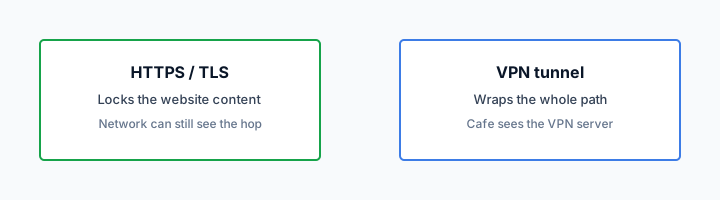
HTTPS already encrypts the bank page. The lock in the address bar is real. A VPN still wraps the path from your device to a server you picked. Wikipedia's VPN page is the noun. RFC 8446 is TLS 1.3 on the website. It is not a tunnel. The cafe can still see that you hopped to a bank IP. Your ISP at home can still see that hop if you are naked. Encrypted Client Hello exists and is uneven. Do not pretend the padlock hid the graph.
I will not invent a Klox consumer dedicated-IP add-on so a bank whitelist becomes a product sentence. Dedicated IP is a white-label and operator topic. If a bank blocks a shared VPN exit, that is the bank's decision. Read Dedicated IP vs Shared IP VPN for the physics. Do not wait for Klox to call your bank. We will not.
KloxVPN is WireGuard, OpenVPN, OpenConnect, and Shadowsocks, five devices, yearly from $2.83 a month, 7-day money-back on first purchase. DNS through the tunnel. IPv6 leak protection and WebRTC leak blocking on the features list. Smart Connect, if the app shows the row, means connect on untrusted Wi-Fi. If the row is missing, you have a Connect button. Use the button before you type the bank password. I will not invent a cape.
I have a bias. Tunnel on cafe and hotel Wi-Fi before the bank. Tunnel at home if you do not want the ISP's name log of that hop. Keep 2FA on the bank. If login fails on a shared IP, try another exit, try cellular, or wait. Do not treat a blocked login as proof the VPN is malware.
Related reading: Online Privacy Best Practices: A Practical 2025 Guide and What is a VPN?. Download KloxVPN and WireGuard vs OpenVPN. VPN pricing.
Looking for a reliable VPN?
KloxVPN — from $2.83/month. Apps for every device.
Two locks again, for a password you care about
Two locks is not marketing poetry. One lock is TLS on the bank site. The other is a tunnel to an exit you chose. They cover different questions. TLS answers: can the person at the next table read the HTML and the password field. The tunnel answers: can the access point, the hotel vendor, or the ISP see that the next hop was a bank, and can they inject themselves as the first hop on a network you do not run.
People collapse those into 'the VPN makes banking safe.' It does not. It changes the hop. The bank still has to be the real bank. Your device still has to be free of the usual garbage. The fraud team still gets to dislike the IP you arrived on. Those are other products. Buy them as other products.
A password manager and a unique password still matter more than the city you picked in a VPN app. I will not invent a city count. Geography is not the lock. The lock is: cafe sees a blob to a VPN server, or cafe sees a blob to a bank. Pick which blob you are willing to donate.
This is also why I will not recycle the shopping article. A cart and a card form are a checkout plot. A bank login is a credential plot plus a fraud plot. Same TLS. Same tunnel. Different failure modes. If you came here for coupons and geo pricing, you are in the wrong file on purpose.
- 1Skim the seating / order diagram.
- 2Do the numbered steps once on your real network.
- 3Use the FAQ if a sentence was too long.
- 4Follow one related article — not ten tabs.
How to read this page
| Lock | What it covers | What it does not | Honest remainder |
|---|---|---|---|
| HTTPS / TLS 1.3 on the bank | Page body, password field, session cookies in transit to that host | The fact of the hop, often SNI, DNS if names are naked | RFC 8446 is the website, not the tunnel |
| VPN tunnel (WireGuard or OpenVPN) | Cafe/ISP seeing bank as the next hop; evil-twin reading the first hop in the clear | A fake bank URL you typed, malware on disk, the bank's IP reputation rules | Shared exits can look like a crowd to fraud engines |
| Bank 2FA | A stolen password used from a new device or IP | A session you already approved, or a prompt you tapped while tired | Still required. The VPN does not replace it |
| Kill switch, if you turn it on | A drop that would otherwise dump you onto cafe DNS mid-form | A captive portal that needs a clear hop first | Pause for splash pages. Then restore |
| Klox consumer plan | Five devices, four protocols, DNS in the tunnel, listed leak protection | A dedicated IP SKU, a call to your bank, a promise they will like the exit | See /pricing. Do not invent an add-on |
HTTPS already locked the page. The cafe still sees the next hop unless that hop is a VPN.
— KloxVPN consumer notes
Cloudflare Learning: What is a VPN?
Wikipedia: Virtual private network
SafetyDetectives: best VPNs for banking (competitor specimen)
The padlock is not the tunnel
If the bank is HTTPS, the waiter is not reading your balance. The waiter, the AP, and a rude LAN can still see where you went. A tunnel moves that fact to 'spoke to a VPN.' That is the remainder after you admit TLS exists.
This is not the shopping guide
Shopping is carts, cards, and whether a shop blocks a VPN for licensing. Banking is a login you cannot shrug off, plus a fraud desk that may treat a shared exit as a red flag. Keep the URLs straight.
Cafe and hotel
Cafe and hotel Wi-Fi are the usual reason people search this query. You did not set the password on the AP. You do not know who else is associated. An evil twin can still exist. HTTPS still encrypts the bank HTML. The twin still gets to be the first hop unless you already have a tunnel, in which case the twin gets a blob to a VPN server. Encryption is not authentication of the coffee shop. Ask the staff the SSID. Then connect.
Splash pages still want a clear hop. That fight belongs to the cafe habit article. I will not rewrite kill-switch deadlock here. The banking-specific rule is simpler: do not type the bank password until the tunnel is up after the portal. Background mail can wait. The bank tab should not.
Cellular is a valid bank strategy. If the shop Wi-Fi is a toy, stay on the phone network and skip the AP. A VPN on cellular still hides the hop from the carrier if you care about that metadata. A VPN on a cafe you should not have joined is how people donate SNI to a LAN and then blame the product when the bank sends an SMS challenge.
Hotel rooms add a voucher or a room number. Same sequence: garden, confirm a boring site, then WireGuard, then the bank. If UDP is rude, OpenVPN. If both fail, cellular. Do not sit in the lobby 'fixing Wi-Fi' with a savings account sitting in a tab.
Smart Connect, if you have the row, will try to fire on untrusted SSIDs. Good after the splash. Bad during the splash. The cafe piece already said that. Here it is one sentence so you do not open the bank during the minute you are naked on purpose.
Evil twin versus a tired brain
A fake SSID plus a fake bank page is two lies. A tunnel only encrypts the hop you actually took. It does not fix a URL you typed wrong. Look at the host. Then look at the lock. Then look at 2FA.
Finish the portal before the password
Naked for the splash is normal. Naked for the bank login is a skip I will not recommend. Sequence: garden, boring site, Connect, then the bank. If you only remember one ritual, remember that one.
Home ISP
Home feels safe because you picked the Wi-Fi password. The ISP still sits on the path. Without a tunnel they can see that you hopped to a bank, often the name in SNI, and DNS if names never entered some other encryption. They do not get the password field on a TLS bank. People mash those together because both sound like 'they can see my money.' Split them.
A VPN at home makes the interesting hop 'a VPN server.' The ISP sees a blob. The bank sees a shared VPN IP. That second sentence is why some people only tunnel in cafes and stay naked at home: they would rather the ISP see the bank than the bank see a VPN crowd. That is an adult trade. Say it out loud. Do not pretend there is a third option where nobody sees anything. There is not, not with a consumer tunnel and a real bank account.
I tunnel at home for mail and for banks when I do not want the ISP's diary of destinations. I disconnect when a bank is being rude about the IP, on a network I actually trust. Home is that network. A cafe is not. If your threat model is 'my ISP is boring and my threat is the shop LAN,' skip the tunnel at home and keep the cafe habit. If your threat model is 'I do not want destination logs at the ISP,' keep the tunnel and accept that some banks will frown.
Klox routes DNS through the tunnel. That is the name hop, not the bank HTML. Features also lists IPv6 leak protection. If your ISP handed you a global v6 and a v4-only tunnel had no block, the bank could still see a home v6 next to a VPN v4. That is the IPv6 Leak in Plain English: Two Addresses, One Laptop plot, not a banking special. Mentioned so you do not think HTTPS ate the other family.
Five devices means the laptop at the desk and the phone on the couch can both hold a seat. The tablet that auto-connected still counts. Banking on two gadgets is two seats, not a family lecture. Disconnect what is not in the room if you hit the cap mid-login. Sleep is not disconnect.

Destination logs are not the password
The ISP seeing 'you talked to a bank' is metadata. The password is in TLS. A VPN hides the metadata hop. It does not hide the account from the bank. The bank already knows you. That is the point of a bank.
Home is the network you can skip on purpose
If a shared IP is fighting the bank, home is where you may disconnect and finish. Cafe is where you do not. Skipping at home is a choice. Forgetting in a hotel is not the same choice.
When the bank blocks the VPN IP
This is the part farms lie about. They sell a 'best VPN for banking' cookie and imply the vendor has a deal with your credit union. Nobody called your credit union. Shared VPN exits are crowded. Crowded IPs show up in fraud feeds. Banks use those feeds. Sometimes you get a hard block. Sometimes you get extra 2FA. Sometimes you get a 'we do not recognize this device' loop that eats an afternoon.
That is a bank decision. Klox does not sell a consumer dedicated-IP SKU in this post. White-label operators can talk dedicated IP as a brand add-on. You, on klox.app, are on shared exits. I will not invent a checkout row so this article ranks for dedicated IP. The compare piece is Dedicated IP vs Shared IP VPN. Read it if you want the privacy trade. Do not read it as a promise we will whitelist you at Chase, HSBC, or a local app that hates datacenter ranges.
What you can do: pick another location in the app. Shared IPs are not all in the same reputation bucket. Try WireGuard, then OpenVPN if the handshake is the actual problem. Try cellular with the tunnel. Try cellular without the tunnel if you are on a network you trust and the bank is the blocker. Try later. Reputation moves. None of that is Klox phoning the fraud desk.
Do not turn this into a support novel about SOC 2. We do not have a SOC 2 sentence to sell you. Do not ask for an API URL so you can 'add the IP to the bank.' There is no such URL in this product. Do not ask for an SLA percentage. The bank is not in the contract.
If every exit fails and you are in a cafe, stop. Use cellular. Or wait until you are home. A blocked login is annoying. A typed password on a LAN you do not run, because you got impatient, is worse. Impatience is how phishing pages get a second chance.
Shared is the consumer product
Many users, one exit IP. That mix is the privacy story. It is also why a bank may see a noisy neighbor. Dedicated IP is a different product family. We are not attaching it to this SKU to close a blog CTA.
The bank will not take our call
Fraud rules are theirs. Switching exits is yours. Disconnecting on a trusted network is yours. A ticket that says 'make my bank allow this IP' is not a ticket we can close with a feature flag.
Phishing still wins
A tunnel encrypts a hop. It does not check that bank-secure-login.example is a lie. If you type the password into the lie, TLS to the lie is still TLS. The padlock can be honest about a host you should not have trusted. RFC 8446 does not include a brain.
VPN ads that say 'bank safely on public Wi-Fi' skip this paragraph because it does not sell a subscription. I am keeping it. The usual hits: a SMS with a link, a search ad on the bank's name, a bookmark you never made, a page that looks like the app download. 2FA can still save you if you do not approve a prompt you did not start. 2FA cannot save you if the phish is a full session steal after you typed everything, or if you read the code aloud to someone on the phone.
Malware on the laptop is the same class of miss. A VPN does not scan the attachment. It does not stop a keylogger. It does not make the bank's own site honest if the bank was breached. Those are antivirus, updates, and the bank's problem. Buy habits for those. Buy a tunnel for the hop.
I still want the tunnel on cafe Wi-Fi when I bank. Not because phishing vanished. Because I would rather not donate DNS and SNI to a LAN while I am staring at a password field. Two problems. Two tools. The Online Privacy Best Practices: A Practical 2025 Guide piece is the broader pile. This page will not become that pile.
Cookies on klox.app are a different document: /cookie. Bank session cookies live at the bank. A VPN does not delete them. Logging out of the bank when you are done is still a habit. The tunnel does not log you out.
Look at the host, not the logo
Logos are cheap. The hostname is the claim. If it is not the host you always use, stop. A green VPN toggle next to a fake host is a green toggle next to a fake host.
2FA on the bank is not optional in this essay
The tunnel is hop cover. The second factor is login cover. Skip the second and you bought a nicer path for the same password reuse. I will nag once and then stop.
Shared IP is not a crime
People hear 'the bank blocked a VPN IP' and assume VPNs are for theft. Shared exits are how consumer VPNs are built. Lots of customers, fewer addresses, a crowd that is hard to pin on one household. That crowd also includes whoever else picked the same node at 4pm. If one of them abused a card, the IP gets a reputation. You inherit it for an hour. That is rude. It is not evidence you committed a crime.
It is also not evidence Klox 'attracts criminals.' Every large shared service has noisy neighbors: email, cloud, mobile CGNAT. Banks already deal with CGNAT. They still get twitchy about datacenter ranges. Datacenter ranges are what many VPN exits look like. You can be angry about that. You cannot litigate it in a blog comment into a dedicated IP we do not sell here.
The privacy side of shared is real. The bank sees an IP many people used. That is weaker as a 'this was you' story than your home ISP IP, which is often one household. If your threat was the ISP diary, shared is the point. If your threat was 'the bank must always recognize me,' shared fights you. Say which threat you actually have. Most readers have both on different days. Cafe day: shared. Bank app being rude: disconnect at home.
I will not frame this as a morality play about who deserves a VPN. You can bank without one on a network you trust. You can bank with one on a network you do not. The crime story is a farm scare. The fraud-flag story is an operations fact. Keep them apart.
Yearly from $2.83 a month is still money. It is not a confession. Seven days on first purchase if you bought only because a listicle said 'must VPN to bank' and then every login failed. Use the window. See /refund. Do not open a chargeback because a bank was picky. Chargebacks are a different mess.
Reputation is borrowed
You borrow an exit. You borrow its reputation. Switching nodes is how you borrow a different one. That is the whole tool. There is no character reference attached to the handshake.
CGNAT already shared your phone IP
Mobile carriers pile people onto addresses too. Banks live with that. VPN exits from hosting networks look different on paper. Different paper, same idea: you are not the only person on the number.
What to do when login fails
Order of operations, not a cape. Confirm you are on the real host. Confirm Connect is actually green. Confirm you finished any splash page. Then:
Try another exit. One dirty IP is not the product. Try OpenVPN if WireGuard will not handshake. That is a network fight, not a bank fight. If the handshake is fine and the bank page is the one saying no, it is reputation or a geo rule. Try a different country only if you already bank from more than one country in real life. Random geography is how you look more like fraud, not less. I will not invent a city list so you can play that game.
If you are on cafe Wi-Fi, switch the phone to cellular and try there, tunnel on. If it still fails, cellular with the tunnel off is acceptable for the bank on a carrier network you have used for years. It is not acceptable as a reason to stay on the cafe AP naked. Get off the AP.
If you are at home and the bank hates the VPN, disconnect, finish, reconnect for everything else. That is the skip I allow. Document what you did if you write to the bank. They will tell you to turn the VPN off. They will not tell you to buy a dedicated IP from us, because we are not selling you that SKU here.
Do not disable 2FA to 'make it work.' Do not approve a prompt you did not start. Do not install a random 'bank security' APK a pop-up offered while the VPN was up. The tunnel does not bless the file.
If the apps will not handshake on that network even after the splash, that is what seven days are for on a first purchase. Write the SSID in the ticket if you write in. Do not invent a story about a DPA PDF. Nobody at the bank asked.
Handshake failure is not a fraud flag
No route, no splash, kill switch deadlock: cafe article. Bank page loads and then rejects you: this article. Do not mix the tickets.
Do not collect protocols as a personality
WireGuard until the AP is rude. OpenVPN when it is. Back to WireGuard on the next normal network. Protocol-hopping will not charm a fraud engine.
Habit, not a cape
The habit is: untrusted Wi-Fi, get a route, start the tunnel, then the bank. Trusted home, tunnel if you care about ISP destination logs, skip if the bank is in a mood and you accept the ISP hop. 2FA stays on. Hostnames get read. Shared IP failures get a retry or a disconnect, not a myth about dedicated IP at checkout.
The cape is: the app makes the waiter honest, the bank friendly, and the phishing page obvious. Farms sell the cape. SafetyDetectives-style listicles will rank 'best VPN for banking' until the affiliate cookie expires. I linked one as a specimen. It is not a protocol.
Phone plus laptop is two of five. Banking on both is two habits. Smart Connect, if it exists, is for untrusted Wi-Fi after the portal. Features-page leak rows (DNS, IPv6, WebRTC) matter after you are connected. They are not a reason to skip 2FA. They are why a connected session is more than 'HTTPS was on anyway.' If you want to verify the session, use the leak-test article. Do not treat a bank login as a lab.
If you bought Klox only for one trip of hotel banking, the consumer window is seven days on first purchase. Live page: /refund. Renewals are not that window. I would rather you keep the year if cafes and hotels are going to repeat. Yearly from $2.83 a month is not a minibar. If you will not repeat, refund inside the clock.
Price stays on /pricing. Apps on /download. The shopping guide remains checkout. The cafe piece remains splash timing. Dedicated vs shared remains the IP product conversation, including the part where we do not invent a consumer dedicated SKU. This page was the bank: two locks, a hop, a fraud engine, a phish, a retry.
One rule if you only keep one
Cafe or hotel: tunnel before the bank password. Home: your call, as long as it is a call you could explain. Fake host: never.
Seven days if the trip was the whole product
First purchase only. If hotel Wi-Fi plus a picky bank was the entire reason you paid, use the window instead of a chargeback. If you will bank in shops again, keep the year.
Key Takeaways
Banking on a VPN is two locks, not a superpower. HTTPS already covers the page. The tunnel covers the hop on a network you do not run, and it can cover the ISP's destination log at home if you want that trade. Shared exits can trip a bank. That is their rule. Klox does not sell a consumer dedicated IP in this article and will not whitelist you with the fraud desk.
Phishing still wins if you type the lie. 2FA on the bank still matters. Cafe splash pages still want a clear minute. WireGuard first. OpenVPN when the AP is rude. Five devices. Yearly from $2.83 a month. Seven days on first purchase if you bought for one trip.
If you wanted carts and cards, that is the shopping guide. If you wanted splash-page timing, that is the cafe habit. If you wanted the IP product split, that is dedicated versus shared. If you wanted a tunnel you will actually use before a bank password, see pricing.
Related Resources
A hop you chose is cheaper than a ranked list
KloxVPN is WireGuard, OpenVPN, OpenConnect, and Shadowsocks, five devices, yearly from $2.83 a month, 7-day first-purchase money-back. DNS through the tunnel. IPv6 leak protection and WebRTC leak blocking on the features list. See live pricing. We are not selling a dedicated-IP add-on on this page.
See KloxVPN pricingFrequently Asked Questions
KloxVPN Team
Experts in VPN infrastructure, network security, and online privacy. The KloxVPN team has been building and operating VPN services since 2019, providing consumer and white-label VPN solutions to thousands of users worldwide.