
Free VPNs are everywhere — in app stores, as browser extensions, and promoted as "no credit card required." They promise the same benefits as paid services: encryption, IP masking, and access to blocked content. The reality is different. Free VPNs must fund their operations somehow. Server costs, bandwidth, and development are not free. The funding model determines what you get — and what you give up.
Many free VPNs impose strict data caps: 500 MB to 10 GB per month, or daily limits that reset. That is enough for light browsing but not for streaming, large downloads, or consistent use. Others throttle speed, reserving full bandwidth for paid users. Some show ads, which can track you and undermine the privacy you sought. Worst of all, some free VPNs log and sell user data — the exact opposite of what a privacy tool should do. Security researchers have repeatedly found free VPN apps that contained malware, leaked user data, or had no encryption at all.
Paid VPNs are not perfect, but the incentives align better. A subscription fee funds the service. There is no need to sell data or show invasive ads. Paid providers typically offer unlimited data, faster speeds, more server locations, and support. The cost is usually a few dollars per month — less than a coffee. For anyone who values privacy, the trade-off is clear.
This guide explains the risks of free VPNs, what paid VPNs offer, how to evaluate any VPN (free or paid), and when a free tier might be acceptable. If you are considering a free VPN, read the privacy policy first. If it is vague, if the provider has been caught logging, or if the business model is unclear, assume your data is the product.
Free VPNs from reputable paid providers (e.g., a limited free tier) are different from standalone free VPNs. The former are trials with clear limits; the latter often monetize through data or ads. Distinguish between them. The cost of a paid VPN is low; the cost of a compromised free VPN can be high.
Related reading: What Is a VPN and How Does It Work? and No-Logs VPN: What It Really Means. How to Read a VPN Logging Policy and VPN Data Caps: Do VPNs Limit Your Data?. What is a VPN? and Download KloxVPN.
Looking for a reliable VPN?
KloxVPN — from $2.83/month. Apps for every device.
How Free VPNs Make Money
Free services need revenue. Understanding the business model reveals what you are trading for "free" access.
- 1Skim the seating / order diagram.
- 2Do the numbered steps once on your real network.
- 3Use the FAQ if a sentence was too long.
- 4Follow one related article — not ten tabs.
How to read this page
Advertising
Many free VPNs show ads. Ads can track you, inject scripts, and collect data. Some ad networks are aggressive; pairing a VPN (meant to protect privacy) with ad tracking is contradictory. Ad-supported free VPNs may also sell your attention to advertisers — your browsing patterns, device info, or location.
Data Selling
Some free VPNs explicitly or implicitly sell user data. Connection logs, browsing data, or "anonymized" usage patterns can be valuable to advertisers and data brokers. A VPN that logs and sells data is not a privacy tool — it is a data collection service with a VPN front end.
Upselling to Paid
Some free VPNs are loss leaders. They offer a limited free tier to attract users, then push upgrades. This model can be legitimate if the free tier is clearly limited and the paid tier is the real product. The risk: aggressive upsells, dark patterns, or misleading "trial" offers that charge without clear consent.
Free VPN Risks: What Can Go Wrong
Free VPNs have been implicated in security incidents, privacy violations, and deceptive practices. Know the risks before you install.
| Fact | KloxVPN | Not on this page |
|---|---|---|
| Protocols | WireGuard, OpenVPN, OpenConnect, and Shadowsocks | A third invented protocol |
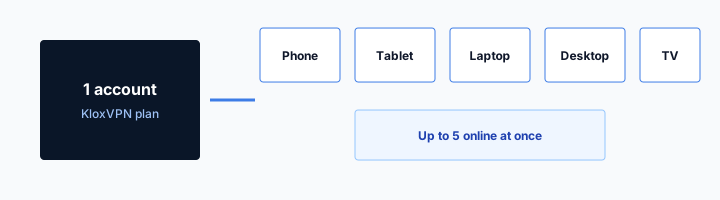
| Devices | Five simultaneous | Unlimited seats |
| Yearly | From $2.83/month | A fake city count |
| Refund | 7-day, first purchase | An On Demand toggle |
Data Caps and Throttling
Most free VPNs cap data at 1–10 GB per month or per day. Exceed the limit and you are cut off or forced to upgrade. Some throttle speed so aggressively that streaming or video calls become unusable. The "free" experience is often a heavily restricted trial.
Logging and Privacy Policies
Free VPNs frequently have vague or absent privacy policies. Some claim "no logs" but have been caught logging. Others admit to collecting connection data, timestamps, or device identifiers. Read the policy. If it does not clearly state what is not collected, assume the worst.
Malware and Security Issues
Security researchers have found free VPN apps containing malware, adware, or data-stealing code. Some use weak or broken encryption. Others leak DNS or IP addresses. Stick to reputable providers with independent audits. Free apps from unknown developers are high risk.
Limited Server Network
Free tiers often restrict you to a handful of servers. Those servers are overloaded — slow speeds, frequent disconnects. You may not get a server in the country you need. Geo-unblocking and reliable access require a larger network, which paid plans provide.
What Paid VPNs Offer
Paid VPNs are not perfect, but they solve most of the problems free VPNs create. The subscription model aligns incentives with user privacy.

HTTPS can hide a page body and still leave a destination visible. That is not a VPN.
— KloxVPN operator notes
No-Logs Policies
Reputable paid VPNs maintain strict no-logs policies: no connection timestamps, no IP logs, no browsing or DNS logs. Many undergo independent audits to verify their claims. Your subscription fee funds the service; there is no need to monetize your data.
Unlimited Data and Speed
Paid plans typically offer unlimited data and full-speed connections. No caps, no throttling. Stream, download, and browse without worrying about hitting a limit.
Larger Server Networks
Paid VPNs operate hundreds or thousands of servers in dozens of countries. You can choose a server for speed, for geo-unblocking, or for a specific use case. Less congestion means better performance.
Support and Reliability
Paid providers offer customer support — email, chat, or knowledge bases. When something breaks, you have a path to resolution. Free VPNs often have no support or only community forums.
When a Free VPN Might Be Acceptable
In a few narrow cases, a free VPN could be acceptable — if you understand the trade-offs and limits.
Reputable Free Tiers
Some paid VPNs offer a limited free tier — for example, a few GB per month or a single device. These are often loss leaders with clear limits. The provider's business model is the paid tier; the free tier is a trial. If the provider has a strong no-logs policy and the free tier is clearly documented, it may be acceptable for light use.
One-Time or Occasional Use
If you need a VPN for a single trip or a one-off task, a free tier might suffice. Use it only for non-sensitive activity. Do not use it for banking, work, or anything that requires real privacy. Understand that your data may be logged or sold.
When to Avoid Free VPNs Entirely
Never use a free VPN for sensitive activity: banking, work, activism, or anything that could harm you if exposed. Do not use free VPNs from unknown developers. Do not assume "free" means "private." When in doubt, pay for a no-logs VPN.
How to Evaluate Any VPN
Whether free or paid, apply the same evaluation criteria. Red flags apply to both.
Read the Privacy Policy
A good policy clearly states what is not collected: no connection logs, no IP logs, no browsing or DNS logs. Vague language like "we value your privacy" without specifics is a red flag. Look for independent audits.
Check Jurisdiction
Where is the company based? Some jurisdictions have data retention laws or allow government access. VPNs in privacy-friendly jurisdictions (e.g., Panama, British Virgin Islands) may offer stronger legal protection.
Protocol and Security
Does the VPN support WireGuard or OpenVPN? Is the encryption strong (AES-256 or ChaCha20)? Does it have a kill switch and DNS leak protection? Avoid proprietary protocols with no independent review.
Independent Reviews and Audits
Look for third-party security audits. Have researchers or journalists reviewed the provider? Have there been incidents or breaches? A history of transparency and accountability matters.
Free VPN and Mobile: Extra Risks
Free VPN apps on mobile pose additional risks beyond desktop.
App Store and Permissions
Free VPN apps often request broad permissions — location, contacts, or device identifiers. A VPN needs only network access. Excessive permissions suggest data collection. Check what the app requests before installing.
Battery and Data Drain
Free VPNs may run background processes for ad delivery or analytics. That drains battery and consumes mobile data. Paid VPNs typically have leaner apps with minimal background activity.
Auto-Renewal Traps
Some "free" VPNs offer a trial that auto-converts to paid. Read the terms. Cancel before the trial ends if you do not want to be charged. Check your app store subscription settings regularly.
Free VPN and Streaming
Free VPNs rarely work well for streaming. Data caps and server limits make them impractical.
Data Caps vs Streaming
Streaming uses 1–3 GB per hour for HD. A 2 GB monthly free cap is exhausted in under an hour. Free VPNs are not designed for streaming. If you want to stream with a VPN, a paid plan is necessary.
Streaming Service Blocks
Netflix and others block known VPN IPs. Free VPNs have small, overloaded server pools that are easily identified and blocked. Paid VPNs rotate IPs and maintain streaming-optimized servers.
Free VPN and Gaming
Gaming with a free VPN is usually a poor experience.
Latency and Gaming
Gaming requires low latency. Free VPNs often route through congested servers, adding 50–200ms or more. That makes competitive gaming unplayable. Paid VPNs with gaming-optimized servers can add only 5–15ms. For casual gaming, a free VPN might work; for anything latency-sensitive, it will not.
Data Usage
Online gaming uses 50–200 MB per hour depending on the game. A 2 GB free cap lasts 10–40 hours. If you game regularly, you will hit the cap quickly. Paid VPNs offer unlimited data.
Free VPN and Torrenting
Torrenting with a free VPN is risky and often ineffective.
Logging and DMCA
Torrenting can attract copyright notices. Free VPNs that log can be compelled to hand over user data. Some free VPNs have been caught sharing user IPs with copyright holders. For torrenting, a paid no-logs VPN in a privacy-friendly jurisdiction is the only safe option.
Speed and Data Caps
Torrenting is bandwidth-heavy. Free VPNs throttle and cap data. Large downloads are impractical. Paid VPNs with P2P-friendly servers offer full speed and unlimited data.
Free VPN Trials and Money-Back Guarantees
Paid VPNs often offer trials or money-back guarantees. Use them instead of free VPNs.
Trial Periods
Many paid VPNs offer 7–30 day trials. You get full access to test the service. No data caps, no logging, full speed. If you decide it is not for you, cancel before the trial ends. This is a better way to "try before you buy" than using a free VPN.
Money-Back Guarantees
Paid VPNs typically offer 30-day money-back guarantees. Subscribe, use the service for a month, and request a refund if it does not meet your needs. You get paid-level protection during the trial with no long-term commitment.
Cost of Paid VPNs: What to Expect
Paid VPNs are inexpensive. Annual plans often cost $3–6 per month when paid yearly.
Typical Pricing
Monthly plans are more expensive ($10–12). Annual plans offer 50–70% discounts. Two-year plans are often the best value. The total cost is usually under $100 for two years of protection.
Value Comparison
A paid VPN costs less than a streaming subscription or a few coffees per month. For encryption, IP masking, and no-logs privacy across all your devices, the value is high. Free VPNs may cost nothing in dollars but cost you in privacy, speed, and risk.
Free VPN and Device Limits
Free VPNs often limit how many devices you can use.
Single Device
Many free VPNs allow only one device. If you have a phone, laptop, and tablet, you must choose one. Paid VPNs typically allow 5–10 devices per account. For full protection across your devices, a paid plan is necessary.
Switching Devices
With a single-device free tier, you can switch which device uses the VPN — but only one at a time. That creates gaps: your phone may be protected while your laptop is not. Paid plans let you protect everything simultaneously.
Free VPN and Customer Support
Support is another area where free and paid differ.
Free VPN Support
Free VPNs often have no support or only community forums. If something breaks, you are on your own. Paid VPNs offer email support, live chat, or knowledge bases. When you need help — connection issues, leak concerns, protocol questions — paid support matters.
Documentation
Paid VPNs typically have better documentation: setup guides, troubleshooting, protocol explanations. Free VPNs may have minimal or outdated docs. Good documentation helps you configure correctly and avoid mistakes.
Free VPN and Work or Remote Access
Using a free VPN for work is risky.
Work Traffic and Free VPNs
Work traffic may include sensitive data, client information, or proprietary content. Free VPNs that log can expose that data. Some free VPNs have been caught sharing user data with third parties. Never use a free VPN for work traffic. Your employer may also prohibit it — check policy. Use corporate VPN for work; use a paid no-logs VPN for personal browsing on personal devices.
Remote Access and Reliability
When you work remotely, you need a reliable connection. Free VPNs are often unreliable — disconnects, slow speeds, overloaded servers. A dropped VPN can expose your traffic. Paid VPNs offer more stable connections and faster reconnection. For work, reliability matters as much as privacy.
Employer Requirements
Some employers require or recommend a VPN for remote work. They typically specify a corporate VPN or an approved provider. A random free VPN is unlikely to meet their requirements. Do not substitute a free VPN for what your employer mandates.
Free VPN and Family or Shared Use
When multiple people use one VPN account, limits matter more.
Device Limits on Free Tiers
Free VPNs often allow one device. A family with multiple devices cannot share protection. Paid plans typically allow 5–10 devices. For a household, one paid subscription covers everyone. A free VPN forces you to choose who gets protection.
Data Caps and Shared Use
A 2 GB monthly cap shared across a family is exhausted in days. Streaming, schoolwork, and browsing add up. Paid VPNs offer unlimited data. For families, the per-person cost of a paid plan is minimal — often under a dollar per month per person.
Teaching Good Habits
If you want a child or family member to use a VPN, a paid plan with multi-device support makes it practical. Free VPNs are a poor fit for teaching privacy habits — the limits and risks discourage consistent use.
Comparing Free vs Paid Feature by Feature
Side by side: free VPNs typically offer 1–3 servers, 1–10 GB monthly, and no support. Paid VPNs offer hundreds of servers, unlimited data, and email or chat support. Free VPNs may log; paid VPNs with no-logs policies do not. The gap is not marginal. For anyone who uses the internet daily, a paid VPN is the baseline.
Free VPN and Privacy Expectations
What you can realistically expect from a free VPN.
Encryption and IP Masking
Even free VPNs typically encrypt your traffic and mask your IP. The technical protection can work. The risk is the provider — do they log? Do they sell data? Encryption protects you from network observers; it does not protect you from the VPN provider. A free VPN that logs undermines the privacy you sought.
Trust and Verification
Paid VPNs with no-logs policies often undergo independent audits. Free VPNs rarely do. Without verification, you are trusting the provider's claims. Some free VPNs have been caught lying about logging. When you cannot verify, assume the worst.
The Upgrade Path
If you start with a free tier from a reputable paid provider, the upgrade path is clear. You get the same app, more servers, no caps. If you use a free-only VPN, switching to paid means changing providers. Start with a paid VPN trial or money-back guarantee instead — less friction, better protection from day one.
How a tunnel applies to Free VPN vs Paid VPN: What You Give Up
Shared Free VPN vs Paid VPN: What You Give Up Wi-Fi is not your network even when the SSID looks friendly. Assume NAT. Assume a garden. Then wrap. Leak sites during the garden will look broken. They are supposed to see you. Test after Connect. Inner packets stay inner. Outer header goes to a node. Free VPN vs Paid VPN: What You Give Up NAT still exists. You wanted that. The SSID label does not change the physics. Wrap after sign-in.
The SSID string is marketing on the AP. The tunnel is WireGuard, OpenVPN, OpenConnect, and Shadowsocks. Keep those sentences in different rooms. Hotel, airport, campus, Free VPN vs Paid VPN: What You Give Up: same NAT story. You are a guest. Guests get wrapped after sign-in. WireGuard is fast when UDP lives. OpenVPN is the spare tire when a filter eats handshake packets. One swap. Then stop. Land, sign in, wrap. Repeat it until it is boring. Boring is the goal.
Smart Connect is untrusted Wi-Fi. It is not On Demand. It is not a Free VPN vs Paid VPN: What You Give Up toggle. If the page loops after you already connected, drop the tunnel, finish the garden, connect again. Do not reboot the phone first. Staff SSIDs still dump you through NAT. "Staff" is a word. Free VPN vs Paid VPN: What You Give Up is a word. Neither word is a private backbone. Portal first. Handshake second. Leak test third. That is the whole checklist.
What success looks like
This slug is a habit page for Free VPN vs Paid VPN: What You Give Up networks, not a new SKU. Device limit stays five devices. Yearly stays $2.83/mo on yearly. Cookies at /cookie do not open the portal. The portal opens in a browser. Then the app. Cookies: /cookie. That is this website. It is not the tunnel and not the portal. Apps at /download. Plans at /pricing. Garden in the browser. Tunnel in the app.
The front desk can print a QR. The kettle can sit next to a portal. Neither object wraps a hop. Free VPN vs Paid VPN: What You Give Up Wi-Fi still needs Connect after sign-in. A minute of waiting after join is normal while DHCP and the garden load. Do not mash Connect ten times. If WireGuard hangs for a minute on Free VPN vs Paid VPN: What You Give Up Wi-Fi, wait out the portal, confirm you have a WAN, then try OpenVPN once. Treat Free VPN vs Paid VPN: What You Give Up like a hotel SSID even when the branding looks official.
Free VPN vs Paid VPN: What You Give Up is a convenient name for a shared hop. It is not a VPN profile and not a city. If the SSID looks like staff Wi-Fi, still assume a portal. Fancy names do not grant a private backbone. White-label branded clients live at /white-label. This page is the traveler habit on Free VPN vs Paid VPN: What You Give Up Wi-Fi, not a partner packaging ticket. Send this slug when someone asks for a special Free VPN vs Paid VPN: What You Give Up profile. There is not one.
When to stop tinkering
If the page loops, you probably raced the tunnel. Drop it. Finish the garden. Connect again. That is the Free VPN vs Paid VPN: What You Give Up recovery. Inner DNS through the tunnel is the setting you wanted. The LAN seeing a blob to a node is success. When the AP filters UDP, OpenVPN often still lands. When both fail, the WAN is the problem, not a missing Free VPN vs Paid VPN: What You Give Up mode. Free VPN vs Paid VPN: What You Give Up Wi-Fi is shared. Finish the portal. Then WireGuard, OpenVPN, OpenConnect, and Shadowsocks.
Join. Portal. Connect. That order is the Free VPN vs Paid VPN: What You Give Up ritual. Everything else is optional tinkering. White-label partners still tell travelers the same habit. Portal, then the branded app. No Free VPN vs Paid VPN: What You Give Up SKU. [Captive portal]({portal}) is the garden. VPN is the truck after. Mix the order and you get a loop or a leak, not a new feature. No Free VPN vs Paid VPN: What You Give Up mode. Same apps. Same five devices. Same yearly $2.83/mo on yearly.
Airport, hotel, campus, Free VPN vs Paid VPN: What You Give Up: the label changes. The hop does not. Untrusted LAN, then wrap. Confirm you have a WAN before you blame the protocol. A captive garden with no accept button is not a WireGuard bug. HTTPS on the website is not a hop wrap. RFC 8446 is TLS. Different job from Connect on Free VPN vs Paid VPN: What You Give Up Wi-Fi. If UDP dies on Free VPN vs Paid VPN: What You Give Up APs, one protocol swap. Then stop tinkering.
Key Takeaways
Free VPNs fund themselves through ads, data selling, or heavy restrictions. Many impose data caps, throttle speed, log user activity, or have been caught in privacy violations. For light, non-sensitive use, a reputable free tier from a known paid provider might be acceptable — but read the policy and understand the limits.
For real privacy — hiding your activity from your ISP, protecting yourself on public WiFi, or avoiding tracking — a paid no-logs VPN is the only responsible choice. The cost is low; the protection is significant. Your browsing data, location, and identity are worth more than the few dollars per month a quality VPN costs.
Evaluate any VPN, free or paid, with the same criteria: clear no-logs policy, strong encryption, kill switch, and independent audits. If the business model is unclear or the privacy policy is vague, assume your data is the product. When in doubt, pay. Use trial periods and money-back guarantees to test paid VPNs — that is a safer way to try before committing than using a free VPN with unknown practices. Free VPNs are fine for one-off tasks on trusted networks; for daily use, banking, work, or travel, a paid VPN is the baseline.
Never use a free VPN for work traffic. For families, paid plans with multi-device support cost little per person and enable consistent protection. The math is simple: a few dollars per month buys privacy, reliability, and peace of mind. Compare annual plans — most paid VPNs cost less than a single streaming subscription per year. The investment is worth it for anyone who values privacy.
Related Resources
Frequently Asked Questions
KloxVPN Team
Experts in VPN infrastructure, network security, and online privacy. The KloxVPN team has been building and operating VPN services since 2019, providing consumer and white-label VPN solutions to thousands of users worldwide.